
JavaFX 效果 - 照明(默认源)
照明效果用于模拟来自光源的光。光源有多种类型,包括 − 点光源、远光源 和 聚光灯。
如果我们没有提到任何照明源,则使用 JavaFX 的默认源。
javafx.scene.effect 包中名为 Lighting 的类表示照明效果,该类包含十个属性,即 −
bumpInput − 此属性属于 Effect 类型,它表示照明效果的可选凹凸贴图输入。
contentInput −此属性为 Effect 类型,表示输入到灯光效果的内容。
diffuseConstant − 此属性为 double 类型,表示光的漫反射常数。
SpecularConstant − 此属性为 double 类型,表示光的镜面反射常数。
SpecularExponent − 此属性为 double 类型,表示光的镜面反射指数。
SurfaceScale − 此属性为 double 类型,表示光的表面比例因子。
示例
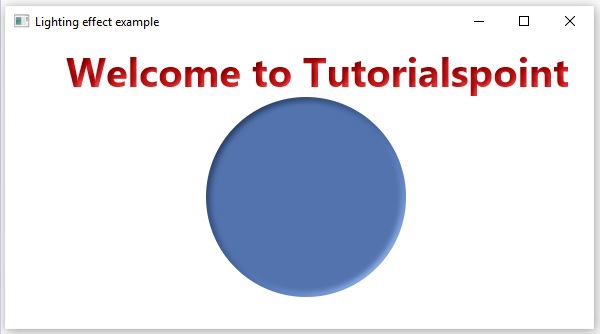
以下程序是演示 JavaFX 灯光效果的示例。在这里,我们在场景中绘制了文本"Welcome to Tutorialspoint"和一个圆圈。
我们为它们应用了灯光效果。在这里,由于我们没有提到任何来源,因此 JavaFX 使用其默认来源。
将此代码保存在名为 LightingEffectExample.java 的文件中。
import javafx.application.Application;
import javafx.scene.Group;
import javafx.scene.Scene;
import javafx.scene.effect.Lighting;
import javafx.scene.paint.Color;
import javafx.scene.shape.Circle;
import javafx.stage.Stage;
import javafx.scene.text.Font;
import javafx.scene.text.FontWeight;
import javafx.scene.text.Text;

public class LightingEffectExample extends Application {
   @Override
   public void start(Stage stage) {
        //创建 Text 对象
        Text text = new Text();

        //设置文本的字体
        text.setFont(Font.font(null, FontWeight.BOLD, 40));

        //设置文本的位置
        text.setX(60);
        text.setY(50);

        //设置要嵌入的文本。
        text.setText("Welcome to Tutorialspoint");

        //设置文本的颜色
        text.setFill(Color.RED);

        //绘制圆圈
        Circle circle = new Circle();

        //设置圆心
        circle.setCenterX(300.0f);
        circle.setCenterY(160.0f);

        //设置圆半径
        circle.setRadius(100.0f);

        //设置圆的填充颜色
        circle.setFill(Color.CORNFLOWERBLUE);

        //实例化 Lighting 类
        Lighting lighting = new Lighting();

        //将灯光效果应用于文本
        text.setEffect(lighting);

        //将灯光效果应用于圆
        circle.setEffect(lighting);

        //创建 Group 对象
        Group root = new Group(text,circle);

        //创建 scene 对象
        Scene scene = new Scene(root, 600, 300);

        //将标题设置为 Stage
        stage.setTitle("远光效果示例");

        //将场景添加到舞台(Stage)
        stage.setScene(scene);

        //显示舞台(Stage)内容
        stage.show();
   }
   public static void main(String args[]){
      launch(args);
   }
}
使用以下命令从命令提示符编译并执行保存的 java 文件。
javac LightingEffectExample.java
java LightingEffectExample
执行时,上述程序将生成一个 JavaFX 窗口,如下所示。
 javafx_effects.html
