
JavaFX - 平移变换
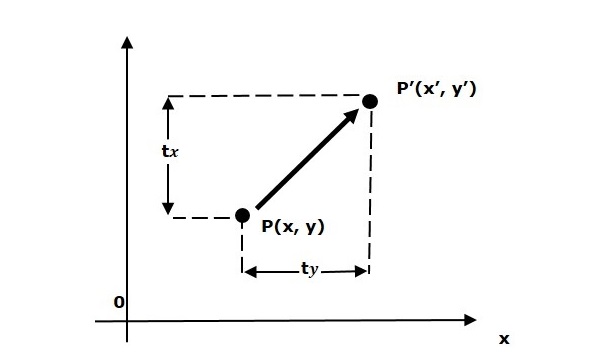
平移将对象移动到屏幕上的不同位置。您可以通过将平移坐标 (tx, ty) 添加到原始坐标 (X, Y) 来获得新坐标 (X', Y'),从而平移 2D 中的点。
示例
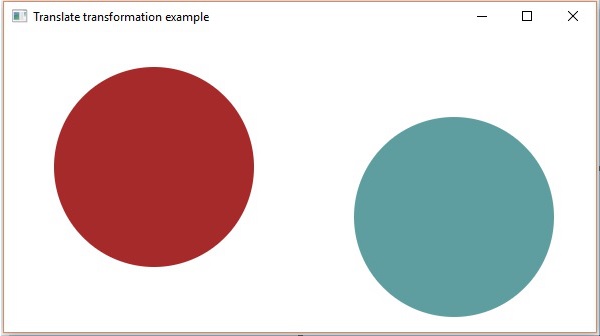
以下是演示 JavaFX 中平移的程序。在这里,我们在同一位置创建 2 个圆圈(节点),尺寸相同,但颜色不同(棕色和 Cadetblue)。我们还对具有 cadetblue 颜色的圆圈应用平移。
将此代码保存在名为 TranslationExample.java 的文件中。
import javafx.application.Application;
import javafx.scene.Group;
import javafx.scene.Scene;
import javafx.scene.paint.Color;
import javafx.scene.shape.Circle;
import javafx.scene.transform.Translate;
import javafx.stage.Stage;

public class TranslationExample extends Application {
   @Override
    public void start(Stage stage) {
        //绘制圆1
        Circle circle = new Circle();

        //设置圆的位置
        circle.setCenterX(150.0f);
        circle.setCenterY(135.0f);

        //设置圆的半径
        circle.setRadius(100.0f);

        //设置圆的颜色
        circle.setFill(Color.BROWN);

        //设置圆的描边宽度
        circle.setStrokeWidth(20);

        //绘制圆2
        Circle circle2 = new Circle();

        //设置圆的位置
        circle2.setCenterX(150.0f);
        circle2.setCenterY(135.0f);

        //设置圆的半径
        circle2.setRadius(100.0f);

        //设置圆的颜色
        circle2.setFill(Color.CADETBLUE);

        //设置圆的描边宽度
        circle2.setStrokeWidth(20);

        //创建平移变换
        Translate Translation = new Translate();

        //设置 X、Y、Z 坐标以应用平移
        Translation.setX(300);
        Translation.setY(50);
        Translation.setZ(100);

        //向 circle2 添加变换
        circle2.getTransforms().addAll(translate);

        //创建 Group 对象
        Group root = new Group(circle,circle2);

        //创建 Scene 对象
        Scene scene = new Scene(root, 600, 300);

        //设置 Stage 标题
        stage.setTitle("平移变换示例");

        //将场景添加到舞台(Stage)
        stage.setScene(scene);

        //显示舞台(Stage)内容
        stage.show();
    }
   public static void main(String args[]){
      launch(args);
   }
}
使用以下命令从命令提示符编译并执行保存的 java 文件。
javac TranslationExample.java
java TranslationExample
执行时,上述程序将生成一个 JavaFX 窗口,如下所示。
 javafx_transformations.html
