Pygame - Sprite 模块
在我们的游戏窗口中绘制并且可以四处移动的任何位图都称为 Sprite(精灵)。 pygame.sprite 模块包含在游戏开发中有用的类和功能。 除了用于创建 sprite 对象集合的 Sprite 类之外,还有一些函数可以实现 sprite 对象的碰撞。
Sprite 类作为游戏中不同对象的基类。 您可能需要再将一个对象分组。 为此,还提供 group 类。
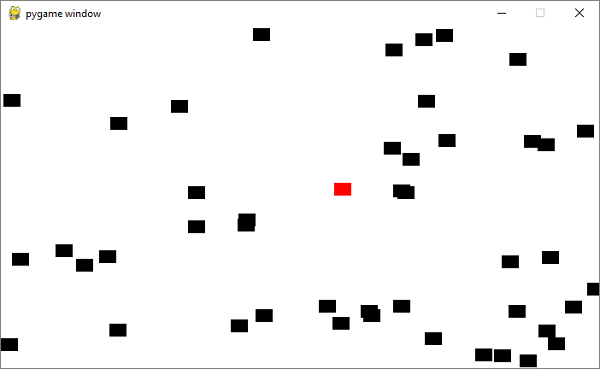
首先让我们通过子类化 sprite.Sprite 类来开发一个 Sprite 类。 这个 Block 类的每个对象都是一个填充黑色的矩形块。
class Block(pygame.sprite.Sprite):

   def __init__(self, color, width, height):
      super().__init__()

      self.image = pygame.Surface([width, height])
      self.image.fill(color)

      self.rect = self.image.get_rect()
我们将创建 50 个块对象并将它们放在一个列表中。
for i in range(50):
   block = Block(BLACK, 20, 15)

   # Set a random location for the block
   block.rect.x = random.randrange(screen_width)
   block.rect.y = random.randrange(screen_height)

   # Add the block to the list of objects
   block_list.add(block)
   all_sprites_list.add(block)
我们创建了一个红色的块,称之为 player,并将其也添加到列表中。
# Create a RED player block
player = Block(RED, 20, 15)
all_sprites_list.add(player)
在游戏的事件循环中,检测红色方块(player)随着鼠标移动和黑色方块移动时的碰撞并计算碰撞次数。
示例
事件循环代码如下 −
while not done:
   for event in pygame.event.get():
      if event.type == pygame.QUIT:
         done = True

   # Clear the screen
   screen.fill(WHITE)

   # Get the current mouse position. This returns the position
   # as a list of two numbers.
   pos = pygame.mouse.get_pos()

   # Fetch the x and y out of the list,
      # just like we'd fetch letters out of a string.
   # Set the player object to the mouse location
   player.rect.x = pos[0]
   player.rect.y = pos[1]

   # See if the player block has collided with anything.
   blocks_hit_list = pygame.sprite.spritecollide(player, block_list, True)

   # Check the list of collisions.
   for block in blocks_hit_list:
      score += 1
      print(score)

   # Draw all the spites
   all_sprites_list.draw(screen)

   # Go ahead and update the screen with what we've drawn.
   pygame.display.flip()

   # Limit to 60 frames per second
   clock.tick(60)

pygame.quit()
输出
运行上面的代码。 移动 player 块以捕获尽可能多的黑色块。 分数将在控制台上回显。