Pygame - 使用文本作为按钮
按钮是典型游戏窗口中的一个重要元素。 我们可以使用文本或图像表面对象作为按钮,以便在单击时触发特定操作。
让我们尝试显示三个带有文本标题的按钮。
text1=font.render(" START ", True, white)
text2=font.render(" PLAY ", True, white)
text3=font.render(" STOP ", True, white)
为了在这些按钮周围绘制边框,获取它们的 Rect 对象。
rect1 = text1.get_rect(topleft=(10,10))
rect2 = text2.get_rect(topleft= (100,10))
rect3 = text3.get_rect(topleft= (200,10))
在事件循环中,blit 周围带有红色边框的文本按钮。
screen.blit(text1, rect1)
pygame.draw.rect(screen, (255,0,0),rect1,2)
screen.blit(text2, rect2)
pygame.draw.rect(screen, (255,0,0),rect2,2)
pygame.draw.rect(screen, (255,0,0),rect3,2)
screen.blit(text3, rect3)
使用 Rect 对象的 collidepoint() 函数来识别点击了哪个按钮。
if event.type == pygame.MOUSEBUTTONDOWN:
   if rect1.collidepoint(event.pos):
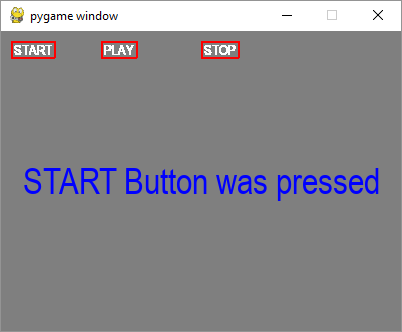
      msg = "START Button was pressed"
   if rect2.collidepoint(event.pos):
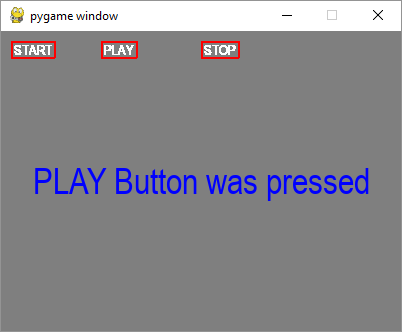
      msg = "PLAY Button was pressed"
   if rect3.collidepoint(event.pos):
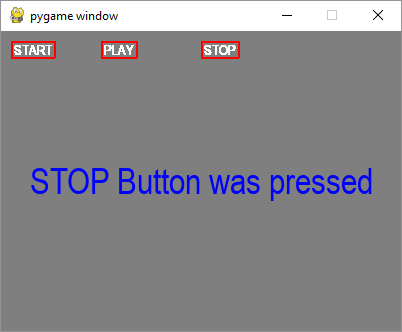
      msg = "STOP Button was pressed"
将适当的消息显示为文本表面 −
img=font.render(msg, True, (0,0,255))
imgrect=img.get_rect()
imgrect.center = (200 , 150 )
pygame.draw.rect(screen, bg, imgrect)
screen.blit(img, imgrect)
示例
以下是完整代码 −
import pygame

pygame.init()
screen = pygame.display.set_mode((400, 300))
done = False

font = pygame.font.SysFont("Arial", 14)
text1=font.render(" START ", True, white)
text2=font.render(" PLAY ", True, white)
text3=font.render(" STOP ", True, white)

rect1 = text1.get_rect(topleft=(10,10))
rect2 = text2.get_rect(topleft= (100,10))
rect3 = text3.get_rect(topleft= (200,10))
bg = (127,127,127)
msg=" "
screen = pygame.display.set_mode((400,300))
screen.fill(bg)
while not done:
   for event in pygame.event.get():
      screen.blit(text1, rect1)
      pygame.draw.rect(screen, (255,0,0),rect1,2)
      screen.blit(text2, rect2)
      pygame.draw.rect(screen, (255,0,0),rect2,2)
      pygame.draw.rect(screen, (255,0,0),rect3,2)
      screen.blit(text3, rect3)

      if event.type == pygame.QUIT:
         done = True
      if event.type == pygame.MOUSEBUTTONDOWN:
         if rect1.collidepoint(event.pos):
            msg = "START Button was pressed"
         if rect2.collidepoint(event.pos):
            msg = "PLAY Button was pressed"
         if rect3.collidepoint(event.pos):
            msg = "STOP Button was pressed"
      img=font.render(msg, True, (0,0,255))
      imgrect=img.get_rect()
      imgrect.center = (200 , 150 )
      pygame.draw.rect(screen, bg, imgrect)
      screen.blit(img, imgrect)

   pygame.display.update()
输出
每个按钮单击时,显示窗口显示以下输出 −