Python MySQL - 简介
Python 数据库接口的标准是 Python DB-API。大多数 Python 数据库接口都遵循此标准。
您可以为您的应用程序选择合适的数据库。Python 数据库 API 支持各种数据库服务器,例如 −
- GadFly
- mSQL
- MySQL
- PostgreSQL
- Microsoft SQL Server 2000
- Informix
- Interbase
- Oracle
- Sybase
以下是可用的 Python 数据库接口列表:Python 数据库接口和 API。您必须为需要访问的每个数据库下载单独的 DB API 模块。例如,如果您需要访问 Oracle 数据库和 MySQL 数据库,则必须同时下载 Oracle 和 MySQL 数据库模块。
什么是 mysql-connector-python?
MySQL Python/Connector 是一个用于从 Python 连接到 MySQL 数据库服务器的接口。它实现了 Python 数据库 API,并建立在 MySQL 之上。
如何安装 mysql-connector-python?
首先,您需要确保您已经在机器上安装了 python。为此,打开命令提示符并在其中输入 python,然后按 Enter。如果你的系统中已经安装了 python,此命令将显示其版本,如下所示 −
C:\Users\Tutorialspoint>python
Python 3.7.3 (v3.7.3:ef4ec6ed12, Mar 25 2019, 22:22:05) [MSC v.1916 64 bit (AMD64)] on win32
Type "help", "copyright", "credits" or "license" for more information.
>>>
现在按 ctrl+z,然后按 Enter 退出 Python shell,并创建一个名为 Python_MySQL 的文件夹(您打算在其中安装 Python-MySQL 连接器),如下所示: −
>>> ^Z
C:\Users\Tutorialspoint>d:
D:\>mkdir Python_MySQL
验证 PIP
PIP 是 Python 中的一个包管理器,您可以使用它在 Python 中安装各种模块/包。因此,要安装 Mysql-python mysql-connector-python,您需要确保您的计算机中安装了 PIP,并将其位置添加到路径中。
您可以通过执行 pip 命令来执行此操作。如果您的系统中没有 PIP,或者如果您没有在 Path 环境变量中添加其位置,您将收到一条错误消息,提示为 −
D:\Python_MySQL>pip
'pip' is not recognized as an internal or external command,
operable program or batch file.
要安装 PIP,请将 get-pip.py 下载到上面创建的文件夹中,然后从命令中导航并安装 pip,如下所示 −
D:\>cd Python_MySQL
D:\Python_MySQL>python get-pip.py
Collecting pip
Downloading https://files.pythonhosted.org/packages/8d/07/f7d7ced2f97ca3098c16565efbe6b15fafcba53e8d9bdb431e09140514b0/pip-19.2.2-py2.py3-none-any.whl (1.4MB)
|████████████████████████████████| 1.4MB 1.3MB/s
Collecting wheel
Downloading https://files.pythonhosted.org/packages/00/83/b4a77d044e78ad1a45610eb88f745be2fd2c6d658f9798a15e384b7d57c9/wheel-0.33.6-py2.py3-none-any.whl
Installing collected packages: pip, wheel
Consider adding this directory to PATH or, if you prefer to suppress this warning, use --no-warn-script-location.
Successfully installed pip-19.2.2 wheel-0.33.6
安装 mysql-connector-python
安装 Python 和 PIP 后,打开命令提示符并升级 pip(可选),如下所示 −
C:\Users\Tutorialspoint>python -m pip install --upgrade pip
Collecting pip
Using cached https://files.pythonhosted.org/packages/8d/07/f7d7ced2f97ca3098c16565efbe6b15fafcba53e8d9bdb431e09140514b0/pip-19.2.2-py2.py3-none-any.whl
Python Data Access
4
Installing collected packages: pip
Found existing installation: pip 19.0.3
Uninstalling pip-19.0.3:
Successfully uninstalled pip-19.0.3
Successfully installed pip-19.2.2
然后以管理员模式打开命令提示符并安装 python MySQL 连接为 −
C:\WINDOWS\system32>pip install mysql-connector-python
Collecting mysql-connector-python
Using cached https://files.pythonhosted.org/packages/99/74/f41182e6b7aadc62b038b6939dce784b7f9ec4f89e2ae14f9ba8190dc9ab/mysql_connector_python-8.0.17-py2.py3-none-any.whl
Collecting protobuf>=3.0.0 (from mysql-connector-python)
Using cached https://files.pythonhosted.org/packages/09/0e/614766ea191e649216b87d331a4179338c623e08c0cca291bcf8638730ce/protobuf-3.9.1-cp37-cp37m-win32.whl
Collecting six>=1.9 (from protobuf>=3.0.0->mysql-connector-python)
Using cached https://files.pythonhosted.org/packages/73/fb/00a976f728d0d1fecfe898238ce23f502a721c0ac0ecfedb80e0d88c64e9/six-1.12.0-py2.py3-none-any.whl
Requirement already satisfied: setuptools in c:\program files (x86)\python37-32\lib\site-packages (from protobuf>=3.0.0->mysql-connector-python) (40.8.0)
Installing collected packages: six, protobuf, mysql-connector-python
Successfully installed mysql-connector-python-8.0.17 protobuf-3.9.1 six-1.12.0
验证
要验证安装,请创建一个示例 Python 脚本,其中包含以下行。
import mysql.connector
如果安装成功,则执行时不应出现任何错误 −
D:\Python_MySQL>python test.py
D:\Python_MySQL>
从头开始安装 Python
简单来说,如果您需要从头开始安装 Python。访问 Python 主页。
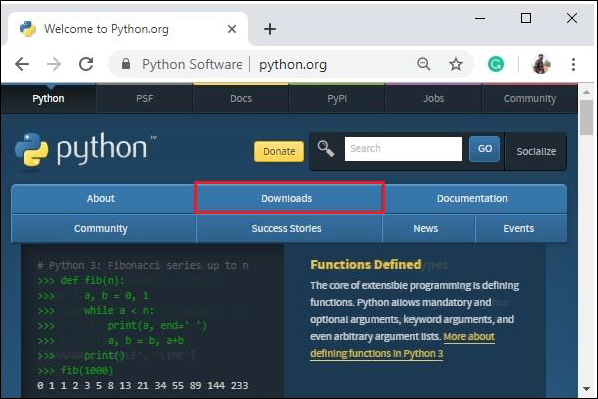
单击下载按钮,您将被重定向到下载页面,该页面提供适用于各种平台的最新版本 Python 的链接,请选择一个并下载。
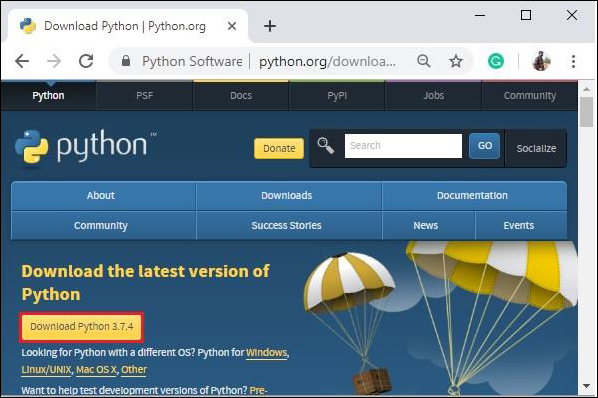
例如,我们下载了 python-3.7.4.exe(适用于 Windows)。双击下载的 .exe 文件开始安装过程。
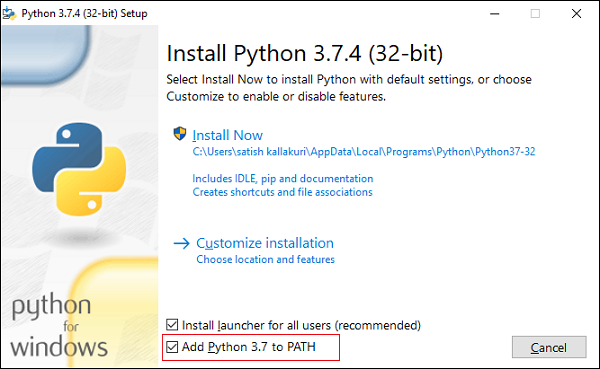
选中"将 Python 3.7 添加到路径"选项并继续安装。完成此过程后,python 将安装在您的系统中。