
Python 数据访问教程

Python 数据访问主页

Python MySQL

Python MySQL 简介 Python MySQL 数据库连接 Python MySQL 创建数据库 Python MySQL 创建表 Python MySQL 插入数据 Python MySQL 选择数据 Python MySQL Where 子句 Python MySQL 排序 Python MySQL 更新表 Python MySQL 删除数据 Python MySQL 删除表 Python MySQL Limit 子句 Python MySQL 连接 Python MySQL 游标对象

Python PostgreSQL

Python PostgreSQL 简介 Python PostgreSQL 数据库连接 Python PostgreSQL 创建数据库 Python PostgreSQL 创建表 Python PostgreSQL 插入数据 Python PostgreSQL 选择数据 Python PostgreSQL Where 子句 Python PostgreSQL 排序 Python PostgreSQL 更新表 Python PostgreSQL 删除数据 Python PostgreSQL 删除表 Python PostgreSQL Limit 子句 Python PostgreSQL 连接 Python PostgreSQL 游标对象

Python SQLite

Python SQLite 简介 Python SQLite 建立连接 Python SQLite 创建表 Python SQLite 插入数据 Python SQLite 选择数据 Python SQLite Where 子句 Python SQLite 排序 Python SQLite 更新表 Python SQLite 删除数据 Python SQLite 删除表 Python SQLite Limit 子句 Python SQLite 连接 Python SQLite 游标对象

Python MongoDB

Python MongoDB 简介 Python MongoDB 创建数据库 Python MongoDB 创建集合 Python MongoDB 插入文档 Python MongoDB 查找 Python MongoDB 查询 Python MongoDB 排序 Python MongoDB 删除文档 Python MongoDB 删除集合 Python MongoDB 更新 Python MongoDB Limit 子句

Python 数据访问资源

Python 数据访问 快速指南 Python 数据访问 有用资源 Python 数据访问 讨论


Python PostgreSQL - 数据库连接

PostgreSQL 提供自己的 shell 来执行查询。要与 PostgreSQL 数据库建立连接,请确保您已在系统中正确安装它。打开 PostgreSQL shell 提示符并传递服务器、数据库、用户名和密码等详细信息。如果您提供的所有详细信息均合适,则会与 PostgreSQL 数据库建立连接。

传递详细信息时,您可以使用 shell 建议的默认服务器、数据库、端口和用户名。
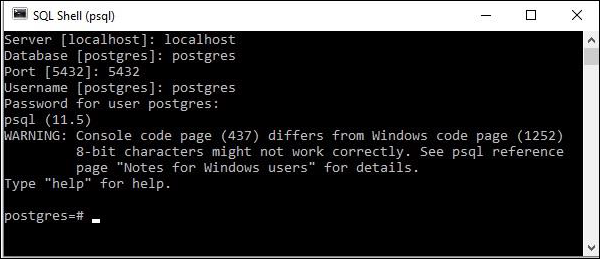
PostgreSQL Shell Prompt

使用 python 建立连接

psycopg2 的连接类表示/处理连接实例。您可以使用 connect() 函数创建新连接。它接受基本连接参数,例如 dbname、user、password、host、port,并返回一个连接对象。使用此函数,您可以与 PostgreSQL 建立连接。

示例

以下 Python 代码显示如何连接到现有数据库。如果数据库不存在,则将创建该数据库,最后返回一个数据库对象。PostgreSQL 的默认数据库名称为 postrgre。因此,我们将其作为数据库名称提供。

import psycopg2

#建立连接
conn = psycopg2.connect(
   database="postgres", user='postgres', password='password', host='127.0.0.1', port= '5432'
)
#使用 cursor() 方法创建游标对象
cursor = conn.cursor()

#使用execute()方法执行MYSQL函数
cursor.execute("select version()")

# 使用 fetchone() 方法获取单行。
data = cursor.fetchone()
print("Connection established to: ",data)

#关闭连接
conn.close()
Connection established to: (
   'PostgreSQL 11.5, compiled by Visual C++ build 1914, 64-bit',
)

输出

Connection established to: (
   'PostgreSQL 11.5, compiled by Visual C++ build 1914, 64-bit',
)
