TurboGears – CRUD 操作
以下会话方法执行 CRUD 操作 −
DBSession.add(model object) − 将记录插入映射表。
DBSession.delete(model object) − 从表中删除记录。
DBSession.query(model).all() − 从表检索所有记录(对应于 SELECT 查询)。
您可以使用过滤器属性将过滤器应用于检索到的记录集。例如,为了检索 students 表中 city = 'Hyderabad' 的记录,请使用以下语句 −
DBSession.query(model.student).filter_by(city = 'Hyderabad').all()
现在我们将了解如何通过控制器 URL 与模型进行交互。
首先让我们设计一个 ToscaWidgets 表单来输入学生的数据
Hello\hello\controllers.studentform.py
import tw2.core as twc
import tw2.forms as twf

class StudentForm(twf.Form):
   class child(twf.TableLayout):
      name = twf.TextField(size = 20)
      city = twf.TextField()
      address = twf.TextArea("",rows = 5, cols = 30)
      pincode = twf.NumberField()

   action = '/save_record'
   submit = twf.SubmitButton(value = 'Submit')
在 RootController(Hello 应用程序的 root.py)中,添加以下函数映射'/add' URL −
from hello.controllers.studentform import StudentForm

class RootController(BaseController):
    @expose('hello.templates.studentform')
    def add(self, *args, **kw):
        return dict(page='studentform', form = StudentForm)
将以下 HTML 代码保存为 templates 文件夹中的 studentform.html −
<!DOCTYPE html>
<html xmlns = "http://www.w3.org/1999/xhtml"
   xmlns:py = "http://genshi.edgewall.org/"
   lang = "en">

   <head>
      <title>Student Registration Form</title>
   </head>

   <body>
      <div id = "getting_started">
         ${form.display(value = dict(title = 'Enter data'))}
      </div>
   </body>

</html>
启动服务器后,在浏览器中输入 http://localhost:8080/add。以下学生信息表单将在浏览器中打开 −
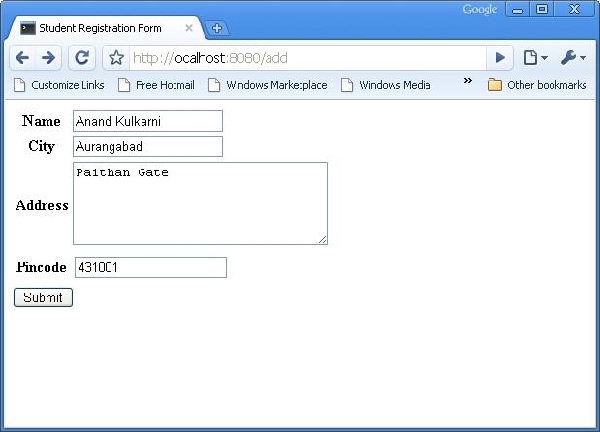
上述表单旨在提交到 '/save_record' URL。因此,需要在 root.py 中添加 save_record() 函数来公开它。此函数将 studentform 中的数据作为 dict() 对象接收。它用于在学生模型底层的学生表中添加新记录。
@expose()
#@validate(form = AdmissionForm, error_handler = index1)

def save_record(self, **kw):
   newstudent = student(name = kw['name'],city = kw['city'],
      address = kw['address'], pincode = kw['pincode'])
   DBSession.add(newstudent)
   flash(message = "new entry added successfully")
   redirect("/listrec")
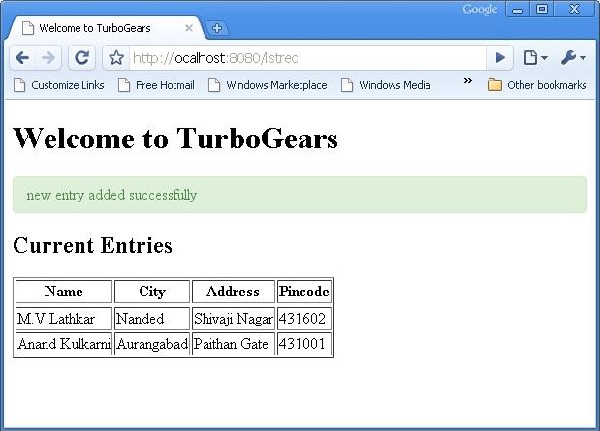
请注意,添加成功后,浏览器将重定向到'/listrec' URL。此URL由listrec()函数公开。此函数选择student表中的所有记录,并以dict对象的形式将它们发送到studentlist.html模板。此listrec()函数如下 −
@expose ("hello.templates.studentlist")
def listrec(self):
    entries = DBSession.query(student).all()
    return dict(entries = entrys)
studentlist.html模板使用py:for指令遍历entries字典对象。studentlist.html模板如下 −
<html xmlns = "http://www.w3.org/1999/xhtml"
   xmlns:py = "http://genshi.edgewall.org/">

   <head>
      <link rel = "stylesheet" type = "text/css" media = "screen"
         href = "${tg.url('/css/style.css')}" />
      <title>Welcome to TurboGears</title>
   </head>

   <body>
      <h1>Welcome to TurboGears</h1>

      <py:with vars = "flash = tg.flash_obj.render('flash', use_js = False)">
         <div py:if = "flash" py:replace = "Markup(flash)" />
      </py:with>

      <h2>Current Entries</h2>

      <table border = '1'>
         <thead>
            <tr>
               <th>Name</th>
               <th>City</th>
               <th>Address</th>
               <th>Pincode</th>
            </tr>
         </thead>

         <tbody>
            <py:for each = "entry in entries">
               <tr>
                  <td>${entry.name}</td>
                  <td>${entry.city}</td>
                  <td>${entry.address}</td>
                  <td>${entry.pincode}</td>
               </tr>
            </py:for>
         </tbody>

      </table>

   </body>
</html>
现在重新访问 http://localhost:8080/add 并在表单中输入数据。单击提交按钮,浏览器将转到 studentlist.html。它还将闪烁"新记录添加成功"消息。