
Angular 8 - 国际化 (i18n)
国际化 (i18n) 是任何现代 Web 应用程序的必备功能。 国际化使应用程序能够针对世界上的任何语言。 本地化是国际化的一部分,它使应用程序能够以目标本地语言呈现。 Angular 提供了对国际化和本地化功能的完整支持。
让我们学习如何用不同的语言创建一个简单的 hello world 应用程序。
使用以下命令创建一个新的 Angular 应用程序 −
cd /go/to/workspace
ng new i18n-sample
使用以下命令运行应用程序 −
cd i18n-sample
npm run start
更改AppComponent的模板,如下所示 −
<h1>{{ title }}</h1>

<div>Hello</div>
<div>The Current time is {{ currentDate | date : 'medium' }}</div>
使用以下命令添加本地化模块 −
ng add @angular/localize
重新启动应用程序。
LOCALE_ID 是引用当前语言环境的 Angular 变量。 默认情况下,它设置为 en_US。 让我们通过在 AppModule 中的提供程序中使用来更改区域设置。
import { BrowserModule } from '@angular/platform-browser';
import { LOCALE_ID, NgModule } from '@angular/core';

import { AppComponent } from './app.component';

@NgModule({
   declarations: [
      AppComponent
   ],
   imports: [
      BrowserModule
   ],
   providers: [ { provide: LOCALE_ID, useValue: 'hi' } ],

   bootstrap: [AppComponent]
})
export class AppModule { }
这里,
- LOCALE_ID 是从 @angular/core 导入的。
- LOCALE_ID 通过提供商设置为 hi,以便 LOCALE_ID 在应用程序中的任何位置都可用。
从@angular/common/locales/hi导入语言环境数据,然后使用registerLocaleData方法注册它,如下所示:
import { Component } from '@angular/core';

import { registerLocaleData } from '@angular/common';
import localeHi from '@angular/common/locales/hi';

registerLocaleData(localeHi);

@Component({
   selector: 'app-root',
   templateUrl: './app.component.html',
   styleUrls: ['./app.component.css'],
})
export class AppComponent {
   title = 'Internationzation Sample';
}
创建一个局部变量CurrentDate并使用Date.now()设置当前时间。
export class AppComponent {
   title = 'Internationzation Sample';

   currentDate: number = Date.now();
}
更改 AppComponent 的模板内容并包含 currentDate,如下所示 −
<h1>{{ title }}</h1>

<div>Hello</div>
<div>The Current time is {{ currentDate | date : 'medium' }}</div>
检查结果,您将看到日期是使用 hi 语言环境指定的。
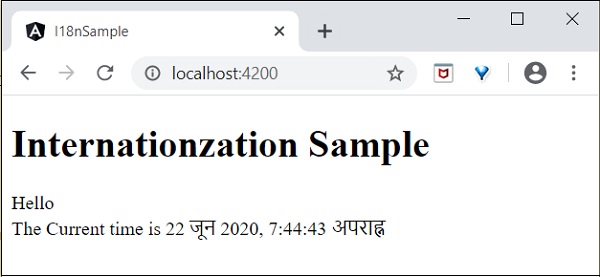
我们已将日期更改为当前区域设置。 让我们也更改其他内容。 为此,请在相关标记中包含 i18n 属性,格式为 title|description@@id。
<h1>{{ title }}</h1>

<h1 i18n="greeting|Greeting a person@@greeting">Hello</h1>
<div>
   <span i18n="time|Specifiy the current time@@currentTime">
      The Current time is {{ currentDate | date : 'medium' }}
   </span>
</div>
这里,
- hello 是简单的翻译格式,因为它包含要翻译的完整文本。
- time 有点复杂,因为它也包含动态内容。 文本格式应遵循ICU消息格式进行翻译。
我们可以使用以下命令提取要翻译的数据 −
ng xi18n --output-path src/locale
命令生成包含以下内容的messages.xlf文件 −
<?xml version="1.0" encoding="UTF-8" ?>
<xliff version="1.2" xmlns="urn:oasis:names:tc:xliff:document:1.2">
   <file source-language="en" datatype="plaintext" original="ng2.template">
      <body>
         <trans-unit id="greeting" datatype="html">
            <source>Hello</source>
            <context-group purpose="location">
               <context context-type="sourcefile">src/app/app.component.html</context>
               <context context-type="linenumber">3</context>
            </context-group>
            <note priority="1" from="description">Greeting a person</note>
            <note priority="1" from="meaning">greeting</note>

         </trans-unit>
         <trans-unit id="currentTime" datatype="html">
            <source>
                        The Current time is <x id="INTERPOLATION" equiv-text="{{ currentDate | date : 'medium' }}"/>
            </source>
            <context-group purpose="location">
               <context context-type="sourcefile">src/app/app.component.html</context>
               <context context-type="linenumber">5</context>
            </context-group>
            <note priority="1" from="description">Specifiy the current time</note>
            <note priority="1" from="meaning">time</note>
         </trans-unit>
      </body>
   </file>
</xliff>
复制文件并将其重命名为messages.hi.xlf
使用 Unicode 文本编辑器打开文件。 找到 source 标记并将其与 target 标记复制,然后将内容更改为 hi 区域设置。 使用谷歌翻译来查找匹配的文本。 修改后的内容如下 −


打开angular.json并将以下配置放在 build -> configuration 下
"hi": {
   "aot": true,
   "outputPath": "dist/hi/",
   "i18nFile": "src/locale/messages.hi.xlf",
   "i18nFormat": "xlf",
   "i18nLocale": "hi",
   "i18nMissingTranslation": "error",
   "baseHref": "/hi/"
},
"en": {
   "aot": true,
   "outputPath": "dist/en/",
   "i18nFile": "src/locale/messages.xlf",
   "i18nFormat": "xlf",
   "i18nLocale": "en",
   "i18nMissingTranslation": "error",
   "baseHref": "/en/"
}
这里,
我们对 hi 和 en 区域设置使用了单独的设置。
在 serve -> configuration 下设置以下内容。
"hi": {
   "browserTarget": "i18n-sample:build:hi"
},
"en": {
   "browserTarget": "i18n-sample:build:en"
}
我们已经添加了必要的配置。 停止应用程序并运行以下命令 −
npm run start -- --configuration=hi
这里,
我们已指定必须使用 hi 配置。
导航到 http://localhost:4200/hi,您将看到印地语本地化内容。
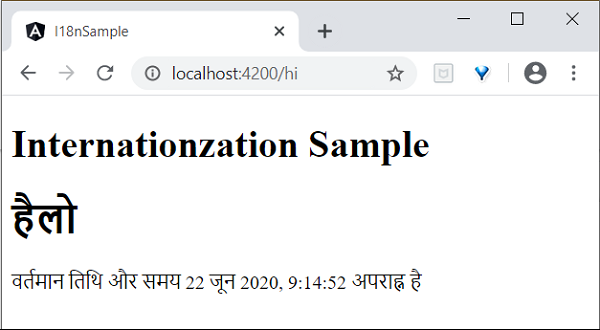
最后,我们在 Angular 中创建了一个本地化应用程序。

