
Angular Material 7 - 输入
<mat-input> 是一个 Angular 指令,用于 <input> 和 <textarea> 元素在 <mat-form-field> 下工作。
<mat-input> 中可以使用以下输入类型。
- color
- date
- datetime-local
- month
- number
- password
- search
- tel
- text
- time
- url
- week
在本章中,我们将展示在 Angular Material 中使用 mat-input 控件所需的配置。
创建 Angular 应用程序
按照以下步骤更新我们在Angular 6 - 项目设置章节中创建的 Angular 应用程序 −
| 步骤 | 说明 |
|---|---|
| 1 | 创建一个名为 materialApp 的项目,如Angular 6 - 项目设置章节中所述。 |
| 2 | 修改 app.module.ts, app.component.ts, app.component.css 和 app.component.html,如下所述。 保持其余文件不变。 |
| 3 | 编译并运行应用程序以验证实现逻辑的结果。 |
以下是修改后的模块描述符app.module.ts的内容。
import { BrowserModule } from '@angular/platform-browser';
import { NgModule } from '@angular/core';
import { AppComponent } from './app.component';
import {BrowserAnimationsModule} from '@angular/platform-browser/animations';
import {MatInputModule} from '@angular/material'
import {FormsModule, ReactiveFormsModule} from '@angular/forms';
@NgModule({
   declarations: [
      AppComponent
   ],
   imports: [
      BrowserModule,
      BrowserAnimationsModule,
      MatInputModule,
      FormsModule,
      ReactiveFormsModule
   ],
   providers: [],
   bootstrap: [AppComponent]
})
export class AppModule { }
以下是修改后的CSS文件app.component.css的内容。
.tp-form {
   min-width: 150px;
   max-width: 500px;
   width: 100%;
}
.tp-full-width {
   width: 100%;
}
以下是修改后的ts文件app.component.ts的内容。
import { Component } from '@angular/core';
import { FormControl } from "@angular/forms";
import {Validators} from '@angular/forms';
@Component({
   selector: 'app-root',
   templateUrl: './app.component.html',
   styleUrls: ['./app.component.css']
})
export class AppComponent {
   title = 'materialApp';
   emailFormControl = new FormControl('', [
      Validators.required,
      Validators.email,
  ]);
}
以下是修改后的HTML主机文件app.component.html的内容。
<form class = "tp-form">
   <mat-form-field class = "tp-full-width">
      <input matInput placeholder = "Favorite Food" value = "Pasta">
   </mat-form-field>
   <mat-form-field class = "tp-full-width">
      <textarea matInput placeholder = "Enter your comment"></textarea>
   </mat-form-field>
   <mat-form-field class = "tp-full-width">
      <input matInput placeholder = "Email" [formControl] = "emailFormControl">
      <mat-error *ngIf = "emailFormControl.hasError('email')
         && !emailFormControl.hasError('required')">
         Please enter a valid email address
      </mat-error>
      <mat-error *ngIf = "emailFormControl.hasError('required')">
         Email is <strong>required</strong>
      </mat-error>
   </mat-form-field>
</form>
结果
验证结果。
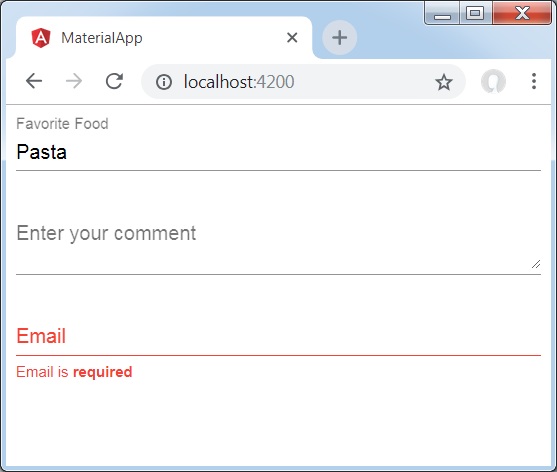
详细信息
首先,我们使用 mat-form-field 包装器创建了一个表单字段。
然后,使用 input 和 matInput 属性将表单控件添加到表单字段。

