
Angular Material 7 - 选择框
<mat-select> 是一个 Angular 指令,用于 <select> 以增强基于选择框设计的样式。。
在本章中,我们将展示使用 Angular Material 绘制选择控件所需的配置。
创建 Angular 应用程序
按照以下步骤更新我们在Angular 6 - 项目设置章节中创建的 Angular 应用程序 −
| 步骤 | 说明 |
|---|---|
| 1 | 创建一个名为 materialApp 的项目,如Angular 6 - 项目设置章节中所述。 |
| 2 | 修改 app.module.ts, app.component.ts, app.component.css 和 app.component.html,如下所述。 保持其余文件不变。 |
| 3 | 编译并运行应用程序以验证实现逻辑的结果。 |
以下是修改后的模块描述符app.module.ts的内容。
import { BrowserModule } from '@angular/platform-browser';
import { NgModule } from '@angular/core';
import { AppComponent } from './app.component';
import {BrowserAnimationsModule} from '@angular/platform-browser/animations';
import {MatSelectModule} from '@angular/material'
import {FormsModule, ReactiveFormsModule} from '@angular/forms';
@NgModule({
   declarations: [
      AppComponent
   ],
   imports: [
      BrowserModule,
      BrowserAnimationsModule,
      MatSelectModule,
      FormsModule,
      ReactiveFormsModule
   ],
   providers: [],
   bootstrap: [AppComponent]
})
export class AppModule { }
以下是修改后的ts文件app.component.ts的内容。
import { Component } from '@angular/core';
import { FormControl } from "@angular/forms";
export interface Food {
  value: string;
  display: string;
}
@Component({
   selector: 'app-root',
   templateUrl: './app.component.html',
   styleUrls: ['./app.component.css']
})
export class AppComponent {
   title = 'materialApp';
   selectedValue: string;
   foods: Food[] = [
      {value: 'steak', display: 'Steak'},
      {value: 'pizza', display: 'Pizza'},
      {value: 'tacos', display: 'Tacos'}
   ];
}
以下是修改后的HTML主机文件app.component.html的内容。
<form>
   <h4>mat-select</h4>
   <mat-form-field>
      <mat-select placeholder = "Favorite food"
         [(ngModel)] = "selectedValue" name = "food">
         <mat-option *ngFor = "let food of foods"
            [value] = "food.value">
            {{food.display}}
         </mat-option>
      </mat-select>
   </mat-form-field>
   <p> Selected food: {{selectedValue}} </p>
</form>
结果
验证结果。
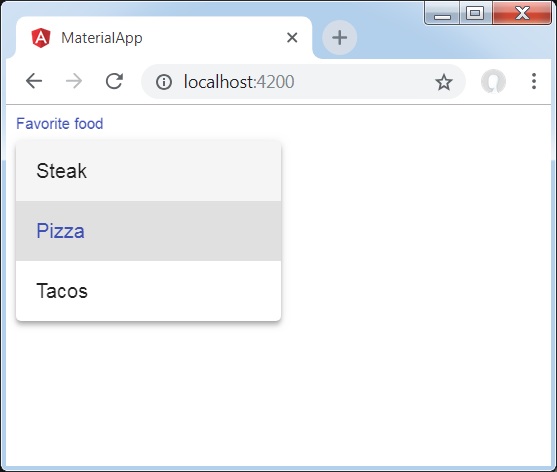
详细信息
首先,我们使用 mat-select 与 ngModel 绑定创建了一个选择框。
然后,我们使用 mat-option 添加了选项。

