使用 JavaScript、Actions 还是 WebDriver 点击元素?
seleniumautomation testingtesting tools更新于 2026/1/8 4:52:17
我们可以使用 JavaScript、Actions 类和 WebDriver 方法点击元素。Selenium 可以借助 execute_script() 方法执行 JavaScript 命令。
我们必须在代码中导入 org.openqa.selenium.JavascriptExecutor 才能使用 JavaScript 执行器。要点击元素,首先必须通过鼠标移动移动到该元素。我们可以借助 Selenium 中的 Actions 类来执行鼠标移动。
我们必须使用 moveToElement() 方法。此方法将执行鼠标移动到元素中间,然后执行点击操作,接着执行 build() 和 perform() 方法。我们必须在代码中为 Action 类导入 org.openqa.selenium.interactions.Actions。要使用 webdriver 方法点击元素,我们可以使用 click() 方法。
示例
使用 click() 方法的代码实现。
import org.openqa.selenium.By;
import org.openqa.selenium.WebDriver;
import org.openqa.selenium.WebElement;
import org.openqa.selenium.chrome.ChromeDriver;
import java.util.concurrent.TimeUnit;
public class ElementClk{
   public static void main(String[] args) {
      System.setProperty("webdriver.chrome.driver", "C:\Users\ghs6kor\Desktop\Java\chromedriver.exe");
      WebDriver driver = new ChromeDriver();
      String url = "https://www.tutorialspoint.com/about/about_careers.htm";
      driver.get(url);
      driver.manage().timeouts().implicitlyWait(5, TimeUnit.SECONDS);
      // identify element and click()
      WebElement l=driver.findElement(By.linkText("Terms of Use"));
      l.click();
      System.out.println("Current page title:" + driver.getTitle());
      driver.quit();
   }
}
示例
Code Implementation with Javascript Executor.
import org.openqa.selenium.By;
import org.openqa.selenium.WebDriver;
import org.openqa.selenium.WebElement;
import org.openqa.selenium.chrome.ChromeDriver;
import java.util.concurrent.TimeUnit;
import org.openqa.selenium.JavascriptExecutor;
public class ElementClkJs{
   public static void main(String[] args) {
      System.setProperty("webdriver.chrome.driver", "C:\Users\ghs6kor\Desktop\Java\chromedriver.exe");
      WebDriver driver = new ChromeDriver();
      String url = "https://www.tutorialspoint.com/about/about_careers.htm";
      driver.get(url);
      driver.manage().timeouts().implicitlyWait(5, TimeUnit.SECONDS);
      // 识别元素
      WebElement l=driver.findElement(By.linkText("使用条款"));
      // 使用 Javascript 执行器点击
      JavascriptExecutor j = (JavascriptExecutor) driver;
      j.executeScript("arguments[0].click();", l);
      System.out.println("Current page title:" + driver.getTitle());
      driver.quit();
   }
}
示例
使用 Actions 类的代码实现。
import org.openqa.selenium.By;
import org.openqa.selenium.WebDriver;
import org.openqa.selenium.WebElement;
import org.openqa.selenium.chrome.ChromeDriver;
import java.util.concurrent.TimeUnit;
import org.openqa.selenium.interactions.Action;
import org.openqa.selenium.interactions.Actions
public class ElementClkActs{
   public static void main(String[] args) {
      System.setProperty("webdriver.chrome.driver",
      "C:\Users\ghs6kor\Desktop\Java\chromedriver.exe");
      WebDriver driver = new ChromeDriver();
      String url = "https://www.tutorialspoint.com/about/about_careers.htm";
      driver.get(url);
      driver.manage().timeouts().implicitlyWait(5, TimeUnit.SECONDS);
      // identify element
      WebElement l=driver.findElement(By.linkText("Terms of Use"));
      // Actions class with moveToElement() and click()
      Actions a = new Actions(driver);
      a.moveToElement(l).click();
      a.build().perform();
      System.out.println("Current page title:" + driver.getTitle());
      driver.quit();
   }
}
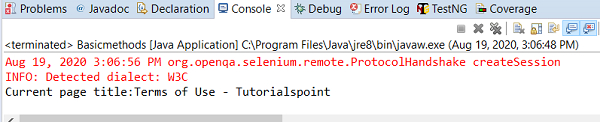
输出