
使用 Selenium 和 Python 将文件下载到指定位置。
seleniumautomation testingtesting tools更新于 2026/2/5 6:07:17
我们可以使用 Python 中的 Selenium 将文件下载到指定位置。这借助 ChromeOptions 类实现。我们需要设置浏览器的首选项并传递 download.default_directory 参数。
我们需要在该参数中指定下载目录的路径。此首选项通过 add_experimental_option方法发送到 ChromeOptions 对象。
最后,此浏览器信息与驱动程序对象共享。
语法
op = webdriver.ChromeOptions()
p = ("download.default_directory": "C:\Users", "safebrowsing.enabled":"false")
op.add_experimental_option("prefs", p)
driver = webdriver.Chrome(chrome_options=op)
示例
代码实现。
from selenium import webdriver
from selenium.webdriver.common.by import By
#ChromeOptions 对象
op = webdriver.ChromeOptions()
#设置下载目录路径
p = ("download.default_directory": "C:\Users""safebrowsing.enabled":"false")
#向 ChromeOptions 添加首选项
op.add_experimental_option("prefs", p)
driver = webdriver.Chrome(executable_path="C:\chromedriver.exe", chrome_options=op)
driver.implicitly_wait(0.4)
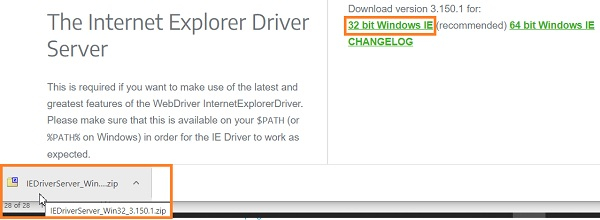
driver.get("https://www.seleniumhq.org/download/");
#识别元素
m = driver.find_element_by_link_text("32 bit Windows IE")
m.click()
输出
相关文章
打印
下一节:如何使用 Python 将选项传递给 Selenium Chrome 驱动程序? ❯❮ 上一节:如何使用 Selenium Webdriver 在"显示通知"弹出窗口中点击"允许"?

