Gecko 驱动程序,使用 Selenium 从下拉列表中选择值
seleniumautomation testingtesting tools更新于 2026/1/24 10:07:17
我们可以在 Firefox(版本 47)中借助 geckodriver.exe 可执行文件使用 Selenium webdriver 脚本。首先,我们需要从以下链接下载此文件 −
https://github.com/mozilla/geckodriver/releases
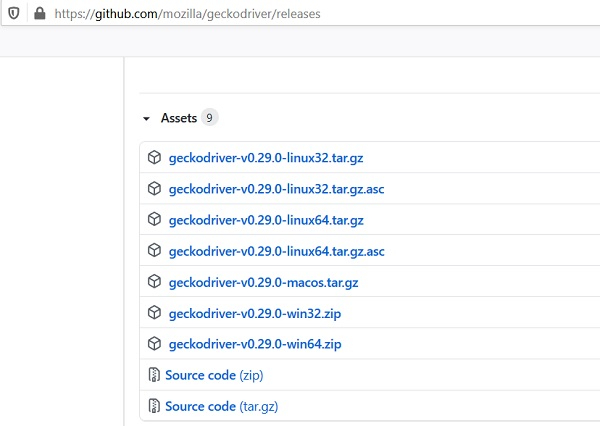
导航到上述 URL 后,我们需要根据当前使用的操作系统(Windows、Linux 或 Mac)点击相应的链接。下载完成后,会创建一个 zip 文件。我们必须解压 zip 文件并将 geckodriver.exe 文件存储在所需位置。
然后,我们必须使用 System.setProperty 方法配置 geckodriver.exe 文件的路径,并创建 FirefoxDriver 类的对象。
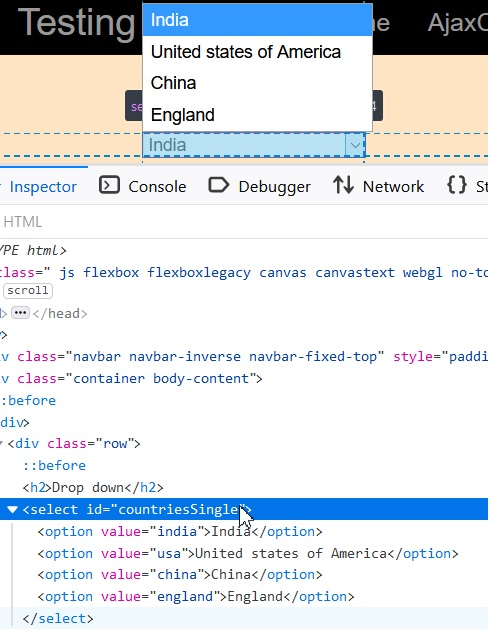
要从下拉列表中选择一个值,我们必须使用 Select 类。HTML 代码中的下拉列表由 <select> 标签表示,下拉列表中的选项由 <option> 标签表示。
Select 类中有多种方法可用于从下拉列表中选择一个选项 −
selectByIndex - 下拉列表中要选择的选项的索引将作为参数传递给此方法。索引从 0 开始。
WebElement e = driver.findElement(By.id("slc"));
Select s = new Select(e);
s.selectByIndex(0);
selectByValue - 下拉菜单中要选择的选项的 value 属性将作为参数传递给此方法。下拉菜单中的选项必须具有 value 属性才能使用此方法。
WebElement e = driver.findElement(By.id("slc"));
Select s = new Select(e);
s.selectByValue("option 1");
selectByVisibleText – 下拉菜单中要选择的选项的可见文本将作为参数传递给此方法。
WebElement e = driver.findElement(By.id("slc"));
Select s = new Select(e);
s.selectByVisibleText("Selenium");
让我们看一个下拉菜单的示例及其 HTML 代码 −
示例
import org.openqa.selenium.By;
import org.openqa.selenium.WebDriver;
import org.openqa.selenium.WebElement;
import org.openqa.selenium.firefox.FirefoxDriver;
import java.util.concurrent.TimeUnit;
import org.openqa.selenium.support.ui.Select
public class DrpDwnValue{
   public static void main(String[] args) {
      System.setProperty("webdriver.gecko.driver", "C:\Users\ghs6kor\Desktop\Java\geckodriver.exe");
      WebDriver driver = new FirefoxDriver();
      //隐式等待
      driver.manage().timeouts().implicitlyWait(5, TimeUnit.SECONDS);
      //URL 启动
      driver.get("http://www.uitestpractice.com/Students/Select");
      //识别下拉菜单
      WebElement m = driver.findElement(By.id("countriesSingle"));

      //通过索引选择选项
      Select s = new Select(m);
      s.selectByIndex(0);
      //获取已选择的选项
      String st = s.getFirstSelectedOption().getText();
      System.out.println("Option selected by Index: " + st);
      //通过值选择选项
      s.selectByValue("england");
      //获取已选择的选项
      String r = s.getFirstSelectedOption().getText();
      System.out.println("根据值选择的选项:" + r);
      //通过可见文本选择选项
      s.selectByVisibleText("美国");
      //获取所选选项
      String l = s.getFirstSelectedOption().getText();
      System.out.println("Option selected by Visible Text: " + l);
      driver.quit();
   }
}
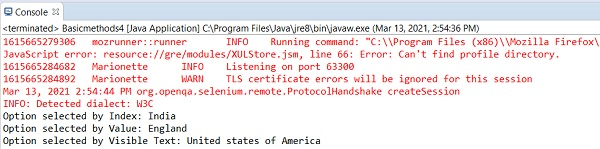
输出