
如何解决 Selenium WebDriver 中的 ElementNotInteractableException?
seleniumautomation testingtesting tools
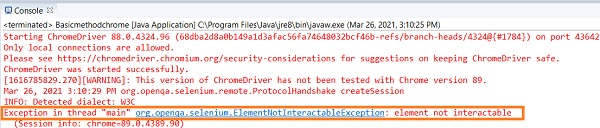
如果某个元素在 DOM 中可用,但不具备可交互的条件,Selenium 就会抛出 ElementNotInteractableException。导致此异常的原因包括 −
我们想要交互的元素上可能被另一个元素覆盖。一个元素覆盖另一个元素可能是暂时的,也可能是永久的。为了解决暂时的覆盖问题,我们可以等待元素达到预期的条件。
我们可以等待覆盖元素达到 invisibilityOfElementLocated 的预期条件。或者,等待我们想要交互的元素达到 elementToBeClickable 的预期条件。
语法
WebDriverWait w= (new WebDriverWait(driver, 7));
w.until(ExpectedConditions
. elementToBeClickable (By.id("id of element")));
//alternate solution
w.until(ExpectedConditions
. invisibilityOfElementLocated(By.id("id of overlay element")));
为了解决永久性覆盖问题,我们可以使用 JavaScript 执行器来执行点击操作。Selenium 使用 executeScript 方法执行 JavaScript 命令。
语法
WebElement l = driver.findElement(By.id("id of element"));
JavascriptExecutor j = (JavascriptExecutor) driver;
j.executeScript("arguments[0].click();", l);
示例
import org.openqa.selenium.By;
import org.openqa.selenium.WebDriver;
import org.openqa.selenium.WebElement;
import org.openqa.selenium.chrome.ChromeDriver;
import org.openqa.selenium.JavascriptExecutor;
public class InteractableExceptionFix{
   public static void main(String[] args) {
      System.setProperty("webdriver.chrome.driver",
         "C:\Users\ghs6kor\Desktop\Java\chromedriver.exe");
      WebDriver driver = new ChromeDriver();
      //启动 URL
      driver.get("https://login.yahoo.com/");
      //识别元素
      WebElement l = driver.findElement(By.xpath("//input[@id='persistent']"));
      //用于点击元素的 JavaScript 执行器
      JavascriptExecutor j = (JavascriptExecutor) driver;
      j.executeScript("arguments[0].click();", l);
      boolean t = l.isSelected();
      if (t) {
         System.out.println("Checkbox is not checked");
      }else {
         System.out.println("Checkbox is checked");
      }
      driver.quit();
   }
}
输出

相关文章
打印
下一节:Selenium 中的测试运行器如何确定测试类的执行优先级? ❯❮ 上一节:在 Selenium WebDriver 测试中,使用 Java 实现 waitForVisible/waitForElementPresent 的等效方法是什么?

