
如何在 Selenium 中避免"StaleElementReferenceException"?
seleniumautomation testingtesting tools
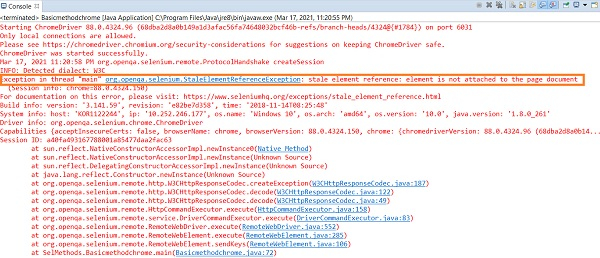
如果 Web 驱动程序尝试访问 DOM 中当前不可用或无效的 Web 元素,则会抛出 StaleElementReferenceException。
这可能是由于页面刷新、元素被意外删除、修改或不再连接到 DOM 造成的。可以通过以下技术避免此类异常 −
页面刷新。
使用重试机制。
使用 try-catch 块。
等待某些预期条件(例如 presenceOfElementLocated)或在获取元素的过时条件时刷新页面。
示例
出现 StaleElementException 的代码实现
import org.openqa.selenium.By;
import org.openqa.selenium.WebDriver;
import org.openqa.selenium.WebElement;
import org.openqa.selenium.chrome.ChromeDriver;
import java.util.concurrent.TimeUnit;
public class StaleElemntExc{
   public static void main(String[] args) {
      System.setProperty("webdriver.chrome.driver",
         "C:\Users\ghs6kor\Desktop\Java\chromedriver.exe");
      WebDriver driver = new ChromeDriver();
      //隐式等待
      driver.manage().timeouts().implicitlyWait(5, TimeUnit.SECONDS);
      //URL 启动
      driver.get("https://www.google.com/");
      // 识别元素
      WebElement n = driver.findElement(By.name("q"));
      n.sendKeys("tutorialspoint");
      //页面刷新
      driver.navigate().refresh();
      n.sendKeys("Java");
      driver.close();
   }
}
输出
避免 StaleElementException 的代码实现。
import org.openqa.selenium.By;
import org.openqa.selenium.WebDriver;
import org.openqa.selenium.WebElement;
import org.openqa.selenium.chrome.ChromeDriver;
import java.util.concurrent.TimeUnit;
import org.openqa.selenium.StaleElementReferenceException;
public class StaleElmntAvoid{
   public static void main(String[] args) {
      System.setProperty("webdriver.chrome.driver",
         "C:\Users\ghs6kor\Desktop\Java\chromedriver.exe");
      WebDriver driver = new ChromeDriver();
      //隐式等待
      driver.manage().timeouts().implicitlyWait(5, TimeUnit.SECONDS);
      //URL 启动
      driver.get("https://www.google.com/");
      // 识别元素
      WebElement n = driver.findElement(By.name("q"));
      n.sendKeys("tutorialspoint");
      //try-catch 块
      try{
         n.sendKeys("Java");
      }
      catch(StaleElementReferenceException exp){
         n = driver.findElement(By.name("q"));
         n.sendKeys("Java");
         String v= n.getAttribute("value");
         System.out.println("Text is: " +v);
      }
      driver.close();
   }
}
输出

相关文章
打印
下一节:如何下载 Microsoft WebDriver/Edge 驱动程序以与 Selenium 配合使用? ❯❮ 上一节:如何在 Selenium 中使用 Java 点击注册按钮?我可以打开页面,但无法点击。

