如何使用 Selenium 检查页面上的图片是否显示?
seleniumautomation testingtesting tools
我们可以使用 Selenium 检查页面上的图片是否显示。为了验证图片,我们需要借助 Javascript Executor。我们将使用 executeScript 方法在 Selenium 中执行 Javascript 命令。
然后将命令 return arguments[0].complete && typeof arguments[0].naturalWidth != \"undefined\" && arguments[0].naturalWidth > 0 作为参数传递给该方法。此外,还需要在代码中添加 import org.openqa.selenium.JavascriptExecutor 语句。
语法
WebElement i = driver.findElement(By.xpath("//img[@title='Tutorialspoint']"));

Boolean p = (Boolean) ((JavascriptExecutor)driver)
.executeScript("return arguments[0].complete "
+ "&& typeof arguments[0].naturalWidth != \"undefined\" "
+ "&& arguments[0].naturalWidth > 0", i);
让我们检查一下下面的图片是否存在于页面上 −

示例
代码实现。
import org.openqa.selenium.By;
import org.openqa.selenium.WebDriver;
import org.openqa.selenium.WebElement;
import org.openqa.selenium.chrome.ChromeDriver;
import java.util.concurrent.TimeUnit;
import org.openqa.selenium.JavascriptExecutor;
public class ImageChk{
   public static void main(String[] args) {
      System.setProperty("webdriver.chrome.driver", "C:\Users\ghs6kor\Desktop\Java\chromedriver.exe");
      WebDriver driver = new ChromeDriver();
      driver.manage().timeouts().implicitlyWait(5, TimeUnit.SECONDS);
      String url = "https://www.tutorialspoint.com/index.htm";
      driver.get(url);
      //识别图像
      WebElement i = driver.findElement
      (By.xpath("//img[@title='Tutorialspoint']"));
      // 用于检查图像的 Javascript 执行器
      Boolean p = (Boolean) ((JavascriptExecutor)driver) .executeScript("return arguments[0].complete " + "&& typeof arguments[0].naturalWidth != \"undefined\" " + "&& arguments[0].naturalWidth > 0", i);

      //验证状态是否为真
      if (p) {
         System.out.println("Logo present");
      } else {
         System.out.println("Logo not present");
      }
      driver.quit();
   }
}
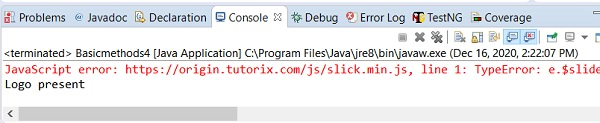
输出