如何使用 Selenium Webdriver 下载任何文件并将其保存到所需位置?
seleniumautomation testingtesting tools
我们可以使用 Selenium 下载任何文件并将其保存到所需位置。这可以通过创建 FirefoxOptions 类的实例来实现。然后,借助 addPreference 方法,我们必须设置浏览器首选项。
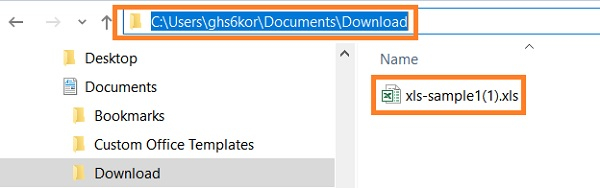
我们还应该借助 addPreference 方法指定要下载文件的路径。
示例
代码实现。
import org.openqa.selenium.By;
import org.openqa.selenium.WebDriver;
import org.openqa.selenium.WebElement;
import org.openqa.selenium.firefox.FirefoxDriver;
import org.openqa.selenium.firefox.FirefoxOptions;
import java.util.concurrent.TimeUnit;
public class FileDwnload{
   public static void main(String[] args) {
      System.setProperty("webdriver.gecko.driver", "C:\Users\ghs6kor\Desktop\Java\geckodriver.exe");
      // 创建 FirefoxOptions 类的对象
      FirefoxOptions profile = new FirefoxOptions();
      // 使用 addPreference 方法添加浏览器首选项
      profile.addPreference(&"browser.download.folderList", 2);
      // 下载文件的位置
      profile.addPreference(&"browser.download.dir", &"C:\Users\ghs6kor\Documents\Download");
      profile.addPreference("browser.helperApps.neverAsk.openFile", "text/csv,application/x-msexcel,application/excel," + "application/x-excel,application/vnd.ms-excel," + "image/png,image/jpeg,text/html,text/plain," + "application/msword,application/xml");
      profile.addPreference("browser.helperApps.neverAsk.saveToDisk", "text/csv,application/x-msexcel," + "application/excel," + "application/x-excel," + "application/vnd.ms- excel,image/png,image/jpeg,text/html," + "text/plain,application/msword,application/xml");
      profile.addPreference("browser.helperApps.alwaysAsk.force", false);
      profile.addPreference
      ("browser.download.manager.alertOnEXEOpen", false);
      profile.addPreference("browser.download.manager.focusWhenStarting", false);
      profile.addPreference("browser.download.manager.useWindow", false);
      profile.addPreference("browser.download.manager.showAlertOnComplete", false);
      profile.addPreference("browser.download.manager.closeWhenDone", false);
      // 将浏览器选项连接到 WebDriver
      WebDriver driver = new FirefoxDriver(profile);
      driver.get("https://the-internet.herokuapp.com/download");
      //最大化窗口
      driver.manage().window().maximize();
      // 识别元素并开始下载
      driver.findElement(By.linkText("xls-sample1.xls")).click();
   }
}
输出

此外,文件也会下载到指定位置。