
如何在 Excel 中将每行导出或保存为文本文件
Excel 是由 Microsoft 开发的一款功能强大的电子表格程序。它广泛应用于各行各业的数据组织、分析和处理。要在 Excel 中将多列导出到单独的文本文件中,可以使用 VBA(Visual Basic for Applications)宏。
在 Excel 中将每行导出或保存为文本文件的步骤
以下是操作示例:
步骤 1:打开要将行导出为文本文件的 Excel 文件。按 Alt + F11 在 Excel 中打开 Visual Basic 编辑器。
点击"插入"并选择"模块"以插入新模块。在模块窗口中,粘贴以下代码:
示例
Sub ExportRowsAsTextFiles()
    Dim ws As Worksheet
    Dim lastRow As Long
    Dim rowNum As Long
    Dim rowRange As Range
    Dim cellValue As String
    Dim filePath As String
    Dim cell As Range

    Set ws = ThisWorkbook.ActiveSheet ' Change to the appropriate sheet if needed
    lastRow = ws.Cells(ws.Rows.Count, 1).End(xlUp).Row ' Assumes data starts in column A

    ' Loop through each row
    For rowNum = 1 To lastRow
        ' Set the range for the current row
        Set rowRange = ws.Range("A" & rowNum & ":" & ws.Cells(rowNum, ws.Columns.Count).End(xlToLeft).Address)

        ' Initialize cellValue as an empty string
        cellValue = ""

        ' Loop through each cell in the row
        For Each cell In rowRange
            ' Check the data type of the cell value
            Select Case True
                Case IsNumeric(cell.Value) ' Numeric value
                    cellValue = cellValue & CStr(cell.Value) & ","
                Case IsDate(cell.Value) ' Date value
                    cellValue = cellValue & Format(cell.Value, "dd-mm-yyyy") & ","
                Case Else ' Text value or other types
                    cellValue = cellValue & CStr(cell.Value) & ","
            End Select
        Next cell

        ' Remove the trailing comma
        cellValue = Left(cellValue, Len(cellValue) - 1)

        ' Define the file path for the text file (change as needed)
        filePath = "E:\Assignments\3rd Assignments\How to export or save each row as text file in Excel\Output\file_" & rowNum & ".txt"

        ' Export the row as a text file
        Open filePath For Output As #1
        Print #1, cellValue
        Close #1
    Next rowNum
    MsgBox "Rows exported to individual text files."
End Sub
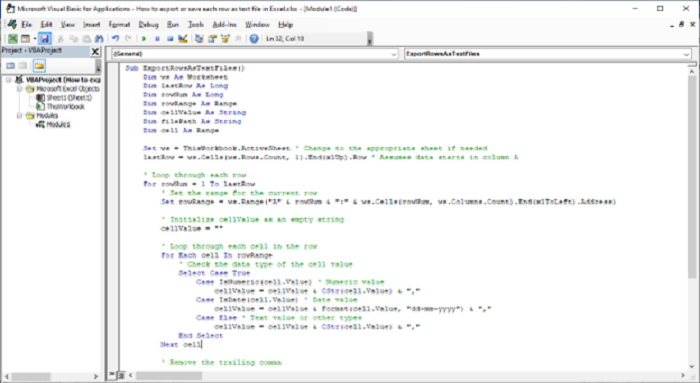
步骤 2:如有需要,请修改代码:
将"ws"变量设置为要从中导出行的工作表。默认情况下,它会从活动工作表导出。
调整 ws.Range("A" & rowNum & ":" & ws.Cells(rowNum, ws.Columns.Count).End(xlToLeft).Address) 中的列引用,以匹配要导出的列范围。
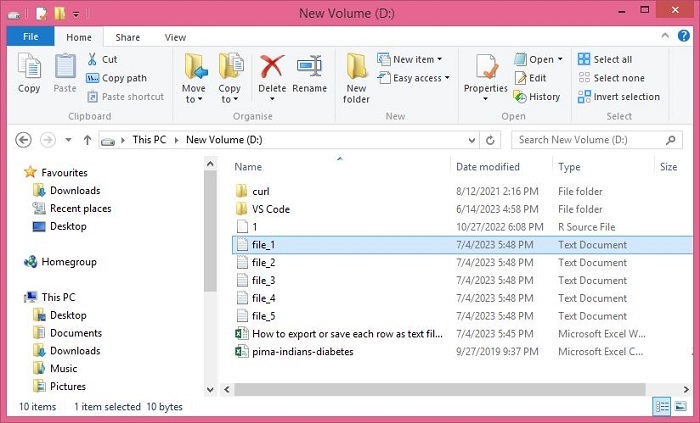
将 filePath 变量更新为要保存文本文件的路径。示例代码将它们以 file_1.txt、file_2.txt 等文件名保存在"我的"文件夹中。确保将路径更改为有效目录。
步骤 3:按 Alt + F8 运行宏,选择"ExportRowsAsTextFiles",然后点击"运行"。
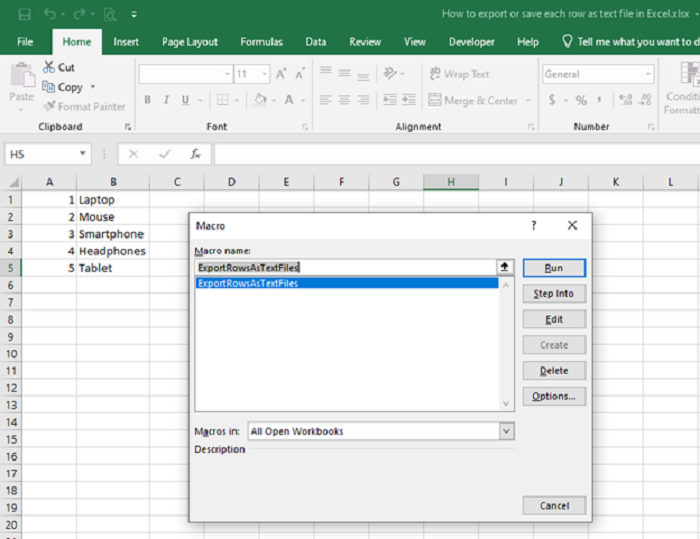
代码将遍历指定工作表中的每一行,将该行中的值连接成逗号分隔的字符串,并将其保存为具有指定文件路径的文本文件。每一行都有自己的文本文件。
结论
要将 Excel 文件中的每一行导出为单独的文本文件,您可以使用 VBA(Visual Basic for Applications)代码。该代码会遍历指定工作表的每一行,将该行中的值连接成一个以逗号分隔的字符串。然后,该字符串会保存为一个文本文件,每行都有一个唯一的文件路径。
该代码包含错误处理功能,用于处理行内的不同数据类型。它会检查值是数字、日期还是"else"类别(涵盖文本和其他类型)。进行适当的转换,并将值附加到 cellValue 变量中。生成的字符串会使用指定的文件路径保存为文本文件。此过程可确保 Excel 文件中的每一行都导出为单独的文本文件,以便在 Excel 之外进行进一步的分析或操作。
相关文章
有用资源
excel 参考教程 - 该教程包含有关 excel 的更多信息:https://www.cainiaomax.com/excel/

