如何使用 Selenium 通过值查找单选按钮元素?
seleniumautomation testingtesting tools更新于 2026/2/11 9:37:17
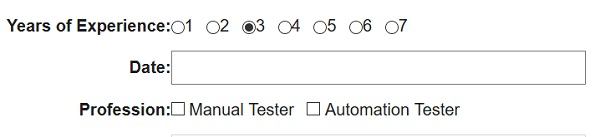
我们可以使用 Selenium webdriver 通过值查找单选按钮元素。HTML 文档中的单选按钮具有标签名 input,其 type 属性设置为 radio。我们可以在识别单选按钮后,使用 click() 方法选中它。
让我们看一下单选按钮的 HTML 代码。要使用值属性识别它,我们必须使用 XPath 或 CSS 定位器。

示例
import org.openqa.selenium.By;
import org.openqa.selenium.WebDriver;
import org.openqa.selenium.WebElement;
import org.openqa.selenium.chrome.ChromeDriver;
import java.util.concurrent.TimeUnit;

public class RadioButnVal{
   public static void main(String[] args) {
System.setProperty("webdriver.chrome.driver","C:\Users\ghs6kor\Desktop\Java\chromedriver.exe");
      WebDriver driver = new ChromeDriver();
      String url="https://www.tutorialspoint.com/selenium/selenium_automation_practice.htm";
      driver.get(url);
      driver.manage().timeouts().implicitlyWait(5, TimeUnit.SECONDS);
      // 通过值识别元素
      WebElement l=driver.findElement(By.cssSelector("input[value='3']"));
      // 通过 click() 选择单选按钮
      l.click();
      driver.quit();
   }
}
输出