
如何使用 Python WebDriver 查找父元素?
seleniumautomation testingtesting tools更新于 2026/2/11 13:07:17
我们可以使用 Selenium WebDriver 查找父元素。首先,我们需要借助 id、class、name、xpath 或 css 等定位器来识别子元素。然后,我们必须使用 find_element_by_xpath() 方法识别父元素。
我们可以通过将父元素与子元素进行本地化,然后将 (..) 作为参数传递给 find_element_by_xpath() 来识别父元素和子元素。
语法−
child.find_element_by_xpath("..")
让我们在下面的 HTML 代码中识别父元素 ul 和子元素 li 的 class 属性−
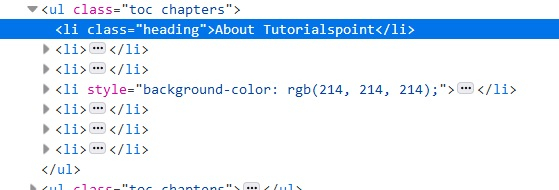
带有 class 的子元素heading 应该能够获取具有 toc chapters class 属性的父元素。
示例
from selenium import webdriver
driver = webdriver.Chrome(executable_path="
C:\chromedriver.exe")
driver.implicitly_wait(0.5)
driver.get("https://www.tutorialspoint.com/about/about_careers.htm")
#识别子元素
l= driver.find_element_by_xpath("//li[@class='heading']")
# 使用 xpath 中的 (..) 识别子元素的父元素
t= l.find_element_by_xpath("..")
# get_attribute() 方法获取父类
print("Parent class attribute: " + t.get_attribute("class"))
driver.close()
输出


