如何在 Selenium 中处理警报?
seleniumautomation testingtesting tools
我们可以使用 Selenium WebDriver 的 Alert 接口来处理警报。警报可以分为三种类型:一个允许用户输入文本的提示框、一个普通提示框和一个确认提示框。
默认情况下,WebDriver 只能访问主页。当出现提示框时,会使用 `switchTo().alert()` 方法将 WebDriver 的焦点转移到该提示框。
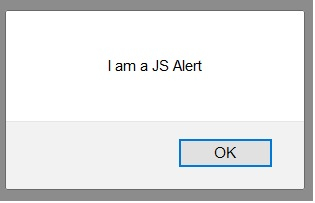
下方显示的是一个普通提示框 −
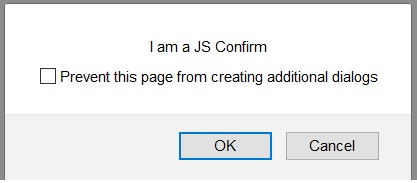
下方显示的是一个确认提示框 −
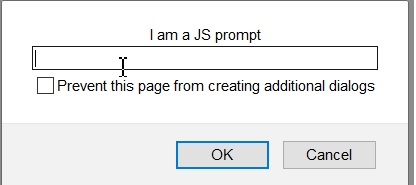
A提示框如下所示 −
要接受提示框(点击提示框中的"确定"按钮),请使用 switchTo().alert().accept() 方法。要关闭提示框(点击提示框中的"取消"按钮),请使用 switchTo().alert().dismiss() 方法。
要提取提示框文本,请使用 switchTo().alert().getText() 方法。要在确认提示框中输入文本,请使用 switchTo().alert().sendKeys() 方法。
要输入的文本作为参数传递给 sendKeys 方法。
示例
import org.openqa.selenium.By;
import org.openqa.selenium.WebDriver;
import org.openqa.selenium.WebElement;
import org.openqa.selenium.firefox.FirefoxDriver;
import java.util.concurrent.TimeUnit;
import org.openqa.selenium.Alert;
public class AlertHandle{
   public static void main(String[] args) {
      System.setProperty("webdriver.gecko.driver",
         "C:\Users\ghs6kor\Desktop\Java\geckodriver.exe");
      WebDriver driver = new FirefoxDriver();
      //隐式等待
      driver.manage().timeouts().implicitlyWait(5, TimeUnit.SECONDS);
      //URL 启动
      driver.get("https://the-internet.herokuapp.com/javascript_alerts");
      // 识别元素
      WebElement c=driver.findElement(By.xpath("//button[text()='Click for JS Prompt']"));
      c.click();
      //切换到警报模式
      Alert a = driver.switchTo().alert();
      //获取提示文本
      String s = a.getText();
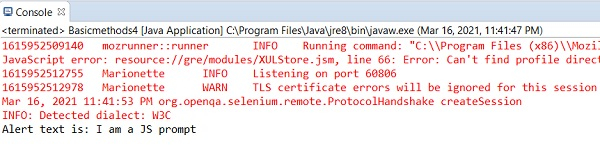
      System.out.println("Alert text is: " + s);
      //输入要提醒的文本
      a.sendKeys("Selenium");
      //关闭警报
      a.dismiss();
      c.click();
      //接受警报
      a.accept();
      driver.quit();
   }
}
输出