如何在 Selenium 中通过部分 ID 匹配定位元素?
我们可以使用 Selenium WebDriver 通过部分 ID 匹配定位元素。这可以通过使用 XPath 或 CSS 定位器识别元素来实现。对于 CSS 和 XPath 表达式,我们使用正则表达式来部分匹配 ID。
让我们看一下元素在其 HTML 代码中的 ID。id 属性值为 gsc-i-id1。
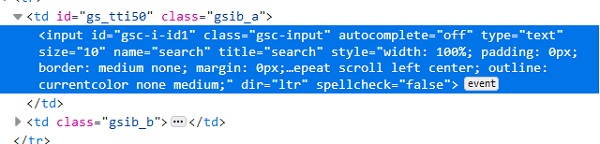
使用 CSS 表达式,我们可以使用 * 并执行 id 的部分匹配。CSS 值应为 input[id*='id']。这意味着子文本 id 存在于实际文本 gsc-i-id1 中。我们还可以使用 ^ 并执行 id 匹配。CSS 值应为 input[id^='gsc']。这意味着实际文本 `gsc-i-id1` 以子文本 `gsc` 开头。我们还可以使用 `$` 并与 id 进行匹配。CSS 值应为 `input[id$='id1']`。这意味着实际文本 `gsc-i-id1` 以子文本 `id1` 结尾。
使用 XPath 表达式,我们可以使用 `contains()` 方法并与 id 进行部分匹配。XPath 值应为 `//*[contains(@id, 'id')]`。这意味着子文本 `id` 存在于实际文本 `gsc-i-id1` 中。我们还可以使用 `starts-with()` 并与 id 进行匹配。 CSS 值应为 `//*[starts-with(@id, 'gsc')]`。这意味着实际文本 `gsc-i-id1` 以子文本 `gsc` 开头。我们还可以使用 `ends-with()` 并与 id 进行匹配。CSS 值应为 `//*[ends-with(@id, 'id1')]`。这意味着实际文本 `gsc-i-id1` 以子文本 `id1` 结尾。
示例
Code Implementation.
import org.openqa.selenium.WebDriver;
import org.openqa.selenium.chrome.ChromeDriver;
import org.openqa.selenium.WebElement;
import org.openqa.selenium.By;
public class PartialMatchId{
   public static void main(String[] args) {
      System.setProperty("webdriver.chrome.driver", "C:\Users\ghs6kor\Desktop\Java\chromedriver.exe");
      WebDriver driver = new ChromeDriver();
      driver.get("https://www.tutorialspoint.com/about/about_careers.htm");
      // 在 CSS 中,使用 * 匹配部分 ID 来识别元素
      WebElement l=driver.findElement(By.cssSelector("input[id*='id']"));
      l.sendKeys("Selenium");
      // 使用 getAttribute 方法获取输入的值
      System.out.println("Using * expression: " +l.getAttribute("value"));
      l.clear();
      // 在 CSS 中,使用 ^ 符号识别具有部分 id 匹配的元素
      WebElement m=driver.findElement(By.cssSelector("input[id^='gsc']"));
      m.sendKeys("Java");
      // 使用 getAttribute 方法获取输入的值
      System.out.println("Using ^ expression: " +m.getAttribute("value"));
      m.clear();
      // 在 CSS 中,使用 $ 符号匹配部分 ID 的元素。
      WebElement n = driver.findElement(By.cssSelector("input[id$='id1']"));
      n.sendKeys("Python");
      // 使用 getAttribute 方法获取输入的值
      System.out.println("Using $ expression: " +n.getAttribute("value"));
      n.clear();
      // 使用 XPath 中的部分 ID 匹配项识别元素。
      WebElement o=driver.findElement(By.xpath("//input[contains(@id,'id')]"));
      o.sendKeys("Selenium");
      // 使用 getAttribute 方法获取输入的值
      System.out.println("Using contains: " +o.getAttribute("value"));
      o.clear();
      // 使用 XPath 识别具有部分 ID 匹配且以"startswith"开头的元素
      WebElement p=driver.findElement(By.xpath("//input[starts-with(@id,'gsc')]"));
      p.sendKeys("Java");
      // 使用 getAttribute 方法获取输入的值
      System.out.println("Using starts-with: " +p.getAttribute("value"));
      p.clear();
      driver.close();
   }
}
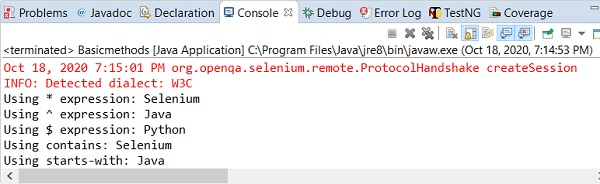
输出