
在 React Native 中编写一个程序来显示"Hello World"?
一旦您的系统上安装了 ReactNative,您应该会在 App.js 中获得如下默认代码 −
import React from 'react';
import { StyleSheet, Text, View } from 'react-native';
export default class App extends React.Component {
   render() {
      return (
         <View style = {styles.container}>
            <Text>Open up App.js to start working on your app!</Text>
               <Text>Changes you make will automatically reload.</Text>
                  <Text>Shake your phone to open the developer menu.</Text>
               </View>
            );
         }
      }
      const styles = StyleSheet.create({
      container: {
         flex: 1,
         backgroundColor: '#fff',
         alignItems: 'center',
         justifyContent: 'center',
   },
});
现在您可以根据需要随意更改代码。我们感兴趣的是要在应用程序中显示文本 Hello World。
首先,您需要先导入所需的组件和模块。我们需要 React 模块,因此让我们首先导入它,如下所示 −
从 'react'; 导入 React
接下来,让我们导入我们将在代码中用于显示文本 Hello World 的其他组件。
从 'react-native'; 导入 { StyleSheet, Text, View }
我们已经导入了 StyleSheet、Text 和 View 组件。我们需要 StyleSheet 组件来设置 View 和 Text 组件的样式。 View 组件将是父组件,Text 组件是其子组件。
App 是导出的默认类,运行项目后,您应该能够在设备上看到 <Text> 组件中的文本,如下所示 −
export default class App extends React.Component {
   render() {
   return (
      <View style = {styles.container}>
         <Text>Open up App.js to start working on your app!</Text>
            <Text>Changes you make will automatically reload.</Text>
               <Text>Shake your phone to open the developer menu.</Text>
         </View>
      );
   }
}
Change the text to Hello World as shown below −
export default class App extends React.Component {
   render() {
      return (
         <View style = {styles.container}>
            <Text>Hello World</Text>
         </View>
      );
   }
}
样式的 props 被添加到 View 组件。给出的值是 style.container。props 值必须放在花括号 {} 中,即 style={styles.container}。
styles 对象是使用 StyleSheet.create() 创建的。所有组件的样式都可以在 StyleSheet.create() 中定义。现在,我们已经将 View 组件上使用的容器样式定义为 <View style={styles.container}></View>。 style forText 变量用于设置 Text 组件的样式。
const style = StyleSheet.create({
   container: {
      flex: 1,
      backgroundColor: '#fff',
      alignItems: 'center',
      justifyContent: 'center',
   },
   forText: {
      color: 'green',
      fontSize: '25px'
   }
});
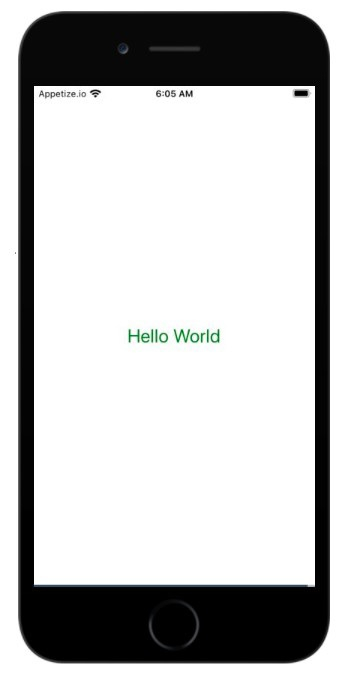
以下是使用 ReactNative 在手机屏幕上显示 Hello World 的完整代码。
import React from 'react';
import { StyleSheet, Text, View } from 'react-native';
export default class App extends React.Component {
   render() {
      return (
         <View style = {styles.container}><Text style={styles.forText}>Hello World</Text></View>
         );
      }
   }
   const styles = StyleSheet.create({
      container: {
         flex: 1,
         backgroundColor: '#fff',
         alignItems: 'center',
         justifyContent: 'center',
   },
   forText: {
      color: 'green',
      fontSize: '25px'
   }
});
输出
相关文章
有用资源
javascript 参考教程 - 该教程包含有关 javascript 的更多信息:https://www.cainiaomax.com/javascript/

