
如何在 React Native 中从服务器加载数据?
react nativejavascriptmobile development更新于 2025/7/25 19:56:17
要从服务器加载数据,您可以使用与 XMLHttpRequest 或任何其他网络 API 类似的 fetch API。
使用 fetch 向服务器发出请求非常容易。查看以下代码 −
fetch('https://jsonplaceholder.typicode.com/posts/1')
   .then((response) => response.json())
   .then((responseJson) => console.log(responseJson));
在上面的代码中,我们获取 JSON 文件 https://jsonplaceholder.typicode.com/posts/1 并将数据打印到控制台。对 fetch() API 的最简单调用接受一个参数,即您想要获取的路径,它会返回一个带有响应的承诺。
fetch api 返回一个带有 http 响应的承诺,要从响应中获取 JSON 主体,我们需要使用 json() 方法。
fetch api 的第二个参数是一个对象,它可以具有方法,即 (GET、POST)、标头、您想要发布的数据等。
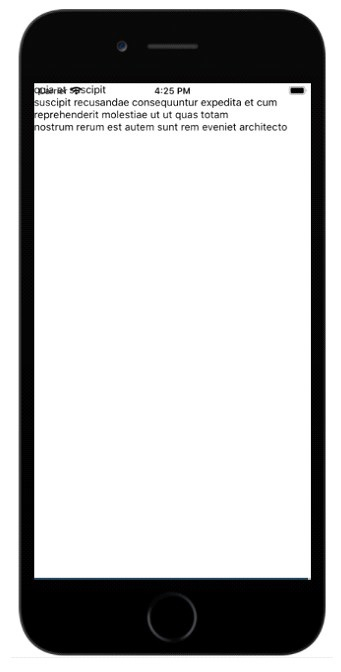
这是一个工作示例,展示了如何从服务器获取数据并显示给用户。
示例:使用 fetch API 获取数据
数据在开始时初始化为空,如下所示 −
state = {
   data: ''
}
关于 componentDidMount() 的详细信息
fetch API 在 componentDidMount() 函数内部调用。componentDidMount() 在组件安装后立即调用,即在页面上呈现所有元素后。
以下是相同的代码 −
componentDidMount = () => {
   fetch('https://jsonplaceholder.typicode.com/posts/1', {
      method: 'GET'
   })
   .then((response) => response.json())
   .then((responseJson) => {
      console.log(responseJson);
      this.setState({
         data: responseJson
      })
   })
   .catch((error) => {
      console.error(error);
   });
}
来自 url : https://jsonplaceholder.typicode.com/posts/1 的数据如下 −
{
   "userId": 1,
   "id": 1,
   "title": "sunt aut facere repellat provident occaecati excepturi optio reprehenderit",
   "body": "quia et suscipit
suscipit recusandae consequuntur expedita et cum
reprehenderit molestiae ut ut quas totam
nostrum rerum est autem sunt rem eveniet architecto"
}
我们想要在 body 中显示文本。
使用 setState 方法更新数据变量,如下所示 −
this.setState({
   data: responseJson
})
因此,现在 this.state.data.body 拥有来自服务器的数据,可用于向用户显示,如下所示−
render() {
   return (
      <View>
         <Text>
            {this.state.data.body}
         </Text>
      </View>
   )
}
以下是使用 fetch Api 从服务器获取数据的工作代码 −
import React, { Component } from "react";
import { Text, View } from "react-native";
class HttpExample extends Component {
   state = {
      data: ''
   }
   componentDidMount = () => { fetch('https://jsonplaceholder.typicode.com/posts/1', {
      method: 'GET'
   })
   .then((response) => response.json())
   .then((responseJson) => {
      console.log(responseJson);
      this.setState({
         data: responseJson
      })
   })
   .catch((error) => {
      console.error(error);
   });
}
render() {
   return (
      <View>
         <Text>
            {this.state.data.body}
            </Text>
         </View>
      )
   }
}
const App = () => {
   return (
      <HttpExample />
   )
}
export default App
输出
相关文章
有用资源
javascript 参考教程 - 该教程包含有关 javascript 的更多信息:https://www.cainiaomax.com/javascript/

