Ngx-Bootstrap - 按钮
ngx-bootstrap 按钮有两个特定指令,使一组按钮表现为复选框或单选按钮或混合按钮,其中可以取消选中单选按钮。
ButtonCheckboxDirective
向任何元素添加复选框功能。
选择器
[btnCheckbox]
输入
btnCheckboxFalse − 布尔值,Falsy 值,将设置为 ngModel,默认值:false
btnCheckboxTrue − boolean,真值,将设置为 ngModel,默认值:true
ButtonRadioDirective
创建单选按钮或按钮组。选定按钮的值绑定到通过 ngModel 指定的变量。
选择器
[btnRadio]
输入
btnRadio − 字符串,单选按钮值,将设置为 ngModel
disabled − boolean,如果为 true - 单选按钮被禁用
uncheckable − boolean,如果为 true - 单选按钮可以取消选中
value − 字符串,单选组件或组的当前值
ButtonRadioGroupDirective
一组单选按钮。选定按钮的值绑定到通过 ngModel 指定的变量。
选择器
[btnRadioGroup]
示例
由于我们要使用按钮,我们必须更新 ngx-bootstrap Alerts 一章中使用的 app.module.ts 以使用 ButtonsModule。我们还添加了使用 FormModule 的输入控件支持。
更新 app.module.ts 以使用 AlertModule 和 AlertConfig。
app.module.ts
import { BrowserModule } from '@angular/platform-browser';
import { NgModule } from '@angular/core';
import { BrowserAnimationsModule } from '@angular/platform-browser/animations';
import { AppComponent } from './app.component';
import { TestComponent } from './test/test.component';
import { AccordionModule } from 'ngx-bootstrap/accordion';
import { AlertModule,AlertConfig } from 'ngx-bootstrap/alert';
import { ButtonsModule } from 'ngx-bootstrap/buttons';
import { FormsModule } from '@angular/forms';
@NgModule({
   declarations: [
      AppComponent,
      TestComponent
   ],
   imports: [
      BrowserAnimationsModule,
      BrowserModule,
      AccordionModule,
      AlertModule,
      ButtonsModule,
      FormsModule
   ],
   providers: [AlertConfig],
   bootstrap: [AppComponent]
})
export class AppModule { }
更新 test.component.html 以使用按钮。
test.component.html
<button type="button" class="btn btn-primary" (click)="clicked()">
   Single Button
</button>
<pre class="card card-block card-header">
   {{clickCounter}}
</pre>
<p>Button as Checkbox</p>
<div class="btn-group">
   <label class="btn btn-primary" [(ngModel)]="checkModel.left"
      btnCheckbox tabindex="0" role="button">Left</label>
   <label class="btn btn-primary" [(ngModel)]="checkModel.right"
      btnCheckbox tabindex="0" role="button">Right</label>
</div>
<pre class="card card-block card-header">
   {{checkModel | json}}
</pre>
<p>Button as RadionButton</p>
<div class="form-inline">
   <div class="btn-group" btnRadioGroup [(ngModel)]="radioModel">
      <label class="btn btn-success" btnRadio="Left">Left</label>
      <label class="btn btn-success" btnRadio="Right">Right</label>
   </div>
</div>
<pre class="card card-block card-header">
   {{radioModel}}
</pre>
更新 test.component.ts 以获取相应的变量和方法。
test.component.ts
import { Component, OnInit } from '@angular/core';
@Component({
   selector: 'app-test',
   templateUrl: './test.component.html',
   styleUrls: ['./test.component.css']
})
export class TestComponent implements OnInit {
   checkModel = { left: false, right: false };
   radioModel = 'Left';
   clickCounter = 0;
   constructor() { }

   ngOnInit(): void {
   }
   clicked(): void {
      this.clickCounter++;
   }
}
构建和服务
运行以下命令启动 angular 服务器。
ng serve
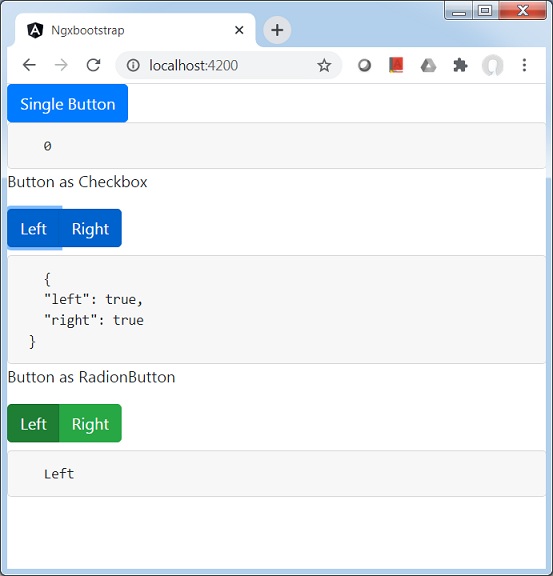
服务器启动并运行后。打开 http://localhost:4200 并验证以下输出。