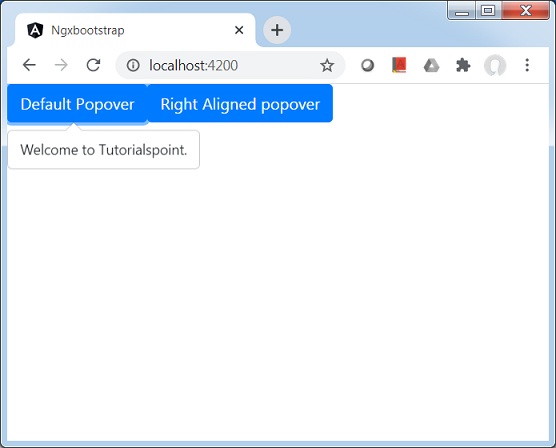
Ngx-Bootstrap - Popover
ngx-bootstrap popover 组件提供了一个小型覆盖组件,用于提供有关组件的少量信息。
PopoverDirective
选择器
popover
输入
adaptivePosition − 布尔值,设置禁用自适应位置。
container − 字符串,指定应将 popover 附加到的元素的选择器。
containerClass − 字符串,popover 容器的 Css 类
delay − number,显示工具提示前的延迟时间
isOpen − boolean,返回当前是否显示弹出窗口
outsideClick − boolean,单击外部时关闭弹出窗口,默认值:false
placement − "top" | "bottom" | "left" | "right" | "auto" | "top left" | "top right" | "right top" | "right bottom" | "bottom right" | "bottom left" | "left bottom" | "left top",弹出窗口的位置。接受:"top"、"bottom"、"left"、"right"。
popover − string | TemplateRef<any>,显示为弹出框的内容。
popoverContext − any,如果弹出框是模板,则使用上下文。
popoverTitle − 字符串,弹出框的标题。
triggers − 字符串,指定应触发的事件。支持以空格分隔的事件名称列表。
输出
onHidden − 弹出框隐藏时发出事件。
onShown −显示弹出窗口时发出事件。
方法
setAriaDescribedBy() − 为元素指令设置属性 aria-writtenBy,并为弹出窗口设置 ID。
show() − 打开元素的弹出窗口。这被视为弹出窗口的"手动"触发。
hide() − 关闭元素的弹出窗口。这被视为弹出窗口的"手动"触发。
toggle() − 切换元素的弹出窗口。这被视为"手动"触发弹出窗口。
示例
由于我们要使用弹出窗口,因此我们必须更新 ngx-bootstrap Pagination 一章中使用的 app.module.ts,以使用 PopoverModule 和 PopoverConfig。
更新 app.module.ts,以使用 PopoverModule 和 PopoverConfig。
app.module.ts
import { BrowserModule } from '@angular/platform-browser';
import { NgModule } from '@angular/core';
import { BrowserAnimationsModule } from '@angular/platform-browser/animations';
import { AppComponent } from './app.component';
import { TestComponent } from './test/test.component';
import { AccordionModule } from 'ngx-bootstrap/accordion';
import { AlertModule,AlertConfig } from 'ngx-bootstrap/alert';
import { ButtonsModule } from 'ngx-bootstrap/buttons';
import { FormsModule } from '@angular/forms';
import { CarouselModule } from 'ngx-bootstrap/carousel';
import { CollapseModule } from 'ngx-bootstrap/collapse';
import { BsDatepickerModule, BsDatepickerConfig } from 'ngx-bootstrap/datepicker';
import { BsDropdownModule,BsDropdownConfig } from 'ngx-bootstrap/dropdown';
import { PaginationModule,PaginationConfig } from 'ngx-bootstrap/pagination';
import { PopoverModule, PopoverConfig } from 'ngx-bootstrap/popover';

@NgModule({
   declarations: [
      AppComponent,
      TestComponent
   ],
   imports: [
      BrowserAnimationsModule,
      BrowserModule,
      AccordionModule,
      AlertModule,
      ButtonsModule,
      FormsModule,
      CarouselModule,
      CollapseModule,
      BsDatepickerModule.forRoot(),
      BsDropdownModule,
      ModalModule,
      PaginationModule,
      PopoverModule
   ],
   providers: [AlertConfig,
      BsDatepickerConfig,
      BsDropdownConfig,
      BsModalService,
      PaginationConfig],
   bootstrap: [AppComponent]
})
export class AppModule { }
更新 test.component.html 以使用模式。
test.component.html
<button type="button" class="btn btn-default btn-primary"
   popover="Welcome to Tutorialspoint." [outsideClick]="true">
   Default Popover
</button>
<button type="button" class="btn btn-default btn-primary"
   popover="Welcome to Tutorialspoint."
   popoverTitle="Tutorialspoint"
   [outsideClick]="true"
   placement="right">
   Right Aligned popover
</button>
更新 test.component.ts 以获取相应的变量和方法。
test.component.ts
import { Component, OnInit } from '@angular/core';
import { BsModalService } from 'ngx-bootstrap/modal';
import { PageChangedEvent } from 'ngx-bootstrap/pagination';

@Component({
   selector: 'app-test',
   templateUrl: './test.component.html',
   styleUrls: ['./test.component.css']
})
export class TestComponent implements OnInit {
   constructor() {}
   ngOnInit(): void {
   }
}
构建和服务
运行以下命令启动 angular 服务器。
ng serve
服务器启动并运行后。打开 http://localhost:4200。单击"打开模式"按钮并验证以下输出。