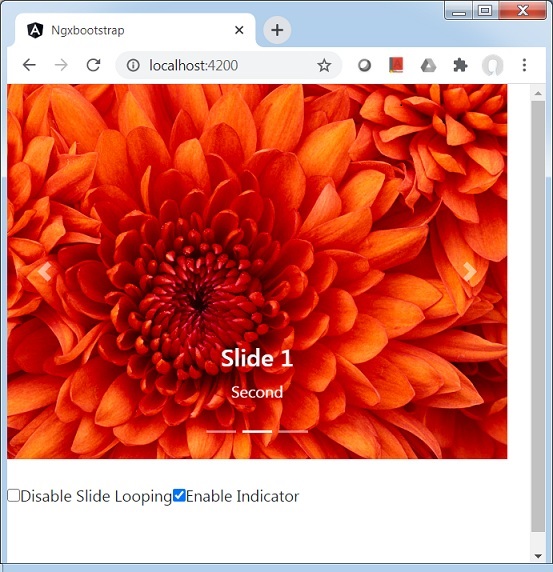
Ngx-Bootstrap - Carousel
ngx-bootstrap Carousel 轮播用于创建图像或文本的幻灯片放映
CarouselComponent
创建轮播的基本元素。
选择器
Carousel
输入
activeSlide − 数字,当前显示的幻灯片的索引(从 0 开始)
indicatorsByChunk − 布尔值,默认值:false
interval − 数字,项目循环的延迟(以毫秒为单位)。如果为 false,轮播将不会自动循环。
isAnimated − boolean,打开/关闭动画。动画不适用于多列表轮播,默认值:false
itemsPerSlide − number,默认值:1
noPause − boolean
noWrap − boolean
pauseOnFocus − boolean
showIndicators − boolean
singleSlideOffset − boolean
startFromIndex − 数字,默认值:0
输出
activeSlideChange − 当活动幻灯片发生更改时将发出。双向可绑定 [(activeSlide)] 属性的一部分
slideRangeChange − 当活动幻灯片在多列表模式下发生更改时将发出
SlideComponent
选择器
slide
输入
active − boolean,当前幻灯片是否处于活动状态
示例
由于我们要使用轮播,因此我们必须更新 ngx-bootstrap Buttons 一章中使用的 app.module.ts 以使用 CarouselModule。
更新 app.module.ts 以使用 CarouselModule。
app.module.ts
import { BrowserModule } from '@angular/platform-browser';
import { NgModule } from '@angular/core';
import { BrowserAnimationsModule } from '@angular/platform-browser/animations';
import { AppComponent } from './app.component';
import { TestComponent } from './test/test.component';
import { AccordionModule } from 'ngx-bootstrap/accordion';
import { AlertModule,AlertConfig } from 'ngx-bootstrap/alert';
import { ButtonsModule } from 'ngx-bootstrap/buttons';
import { FormsModule } from '@angular/forms';
import { CarouselModule } from 'ngx-bootstrap/carousel';

@NgModule({
   declarations: [
      AppComponent,
      TestComponent
   ],
   imports: [
      BrowserAnimationsModule,
      BrowserModule,
      AccordionModule,
      AlertModule,
      ButtonsModule,
      FormsModule,
      CarouselModule
   ],
   providers: [AlertConfig],
   bootstrap: [AppComponent]
})
export class AppModule { }
更新 test.component.html 以使用 Carousel。
test.component.html
<div style="width: 500px; height: 500px;">
   <carousel [noWrap]="noWrapSlides" [showIndicators]="showIndicator">
      <slide *ngFor="let slide of slides; let index=index">
         <img [src]="slide.image" alt="image slide" style="display: block; width: 100%;">
         <div class="carousel-caption">
			<h4>Slide {{index}}</h4>
            <p>{{slide.text}}</p>
         </div>
      </slide>
   </carousel>
   <br/>
   <div>
      <div class="checkbox">
         <label><input type="checkbox" [(ngModel)]="noWrapSlides">Disable Slide Looping</label>
         <label><input type="checkbox" [(ngModel)]="showIndicator">Enable Indicator</label>
      </div>
   </div>
</div>
更新 test.component.ts 以获取相应的变量和方法。
test.component.ts
import { Component, OnInit } from '@angular/core';
import { CarouselConfig } from 'ngx-bootstrap/carousel';

@Component({
   selector: 'app-test',
   templateUrl: './test.component.html',
   providers: [
      { provide: CarouselConfig, useValue: { interval: 1500, noPause: false, showIndicators: true } }
   ],
   styleUrls: ['./test.component.css']
})
export class TestComponent implements OnInit {
   slides = [
      {image: 'assets/images/nature/1.jpg', text: 'First'},
      {image: 'assets/images/nature/2.jpg',text: 'Second'},
      {image: 'assets/images/nature/3.jpg',text: 'Third'}
   ];
   noWrapSlides = false;
   showIndicator = true;
   constructor() { }

   ngOnInit(): void {
   }
}
构建和服务
运行以下命令启动 angular 服务器。
ng serve
服务器启动并运行后。打开 http://localhost:4200 并验证以下输出。