WebAssembly - 模块
我们已经了解了如何从 c /c++ 代码获取 .wasm 文件。 在本章中,我们将把 wasm 转换为 WebAssembly 模块并在浏览器中执行。
让我们使用 C++ 阶乘代码,如下所示 −
int fact(int n) {
   if ((n==0)||(n==1))
      return 1;
   else
      return n*fact(n-1);
}
打开位于 https://mbebenita.github.io/WasmExplorer/ 的 Wasm Explorer,如下所示 −
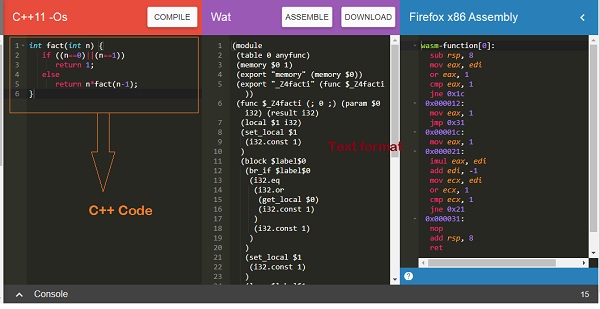
第一列具有 C++ 阶乘函数,第二列具有 WebAssembly 文本格式,最后一列具有 x86 汇编代码。
WebAssembly 文本格式 −
(module
   (table 0 anyfunc)
   (memory $0 1)
   (export "memory" (memory $0))
   (export "_Z4facti" (func $_Z4facti))
   (func $_Z4facti (; 0 ;) (param $0 i32) (result i32)
      (local $1 i32)
      (set_local $1
         (i32.const 1)
      )
      (block $label$0
         (br_if $label$0
            (i32.eq
               (i32.or
                  (get_local $0)
                  (i32.const 1)
               )
               (i32.const 1)
            )
         )
         (set_local $1
            (i32.const 1)
         )
         (loop $label$1
            (set_local $1
               (i32.mul
                  (get_local $0)
                  (get_local $1)
               )
            )
            (br_if $label$1
               (i32.ne
                  (i32.or
                     (tee_local $0
                        (i32.add
                           (get_local $0)
                           (i32.const -1)
                        )
                     )
                     (i32.const 1)
                  )
                  (i32.const 1)
               )
            )
         )
      )
      (get_local $1)
   )
)
C++ 函数 fact 已以 WebAssembly 文本格式导出为"_Z4facti"。
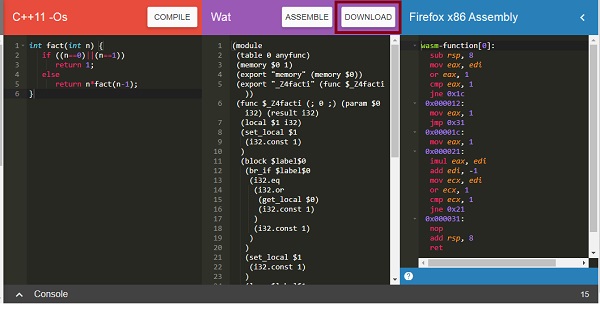
点击下载按钮下载 wasm 代码并将文件保存为 Factorial.wasm。
现在要将 .wasm 代码转换为模块,我们必须执行以下操作 −
步骤 1
使用ArrayBuffer将.wasm转换为arraybuffer。 ArrayBuffer 对象将返回一个固定长度的二进制数据缓冲区。
步骤 2
必须使用 WebAssembly.compile(buffer) 函数将 ArrayBuffer 中的字节编译到模块中。
WebAssembly.compile() 函数根据给定的字节编译并返回 WebAssembly.Module。
这里是步骤 1 和步骤 2 中讨论的 Javascript 代码。
<script type="text/javascript">
   let factorial;
   fetch("factorial.wasm")
      .then(bytes => bytes.arrayBuffer())
      .then(mod => WebAssembly.compile(mod))
      .then(module => {return new WebAssembly.Instance(module) })
      .then(instance => {

      factorial = instance.exports._Z4facti;
      console.log('Test the output in Brower Console by using factorial(n)');
   });
</script>
代码说明
Javascript浏览器API fetch用于获取factorial.wasm的内容。
使用 arrayBuffer() 将内容转换为字节。
该模块是通过调用 WebAssembly.compile(mod) 从字节创建的。
模块的实例是使用 new WebAssembly.Instance(module)
创建的
使用 WebAssembly.Module.exports() 将阶乘函数导出 _Z4facti 分配给变量阶乘。
示例
这里是 module.html 以及 javascript 代码 −
module.html
<!doctype html>
<html>
   <head>
      <meta charset="utf-8">
      <title>WebAssembly Module</title>
   </head>
   <body>
      <script>
      let factorial;
      fetch("factorial.wasm")
      .then(bytes => bytes.arrayBuffer())
      .then(mod => WebAssembly.compile(mod))
      .then(module => {return new WebAssembly.Instance(module) })
      .then(instance => {
         factorial = instance.exports._Z4facti;
         console.log('Test the output in Browser Console by using factorial(n)');
      });
      </script>
   </body>
</html>
输出
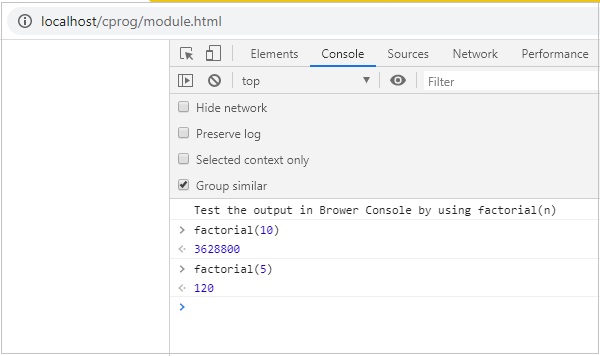
在浏览器中执行module.html即可看到输出 −