
WebAssembly - 使用 Nodejs
Javascript 有很多可以与 wasm 代码一起使用的 API。 Nodejs 也支持该 API。
在您的系统上安装 NODEJS。 创建 Factorialtest.js 文件。
让我们使用 C++ 阶乘代码,如下所示 −
int fact(int n) {
   if ((n==0)||(n==1))
      return 1;
   else
      return n*fact(n-1);
}
打开 Wasm Explorer,可在 https://mbebenita.github.io/WasmExplorer/ 处找到,如下所示−
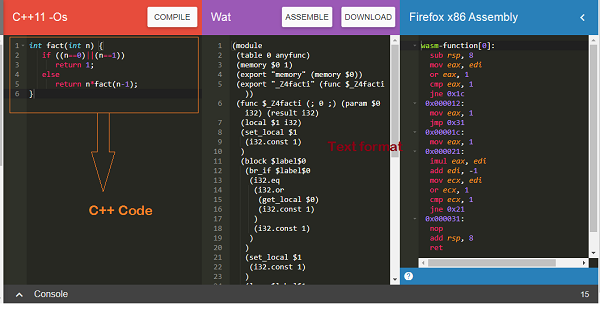
第一列具有 C++ 阶乘函数,第二列具有 WebAssembly 文本格式,最后一列具有 x86 汇编代码。
WebAssembly 文本格式如下 −
(module
   (table 0 anyfunc)
   (memory $0 1)
   (export "memory" (memory $0))
   (export "_Z4facti" (func $_Z4facti))
   (func $_Z4facti (; 0 ;) (param $0 i32) (result i32)
      (local $1 i32)
      (set_local $1(i32.const 1))
      (block $label$0
         (br_if $label$0
            (i32.eq
               (i32.or
                  (get_local $0)
                  (i32.const 1)
               )
               (i32.const 1)
            )
         )
         (set_local $1
            (i32.const 1)
         )
         (loop $label$1
            (set_local $1
               (i32.mul
                  (get_local $0)
                     (get_local $1)
               )
            )
            (br_if $label$1
               (i32.ne
                  (i32.or
                     (tee_local $0
                        (i32.add
                           (get_local $0)
                           (i32.const -1)
                        )
                     )
                     (i32.const 1)
                  )
                  (i32.const 1)
               )
            )
         )
      )
      (get_local $1)
   )
)
C++ 函数事实已以 WebAssembly 文本格式导出为"_Z4facti"。
Factorialtest.js
const fs = require('fs');
const buf = fs.readFileSync('./factorial.wasm');
const lib = WebAssembly.instantiate(new Uint8Array(buf)).
   then(res => {
      for (var i=1;i<=10;i++) {
         console.log("The factorial of "+i+" = "+res.instance.exports._Z4facti(i))
      }
   }
);
在命令行中运行命令node Factorialtest.js,输出如下 −
C:\wasmnode>node factorialtest.js
The factorial of 1 = 1
The factorial of 2 = 2
The factorial of 3 = 6
The factorial of 4 = 24
The factorial of 5 = 120
The factorial of 6 = 720
The factorial of 7 = 5040
The factorial of 8 = 40320
The factorial of 9 = 362880
The factorial of 10 = 3628800

