WebAssembly - 使用 C
在本章中,我们将把一个简单的 C 程序编译为 JavaScript,并在浏览器中执行相同的代码。
例如 − C 程序
#include<stdio.h>
int square(int n) {
   return n*n;
}
我们已经在wa/文件夹中完成了emsdk的安装。 在同一文件夹中,创建另一个文件夹 cprog/ 并将上述代码保存为 square.c。
我们在上一章已经安装了emsdk。 这里,我们将使用emsdk来编译上面的c代码。
在命令提示符下编译 test.c,如下所示 −
emcc square.c -s STANDALONE_WASM –o findsquare.wasm
emcc 命令负责编译代码并为您提供 .wasm 代码。 我们使用了 STANDALONE_WASM 选项,该选项仅提供 .wasm 文件。
示例 − findsquare.html
<!doctype html>
<html>
   <head>
      <meta charset="utf-8">
      <title>WebAssembly Square function</title>
      <style>
         div {
            font-size : 30px; text-align : center; color:orange;
         }
      </style>
   </head>
   <body>
      <div id="textcontent"></div>
      <script>
      let square; fetch("findsquare.wasm").then(bytes => bytes.arrayBuffer())
      .then(mod => WebAssembly.compile(mod)) .then(module => {
         return new WebAssembly.Instance(module)
      })
      .then(instance => {
         square = instance.exports.square(13);
         console.log("The square of 13 = " +square);
         document.getElementById("textcontent").innerHTML = "The square of 13 = " +square;
      });
      </script>
   </body>
</html>
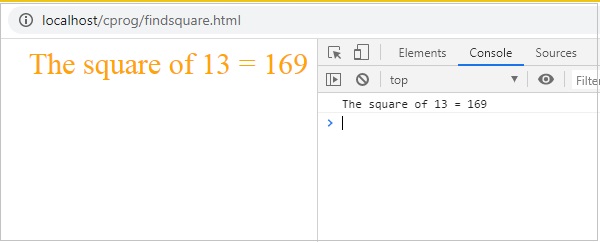
输出
输出结果如下所示 −