
使用 Selenium 2 在页面上查找文本
seleniumautomation testingtesting tools更新于 2026/2/2 15:07:17
我们可以使用 Selenium webdriver 在页面上查找文本。首先,我们需要借助定位器 xpath 来识别元素。在 xpath 中,我们可以使用 contains() 和 text() 函数。
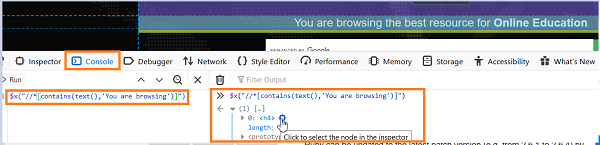
让我们在页面上找到以下突出显示的文本 −

Xpath 表达式应为 //*[contains(text(),'You are browsing')]。要获取元素的文本,请使用 getText 方法。让我们使用以下表达式检查从"控制台"选项卡创建的 xpath 表达式:$x("//*[contains(text(),'You are browsing')]").
示例
import org.openqa.selenium.By;
import org.openqa.selenium.WebDriver;
import org.openqa.selenium.WebElement;
import org.openqa.selenium.chrome.ChromeDriver;
import java.util.concurrent.TimeUnit;
public class FindElmntsText{
   public static void main(String[] args) {
      System.setProperty("webdriver.chrome.driver",       "C:\Users\ghs6kor\Desktop\Java\chromedriver.exe");
      WebDriver driver = new ChromeDriver();
      driver.manage().timeouts().implicitlyWait(5, TimeUnit.SECONDS);
      driver.get("https://www.tutorialspoint.com/index.htm");
      // 通过文本识别元素
      WebElement i=
      driver.findElement
      (By.xpath("//*[contains(text(), 'You are browsing')]"));
      // 获取元素的文本
      System.out.println("Text is: " + i.getText());
   }
   driver.close();
}
输出


