如何让 Selenium 2.0 等待页面加载?
seleniumautomation testingtesting tools
我们可以让 Selenium 等待页面加载。我们可以使用 Selenium 中的同步概念来等待页面加载。隐式等待是一种应用于元素的同步类型,用于等待指定的时间。
语法
driver.manage().timeouts().implicitlyWait();
我们也可以调用 JavaScript 方法 document.readyState 并等待它返回值 complete。Selenium 借助 executeScript 方法执行 JavaScript 命令。
语法
JavascriptExecutor j = (JavascriptExecutor)driver;
j.executeScript("return document.readyState").toString().equals("complete");
完成此步骤后,我们应该检查 URL 是否与我们要查找的 URL 相似。
示例
隐式等待的代码实现。
import org.openqa.selenium.By;
import org.openqa.selenium.WebDriver;
import org.openqa.selenium.WebElement;
import org.openqa.selenium.chrome.ChromeDriver;
import java.util.concurrent.TimeUnit;
public class PageloadImplWt{
   public static void main(String[] args) {
      System.setProperty("webdriver.chrome.driver",
      "C:\Users\ghs6kor\Desktop\Java\chromedriver.exe");
      WebDriver driver = new ChromeDriver();
      // 等待页面加载
      driver.manage().timeouts().implicitlyWait(12, TimeUnit.SECONDS);
      driver.get("https://www.tutorialspoint.com/index.htm");
      // 识别元素
      WebElement n=driver.findElement(By.id("gsc−i−id1"));
      n.sendKeys("Selenium");
      driver.quit();
   }
}
示例
Code Implementation with Javascript Executor.
import org.openqa.selenium.By;
import org.openqa.selenium.WebDriver;
import org.openqa.selenium.WebElement;
import org.openqa.selenium.chrome.ChromeDriver;
import java.util.concurrent.TimeUnit;
import org.openqa.selenium.JavascriptExecutor;
public class PagaLoadWtJS{
   public static void main(String[] args) {
      System.setProperty("webdriver.chrome.driver",
      "C:\Users\ghs6kor\Desktop\Java\chromedriver.exe");
      WebDriver driver = new ChromeDriver();
      //启动 URL
      driver.get("https://www.tutorialspoint.com/index.htm");
      // Javascript 执行器
      JavascriptExecutor js = (JavascriptExecutor) driver;
      js.executeScript("return document.readyState")
      .toString().equals("complete");
      // 获取当前 URL
      String str = driver.getCurrentUrl();
      // 检查 URL 是否已加载
      if (str.equals(u)) {
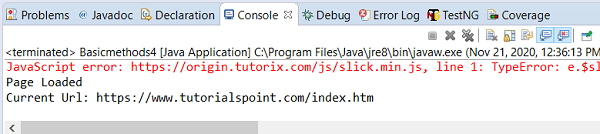
         System.out.println("Page Loaded");
         System.out.println("Current Url: " + str);
      }
      else {
         System.out.println("Page did not load");
      }
      driver.quit();
   }
}
输出