
如何在 C# Selenium 驱动程序中检查元素是否存在?
seleniumautomation testingtesting tools
我们可以使用 C# 中的 Selenium webdriver 来检查元素是否存在。这可以通过 FindElements 方法来确定。该方法返回与作为参数传递给该方法的定位器匹配的元素列表。
如果没有匹配的元素,则返回一个空列表。如果我们使用了 FindElement 方法而不是 FindElements,则在没有匹配元素的情况下会抛出 NoSuchElementException 异常。
我们将使用 NUnit 框架来实现。
示例
using NUnit.Framework;
using OpenQA.Selenium;
using OpenQA.Selenium.Chrome;
using OpenQA.Selenium.Firefox;
using System;
using System.Collections.Generic;
namespace NUnitTestProject1{
   public class Tests{
      String u
      = "https://www.tutorialspoint.com/about/about_careers.htm";
      IWebDriver d;
      [SetUp]
      public void Setup(){
         //creating object of FirefoxDriver
         d = new FirefoxDriver();
      }
      [Test]
      public void Test1(){
         //launching URL
         d.Navigate()
         .GoToUrl(u);
         //identify elements and store it in list
         List<IWebElement> e = new List<IWebElement>();
         e.AddRange(d.FindElements
         (By.XPath("//*[text()='Terms of Use']")));
         //checking element count in list
         if (e.Count > 0){
            Console.WriteLine("Element is Present");
         } else {
            Console.WriteLine("Element is not Present");
         }
      }
      [TearDown]
      public void close_Browser(){
         d.Quit();
      }
   }
}
输出
点击运行所有测试 −

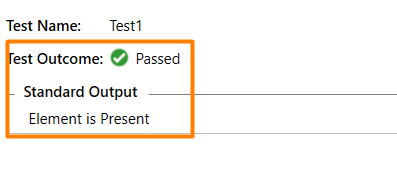
点击打开此结果的更多输出链接 −
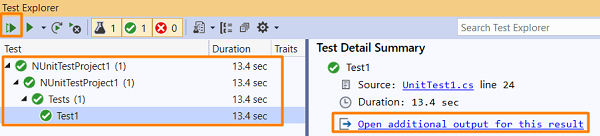
我们应该得到测试结果和标准输出。
相关文章
打印
下一节:如何使用 C# 通过 Selenium WebDriver 获取下拉列表中的所有选项? ❯❮ 上一节:如何在 C# 的 phantomjsdriver selenium 中启用 Cookie?

