如何在 C# 的 phantomjsdriver selenium 中启用 Cookie?
seleniumautomation testingtesting tools
我们可以在 C# 中使用 Selenium Webdriver 启用 Cookie。Cookie 是浏览器存储的数据。Cookie 中存储的信息由键值对组成,用于保存相关信息。
要添加 Cookie,请使用方法 AddCookie。Cookie 的键和值将作为参数传递给该方法。此外,要获取 Cookie 信息,请使用方法 GetCookieNamed。
语法
driver.Manage().Cookies.AddCookie(new Cookie("Automation","QA"));
driver.Manage().Cookies.GetCookieNamed("Automation");
为了实现,我们将使用 NUnit 框架。
示例
using NUnit.Framework;
using OpenQA.Selenium;
using OpenQA.Selenium.Firefox;
using System;
namespace NUnitTestProject1{
   public class Tests{
      String u = "https://www.tutorialspoint.com/index.htm";
      IWebDriver d;
      [SetUp]
      public void Setup(){
         //创建 FirefoxDriver 对象
         d = new FirefoxDriver();
      }
      [测试]
      public void Test1(){
         //启动 URL
         d.Navigate().GoToUrl(u);
         //添加 cookie
         d.Manage().Cookies.AddCookie(new Cookie("Automation", "QA"));
          //获取 Cookie
         var c = d.Manage().Cookies.GetCookieNamed("Automation");
         Console.WriteLine(c);
      }
      [TearDown]
      public void close_Browser(){
         d.Quit();
      }
   }
}
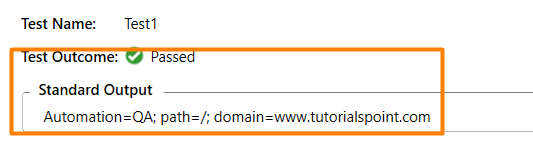
输出
点击运行所有测试按钮 −

点击打开此结果的更多输出链接 −
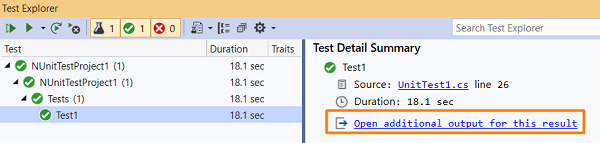
我们应该得到测试结果和标准输出。