
如何使用 Selenium WebDriver 检查 URL 是否为 404?
seleniumautomation testingtesting tools
我们可以使用 Selenium WebDriver 检查 URL 是否为 404。404 检查实际上是为了验证页面中是否存在断开的链接。点击此类链接时,我们将无法跳转到正确的页面。
以下原因可能导致链接断开 −
目标网页不再可用。
URL 的某些部分已被修改。
页面上指定的 URL 不正确。
防火墙或地理位置限制。
URL 可能包含以下状态码 −
5XX −表示服务器出现问题。
4XX − 表示无法确定资源。
3XX − 表示重定向。
2XX − 表示正确状态。
因此,我们看到只有 2XX 状态码才能获得正确的 URL。我们应该发送一个 HTTP 请求,并分析页面上所有链接的响应代码。
示例
import org.openqa.selenium.By;
import org.openqa.selenium.WebDriver;
import org.openqa.selenium.WebElement;
import org.openqa.selenium.firefox.FirefoxDriver;
import java.util.concurrent.TimeUnit;
import java.net.HttpURLConnection;
import java.net.URL;
import java.net.URLConnection;
import java.util.List;
public class BrokenURL{
   public static void main(String[] args) throws
   InterruptedException{
      System.setProperty("webdriver.gecko.driver",
         "C:\Users\ghs6kor\Desktop\Java\geckodriver.exe");
      WebDriver driver = new FirefoxDriver();
      // 等待 5 秒
      driver.manage().timeouts().implicitlyWait(5, TimeUnit.SECONDS);
      driver.get("https://www.google.com/");
      //获取带有锚标记的元素列表
      List<WebElement> l = driver.findElements(By.tagName("a"));
      //迭代链接
      for(int j=0; j<l.size(); j++) {
         WebElement e = l.get(i);
          //使用 getAttribute() 获取链接的 URL
         String u = e.getAttribute("href");
          //捕获 MalFormedURLException
         try{
            //URL 类的对象
            URL link = new URL(u);
            // 建立连接 URL 对象
            HttpURLConnection c = (HttpURLConnection)link.openConnection();
            // 超时
            c.setConnectTimeout(1000);
            // 连接开始
            c.connect();
            //getResponseCode() 获取响应代码
            if(c.getResponseCode()== 200) {
               System.out.println(u+" − "+ c.getResponseMessage());
            }
            if(c.getResponseCode()== 404) {
               System.out.println(u+" − "+c.getResponseMessage());
            }
         }
         catch (Exception ex) {
         }
      }
   }
}
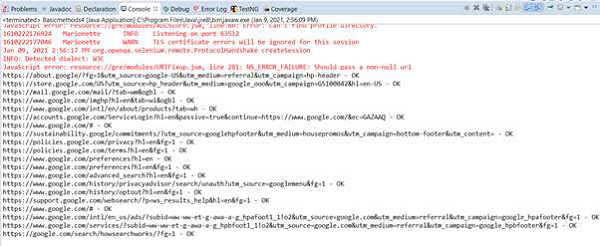
输出
相关文章
打印
下一节:使用 Selenium Python API 绑定从 Chrome 获取 console.log 输出。 ❯❮ 上一节:如何使用 Selenium Webdriver 连接到已打开的浏览器?

