如何使用 Selenium Webdriver 连接到已打开的浏览器?
seleniumautomation testingtesting tools
我们可以使用 Selenium Webdriver 连接到已打开的浏览器。这可以通过 Capabilities 和 ChromeOptions 类来实现。Capabilities 类通过 getCapabilities 方法获取浏览器功能。
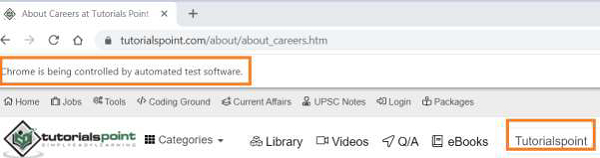
这通常用于调试目的,当测试中有大量步骤并且我们不想重复相同的步骤时。首先,我们启动浏览器并在下面的编辑框中输入一些文本。

示例
import org.openqa.selenium.WebDriver;
import org.openqa.selenium.WebElement;
import org.openqa.selenium.chrome.ChromeDriver;
import org.openqa.selenium.Capabilities;
import org.openqa.selenium.By;
import java.util.Map;
import java.util.concurrent.TimeUnit;
public class ConnectBrwSession{
   public static void main(String[] args)
   throws InterruptedException{
      System.setProperty("webdriver.chrome.driver",
         "C:\Users\ghs6kor\Desktop\Java\chromedriver.exe");
      WebDriver driver = new ChromeDriver();
      //获取键值对形式的浏览器功能
      Capabilities c = driver.getCapabilities();
      Map<String, Object> m = c.asMap();
      m.forEach((key, value) −> {
         System.out.println(&"Key is: &" + key + &" Value is: &" + value);
      });
      //设置隐式等待
      driver.manage().timeouts().implicitlyWait(5, TimeUnit.SECONDS);
      driver.get("https://www.tutorialspoint.com/about/about_careers.htm");
      //识别元素
      WebElement l = driver.findElement(By.id("gsc−i−id1"));
      l.sendKeys("Selenium");
   }
}
输出
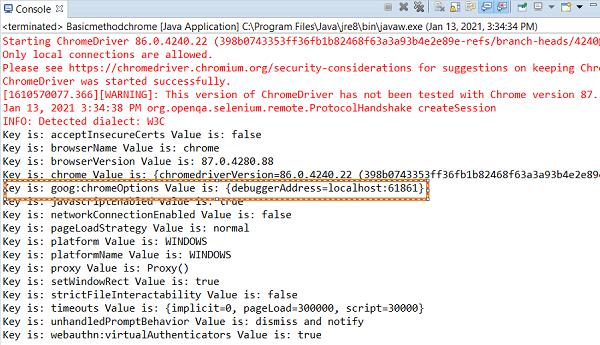
我们要注意,将从 控制台输出 获取的参数 {debuggerAddress=localhost:61861 添加到 ChromeOptions 对象中。
浏览器窗口 −
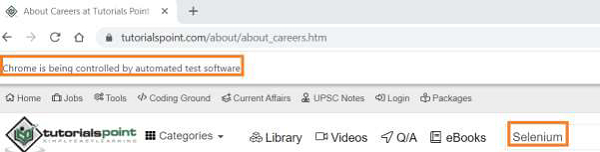
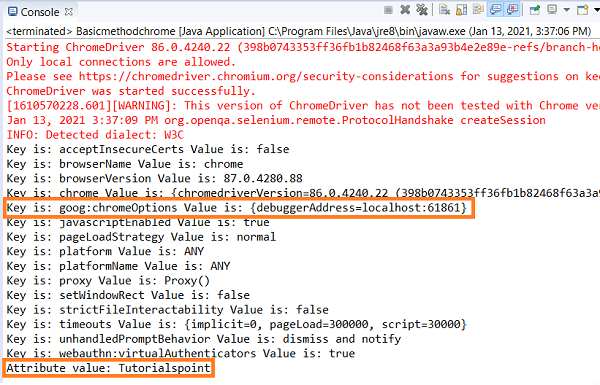
现在,让我们连接到同一个浏览器会话并对其执行一些操作。连接到现有会话时,我们不应使用浏览器的 close 或 quit 方法。
示例
代码修改已完成,以便连接到同一个会话。
import org.openqa.selenium.WebElement;
import org.openqa.selenium.chrome.ChromeDriver;
import org.openqa.selenium.chrome.ChromeOptions;
import org.openqa.selenium.Capabilities;
import org.openqa.selenium.By;
import java.util.Map;
import org.openqa.selenium.WebDriver;
import java.util.concurrent.TimeUnit;
public class ConnectBrwSession{
   public static void main(String[] args)
   throws InterruptedException{
      System.setProperty("webdriver.chrome.driver",
         "C:\Users\ghs6kor\Desktop\Java\chromedriver.exe");
      WebDriver driver = new ChromeDriver();
      //ChromeOptions 类的对象
      ChromeOptions o = new ChromeOptions();
      //设置 debuggerAddress 值
      o.setExperimentalOption(&"debuggerAddress&";, &"localhost:61861&";);
      //向浏览器功能添加选项
      Capabilities c = driver.getCapabilities(o);
      Map<String, Object> m = c.asMap();
      m.forEach((key, value) −> {
         System.out.println("Key is: " + key + " Value is: " + value);
      });
      //设置隐式等待
      driver.manage().timeouts().implicitlyWait(5, TimeUnit.SECONDS);
      //识别元素
      WebElement l = driver.findElement(By.id("gsc−i−id1"));
      //删除编辑框中现有的数据
      l.clear();
      l.sendKeys("Tutorialspoint");
      String s = l.getAttribute("value");
      System.out.println("Attribute value: " + s);
   }
}
输出
浏览器窗口