如何使用 Selenium WebDriver 获取页面加载的准确时间?
seleniumautomation testingtesting tools
我们可以使用 Selenium WebDriver 来确定页面加载的准确时间。我们可以借助 `System.currentTimeMillis` 方法获取页面加载前的时间。
启动应用程序 URL 后,我们需要借助显式等待条件等待页面完全加载。一旦满足元素的预期条件,我们将再次记录当前时间。
页面加载前后记录的时间之差即为页面加载的准确时间。
语法
long s = System.currentTimeMillis();
示例
import org.openqa.selenium.By;
import org.openqa.selenium.WebDriver;
import org.openqa.selenium.WebElement;
import org.openqa.selenium.firefox.FirefoxDriver;
import org.openqa.selenium.support.ui.ExpectedConditions;
import org.openqa.selenium.support.ui.WebDriverWait;
public class PageLoadTime{
   public static void main(String[] args) {
      System.setProperty("webdriver.gecko.driver",
         "C:\Users\ghs6kor\Desktop\Java\geckodriver.exe");
      WebDriver driver = new FirefoxDriver();
      //capture time before page load
      long s = System.currentTimeMillis();
      //URL 启动
      driver.get("https://www.tutorialspoint.com/videotutorials/subscription.php");
      //验证页面是否已加载
      WebDriverWait wt = new WebDriverWait(driver,6);
      wt.until(ExpectedConditions.elementToBeClickable (By.className("s-buy")));
      //记录页面加载后的时间
      long e = System.currentTimeMillis();
      //计算时间
      long r = e – s;
      System.out.println("Page load time in milliseconds: " + r);
      driver.close();
   }
}
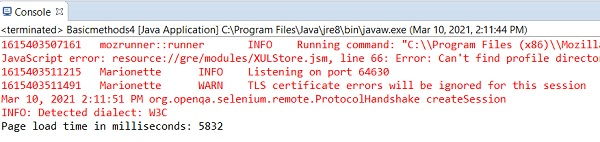
输出