
BabylonJS - 旋转
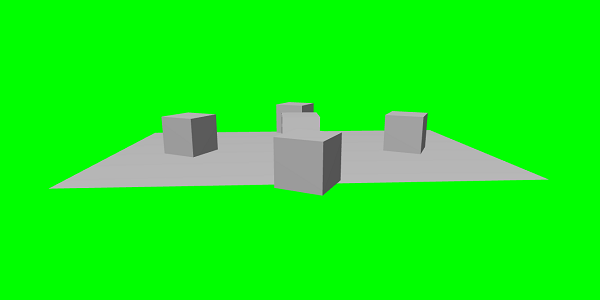
在下面的演示中,我们将旋转上面看到的盒子。
演示
<!doctype html>
<html>
   <head>
      <meta charset = "utf-8">
      <title>BabylonJs - Basic Element-Creating Scene</title>
      <script src = "babylon.js"></script>
      <style>
         canvas {width: 100%; height: 100%;}
      </style>
   </head>

   <body>
      <canvas id = "renderCanvas"></canvas>
      <script type = "text/javascript">
         var canvas = document.getElementById("renderCanvas");
         var engine = new BABYLON.Engine(canvas, true);
         var createScene  = function() {
            var scene = new BABYLON.Scene(engine);
            scene.clearColor = new BABYLON.Color3(0, 1, 0);

            var camera = new BABYLON.ArcRotateCamera("Camera", 1, 0.8, 10, new BABYLON.Vector3(0, 0, 0), scene);
            scene.activeCamera.attachControl(canvas);

            var light = new BABYLON.PointLight("Omni", new BABYLON.Vector3(0, 100, 100), scene);

            var boxa = BABYLON.Mesh.CreateBox("BoxA", 1.0, scene);
            boxa.position = new BABYLON.Vector3(0,0.5,0);

            var boxb = BABYLON.Mesh.CreateBox("BoxB", 1.0, scene);
            boxb.position = new BABYLON.Vector3(3,0.5,0);
            boxb.rotation = new BABYLON.Vector3(Math.PI/2,0.5,0);

            var boxc = BABYLON.Mesh.CreateBox("BoxC", 1.0, scene);
            boxc.position = new BABYLON.Vector3(-3,0.5,0);
            boxc.rotation = new BABYLON.Vector3(Math.PI/2,0.5,0);

            var boxd = BABYLON.Mesh.CreateBox("BoxD", 1.0, scene);
            boxd.position = new BABYLON.Vector3(0,0.5,3);
            boxd.rotation = new BABYLON.Vector3(0,0.5,Math.PI/2);

            var boxe = BABYLON.Mesh.CreateBox("BoxE", 1.0, scene);
            boxe.position = new BABYLON.Vector3(0,0.5,-3);
            boxe.rotation = new BABYLON.Vector3(0,0.5,Math.PI/2);

            var ground = BABYLON.Mesh.CreateGround("ground1", 10, 6, 2, scene);
            ground.position = new BABYLON.Vector3(0,0,0);
            return scene;
         };
         var scene = createScene();
         engine.runRenderLoop(function() {
            scene.render();
         });
      </script>
   </body>
</html>
示例
请考虑以下示例,了解上述代码的工作原理 −
解释
我们使用 new BABYLON.Vector3(x,y,z) 进行定位的方式,也可以应用相同的旋转方式。在这里,您可以使用 new BABYLON.Vector3(x,y,z) 进行旋转,也可以使用 box.rotation.x,box.rotation.y,box.rotation.z。
要旋转,您必须以弧度为单位给出角度。一度等于 0.01745329252 弧度:1° = π/180° = 0.01745329252 弧度。例如,boxb.rotation = new BABYLON.Vector3(Math.PI/2,0.5,0);
 babylonjs_basic_elements.html
