BabylonJS - 反射探针
反射探针用于创建类似镜子的场景。这有助于在其中看到网格的反射。要创建类似镜子的场景,您需要调用类和所需的网格,其中您想要看到反射。稍后,您需要将网格添加到渲染列表中,如下所示。假设您有一个带水面的天空盒,您需要显示云或树的反射或在水中飞翔的鸟,您可以使用反射探针来实现,并且可以将创建的网格添加到渲染列表中,如下所示。
语法
var probe = new BABYLON.ReflectionProbe("main", 512, scene);
probe.renderList.push(yellowSphere);
probe.renderList.push(greenSphere);
probe.renderList.push(blueSphere);
probe.renderList.push(mirror);
演示
<!doctype html>
<html>
   <head>
      <meta charset = "utf-8">
      <title>BabylonJs - Basic Element-Creating Scene</title>
      <script src = "babylon.js"></script>
      <style>
         canvas {width: 100%; height: 100%;}
      </style>
   </head>

   <body>
      <canvas id = "renderCanvas"></canvas>
      <script type = "text/javascript">
         var canvas = document.getElementById("renderCanvas");
         var engine = new BABYLON.Engine(canvas, true);

         var createScene  = function() {
            var scene = new BABYLON.Scene(engine);

            var camera = new BABYLON.ArcRotateCamera("camera1", 0, 0, 10, BABYLON.Vector3.Zero(), scene);

            camera.setPosition(new BABYLON.Vector3(0, 5, -10));
            camera.attachControl(canvas, true);

            camera.upperBetaLimit = Math.PI / 2;
            camera.lowerRadiusLimit = 4;

            var light = new BABYLON.HemisphericLight("light1", new BABYLON.Vector3(0, 1, 0), scene);
            light.intensity = 0.7;

            var knot = BABYLON.Mesh.CreateTorusKnot("knot", 1, 0.4, 128, 64, 2, 3, scene);

            var yellowSphere = BABYLON.Mesh.CreateSphere("yellowSphere", 16, 1.5, scene);
            yellowSphere.setPivotMatrix(BABYLON.Matrix.Translation(3, 0, 0));

            var blueSphere = BABYLON.Mesh.CreateSphere("blueSphere", 16, 1.5, scene);
            blueSphere.setPivotMatrix(BABYLON.Matrix.Translation(-1, 3, 0));

            var greenSphere = BABYLON.Mesh.CreateSphere("greenSphere", 16, 1.5, scene);
            greenSphere.setPivotMatrix(BABYLON.Matrix.Translation(0, 0, 3));

            // Mirror
            var mirror = BABYLON.Mesh.CreateBox("Mirror", 1.0, scene);
            mirror.scaling = new BABYLON.Vector3(100.0, 0.01, 100.0);
            mirror.material = new BABYLON.StandardMaterial("mirror", scene);
            mirror.material.diffuseTexture = new BABYLON.Texture("images/square.jpg", scene);

            mirror.material.diffuseTexture.uScale = 10;
            mirror.material.diffuseTexture.vScale = 10;
            mirror.material.reflectionTexture = new BABYLON.MirrorTexture("mirror", 1024, scene, true);

            mirror.material.reflectionTexture.mirrorPlane = new BABYLON.Plane(0, -1.0, 0, -2.0);
            mirror.material.reflectionTexture.renderList = [greenSphere, yellowSphere, blueSphere, knot];
            mirror.material.reflectionTexture.level = 0.5;
            mirror.position = new BABYLON.Vector3(0, -2, 0);

            // Main material
            var mainMaterial = new BABYLON.StandardMaterial("main", scene);
            knot.material = mainMaterial;

            var probe = new BABYLON.ReflectionProbe("main", 512, scene);
            probe.renderList.push(yellowSphere);
            probe.renderList.push(greenSphere);
            probe.renderList.push(blueSphere);
            probe.renderList.push(mirror);

            mainMaterial.diffuseColor = new BABYLON.Color3(1, 0.5, 0.5);
            mainMaterial.reflectionTexture = probe.cubeTexture;
            mainMaterial.reflectionFresnel<h3>Parameters</h3> = new BABYLON.Fresnel<h3>Parameters</h3>();
            mainMaterial.reflectionFresnel<h3>Parameters</h3>.bias = 0.02;

            // Fog
            scene.fogMode = BABYLON.Scene.FOGMODE_LINEAR;
            scene.fogColor = scene.clearColor;
            scene.fogStart = 20.0;
            scene.fogEnd = 50.0;

            // Animations
            scene.registerBeforeRender(function () {
               yellowSphere.rotation.y += 0.01;
               greenSphere.rotation.y += 0.01;
               blueSphere.rotation.y += 0.01;
            });
            return scene;
         };
         var scene = createScene();
         engine.runRenderLoop(function() {
            scene.render();
         });
      </script>
   </body>
</html>
输出
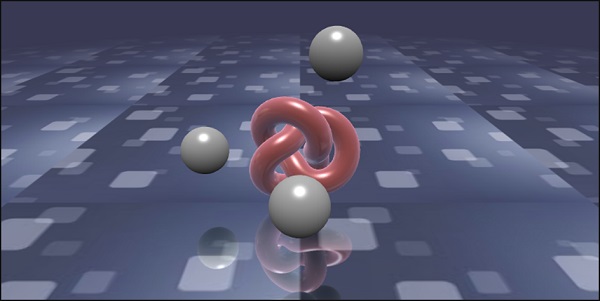
在此演示中,我们使用了图像 square.jpg。图像存储在本地的 images/ 文件夹中,也粘贴在下面以供参考。您可以下载您选择的任何图像并在演示链接中使用。
images/square.jpg