
BabylonJS - 动态纹理
BabylonJS 的动态纹理会创建一个画布,您可以轻松地在纹理上书写文本。它还允许您使用画布并使用 html5 画布提供的所有功能与动态纹理一起使用。
我们将使用一个示例,该示例将展示如何在纹理上书写文本,还将在我们创建的网格上绘制贝塞尔曲线。
语法
以下是创建动态纹理的语法 −
var myDynamicTexture = new BABYLON.DynamicTexture(name, option, scene);
参数
以下是创建动态纹理 − 所需的参数
name −动态纹理的名称
option − 将具有动态纹理的宽度和高度
scene − 创建的场景
语法
以下是在纹理上写入文本的语法 −
myDynamicTexture.drawText(text, x, y, font, color, canvas color, invertY, update);
参数
以下是在纹理上写入文本所需的参数 −
text − 要写入的文本;
x −距左侧边缘的距离;
Y − 距顶部或底部边缘的距离,取决于 invertY;
font − 字体定义,格式为 font-style、font-size、font_name;
invertY − 默认为 true,此时 y 是距顶部的距离,为 false 时,y 是距底部的距离,字母反转;
update − 默认为 true,动态纹理将立即更新。
演示
<!doctype html>
<html>
   <head>
      <meta charset = "utf-8">
      <title>MDN Games: Babylon.js demo - shapes</title>
      <script src = "https://end3r.github.io/MDN-Games-3D/Babylon.js/js/babylon.js"></script>
      <style>
         html,body,canvas { margin: 0; padding: 0; width: 100%; height: 100%; font-size: 0; }
      </style>
   </head>

   <body>
      <canvas id = "renderCanvas"></canvas>
      <script type = "text/javascript">
         var canvas = document.getElementById("renderCanvas");

         var engine = new BABYLON.Engine(canvas, true);
         var createScene  = function() {
            var scene = new BABYLON.Scene(engine);

            var camera = new BABYLON.ArcRotateCamera("Camera", -Math.PI/2, Math.PI / 3, 25, BABYLON.Vector3.Zero(), scene);
            camera.attachControl(canvas, true);

            var light = new BABYLON.HemisphericLight("light1", new BABYLON.Vector3(0, 1, 0), scene);
            light.intensity = 0.7;

            var box = BABYLON.Mesh.CreateBox("box", 3.0, scene);
            box.position = new BABYLON.Vector3(0, 0, -5);

            //创建动态纹理
            var textureGround = new BABYLON.DynamicTexture("dynamic texture", {width:512, height:256}, scene);
            var textureContext = textureGround.getContext();

            var materialGround = new BABYLON.StandardMaterial("Mat", scene);
            materialGround.diffuseTexture = textureGround;
            box.material = materialGround;

            //将文本添加到动态纹理中
            var font = "bold 60px Arial";
            textureGround.drawText("Box", 200, 150, font, "green", "white", true, true);
            return scene;
         };
         var scene = createScene();
         engine.runRenderLoop(function() {
            scene.render();
         });
      </script>
   </body>
</html>
输出
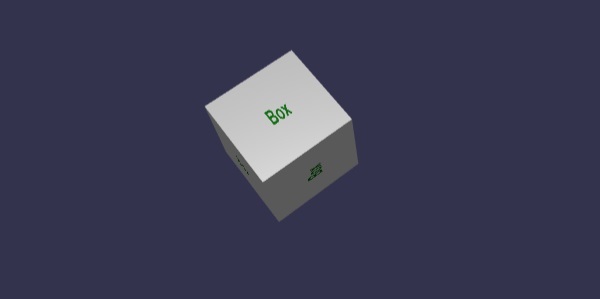
动态纹理还允许使用 html5 画布方法和动态纹理上的属性,如下所示 −
语法
var ctx = myDynamicTexture.getContext();
演示
<!doctype html>
<html>
   <head>
      <meta charset = "utf-8">
      <title> Babylon.JS : Demo2</title>
      <script src = "babylon.js"></script>
      <style>
         canvas { width: 100%; height: 100%;}
      </style>
   </head>

   <body>
      <canvas id = "renderCanvas"></canvas>
      <script type = "text/javascript">
         var canvas = document.getElementById("renderCanvas");
         var engine = new BABYLON.Engine(canvas, true);
         var createScene = function () {
            var scene = new BABYLON.Scene(engine);

            var camera = new BABYLON.ArcRotateCamera("Camera", -Math.PI/2, Math.PI / 3, 25, BABYLON.Vector3.Zero(), scene);
            camera.attachControl(canvas, true);

            var light = new BABYLON.HemisphericLight("light1", new BABYLON.Vector3(0, 1, 0), scene);
            light.intensity = 0.7;

            var ground = BABYLON.MeshBuilder.CreateGround("ground1", {width: 20, height: 10, subdivisions: 25}, scene);

            //创建动态纹理
            var textureGround = new BABYLON.DynamicTexture("dynamic texture", 512, scene);
            var textureContext = textureGround.getContext();

            var materialGround = new BABYLON.StandardMaterial("Mat", scene);
            materialGround.diffuseTexture = textureGround;
            ground.material = materialGround;

            //Draw on canvas
            textureContext.beginPath();
            textureContext.moveTo(75,40);
            textureContext.bezierCurveTo(75,37,70,25,50,25);
            textureContext.bezierCurveTo(20,25,20,62.5,20,62.5);
            textureContext.bezierCurveTo(20,80,40,102,75,120);
            textureContext.bezierCurveTo(110,102,130,80,130,62.5);
            textureContext.bezierCurveTo(130,62.5,130,25,100,25);
            textureContext.bezierCurveTo(85,25,75,37,75,40);
            textureContext.fillStyle = "red";
            textureContext.fill();
            textureGround.update();

            return scene;
         };
         var scene = createScene();
            engine.runRenderLoop(function() {
            scene.render();
         });
      </script>
   </body>
</html>
输出
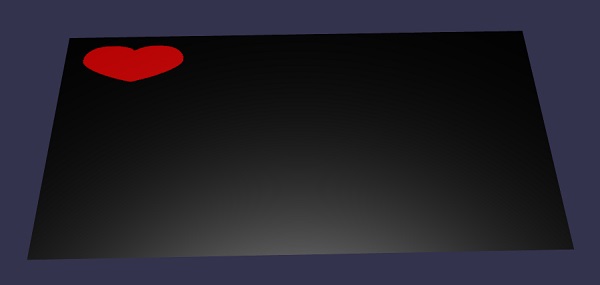
说明
我们已经创建了地面网格并为其添加了动态纹理。
//地面网格
var ground = BABYLON.MeshBuilder.CreateGround("ground1", {width: 20, height: 10, subdivisions: 25}, scene);

//创建动态纹理
var TextureGround = new BABYLON.DynamicTexture("dynamic Texture", 512, scene);

//使用标准材质向地面添加动态纹理
var MaterialGround = new BABYLON.StandardMaterial("Mat", scene);
materialGround.diffuseTexture = TextureGround;
ground.material = MaterialGround;
要使用动态纹理上的画布,我们需要先调用画布方法 −
var TextureContext = TextureGround.getContext()
我们将在画布上添加贝塞尔曲线,如下所示 −
textureContext.beginPath();
textureContext.moveTo(75,40);

textureContext.bezierCurveTo(75,37,70,25,50,25);
textureContext.bezierCurveTo(20,25,20,62.5,20,62.5);
textureContext.bezierCurveTo(20,80,40,102,75,120);
textureContext.bezierCurveTo(110,102,130,80,130,62.5);
textureContext.bezierCurveTo(130,62.5,130,25,100,25);
textureContext.bezierCurveTo(85,25,75,37,75,40);

textureContext.fillStyle = "red";
textureContext.fill();
textureGround.update();

