
BabylonJS - MeshHightlight 层
MeshHightlight 高亮层用于高亮场景中的网格。您可以为其赋予颜色,并将颜色应用于网格的边框。如果您在游戏中想要高亮,可以使用网格高亮层来实现这一点。
语法
var h1 = new BABYLON.HighlightLayer("h1", scene);
您可以使用 addmesh 属性将网格添加到该层。
演示
<!doctype html>
<html>
   <head>
      <meta charset = "utf-8">
      <title>BabylonJs - Basic Element-Creating Scene</title>
      <script src = "babylon.js"></script>
      <style>
         canvas {width: 100%; height: 100%;}
      </style>
   </head>

   <body>
      <canvas id = "renderCanvas"></canvas>
      <script type = "text/javascript">
         var canvas = document.getElementById("renderCanvas");
         var engine = new BABYLON.Engine(canvas, true,{ stencil: true });

         var createScene  = function() {
            var scene = new BABYLON.Scene(engine);
            var camera = new BABYLON.FreeCamera("camera1", new BABYLON.Vector3(0, 5, -10), scene);
            camera.setTarget(BABYLON.Vector3.Zero());
            camera.attachControl(canvas, true);

            var light = new BABYLON.HemisphericLight("light1", new BABYLON.Vector3(0, 1, 0), scene);
            light.intensity = 0.7;
            var sphere = BABYLON.Mesh.CreateSphere("sphere1", 16, 2, scene);
            sphere.position.y = 1;

            var box = BABYLON.Mesh.CreateBox("box", 5, scene);
            box.position.x = 5;
            box.position.y = 1;

            var materialSphere = new BABYLON.StandardMaterial("texture4", scene);
            materialSphere.emissiveTexture = new BABYLON.Texture("images/baseball.jpg", scene);
            materialSphere.emissiveTexture.uOffset = -0.1;
            sphere.material = materialSphere;

            var ground = BABYLON.Mesh.CreateGround("ground1", 6, 6, 2, scene);
            var h1 = new BABYLON.HighlightLayer("h1", scene);
            h1.addMesh(sphere, BABYLON.Color3.Green(), true);
            h1.addMesh(ground, BABYLON.Color3.Red());
            h1.addMesh(box, BABYLON.Color3.Red());

            var alpha = 0;
            scene.registerBeforeRender(() => {
               alpha += 0.06;
               var dateValue = new Date();
               var s = dateValue.getSeconds();
               if (s %2 == 0) {
                  h1.outerGlow = false;
                  h1.innerGlow = true;
               } else {
                  h1.outerGlow = true;
                  h1.innerGlow = false;
               }
               h1.blurHorizontalSize = 0.3 + Math.cos(alpha) * 0.6 + 0.6;
               h1.blurVerticalSize = 0.3 + Math.sin(alpha / 3) * 0.6 + 0.6;

            });
            return scene;
         };
         var scene = createScene();
         engine.runRenderLoop(function() {
            scene.render();
         });
      </script>
   </body>
</html>
输出
上述代码行生成以下输出 −
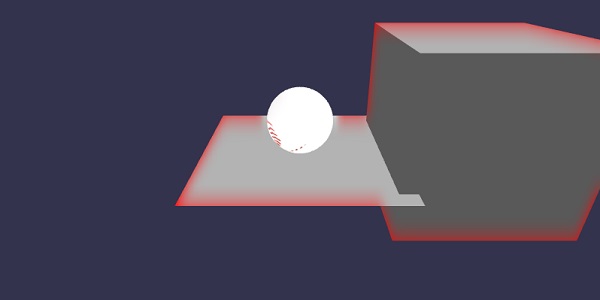
在此演示中,我们使用了名为 baseball.jpg 的图像。图像存储在本地 images/ 文件夹中,也粘贴在下面以供参考。您可以下载您选择的任何图像并在演示链接中使用。
images/baseball.jpg

说明
突出显示层用于突出显示场景中的网格。
语法
var h1 = new BABYLON.HighlightLayer("h1", scene);
您可以向其中添加网格,以使用您需要的颜色突出显示。请考虑以下示例以了解这一点。
h1.addMesh(sphere, BABYLON.Color3.Green(), true);
h1.addMesh(ground, BABYLON.Color3.Red());
h1.addMesh(box, BABYLON.Color3.Red());
要使高光层发光,您可以使用以下命令。将 innerGlow 设置为 true 以激活。要激活 outerGlow,请将其设置为 true。
h1.outerGlow = true;
h1.innerGlow = false;
在浏览器中检查演示以查看高光层和添加到其中的光辉。
 babylonjs_mesh.html
