
BabylonJS - 管状体
管状体是一种弯曲的圆柱形状。它可以根据应用于其以获得坐标的方程式(数学函数)给出不同的参数形状。
语法
以下是创建管状体的语法 −
var tube = BABYLON.Mesh.CreateTube(name, path, radius, tessellation, radiusFunction, cap, scene, updatable?, sideOrientation);
参数
考虑以下参数来创建管状体 −
Name − 为管状体指定的名称。
Path −这是将构建管道的路径。此路径是管道的中心轴。此数组必须至少有两个 Vector3。第一个点是管道的起点,最后一个点是管道的终点。因此,只有两个点,您就会得到一个简单的圆柱体。
Radius − 这是沿管道应用的恒定半径值。仅当参数为 radiusFunction null 时才会考虑此值。
Tessellation − 这与径向段的数量有关。如果将其设置为 3,您将得到一个三角形管道部分;如果将其设置为 4,您将得到一个方形部分,依此类推。因此,请将其设置为您需要的精度级别;段越多,网格越重。
RadiusFunction − 自定义 javascript 函数。构建管道时,将在路径的每个点调用此函数。它将采用 2 个参数,即当前点的位置和此点与起点的距离。该函数将根据计算返回半径。
Cap − BABYLON.Mesh.NO_CAP、BABYLON.Mesh.CAP_START、BABYLON.Mesh.CAP_END、BABYLON.Mesh.CAP_ALL。
Scene − 将显示管道的场景。
Updatable − 默认情况下,此项设置为 false。如果设置为 true,则网格可以更新。
SideOrientation −它采用默认的侧面方向。
带有 radiusFunction 的语法
var myradiusFunction = function(i, distance) {
   var radius = 3 * Math.cos(distance / 5);
   return radius;
};
var tube = BABYLON.Mesh.CreateTube("tubr", path, null, 20, myFunction, scene);
演示
<!doctype html>
<html>
   <head>
      <meta charset = "utf-8">
      <title>BabylonJs - Basic Element-Creating Scene</title>
      <script src = "babylon.js"></script>
      <style>
         canvas {width: 100%; height: 100%;}
      </style>
   </head>

   <body>
      <canvas id = "renderCanvas"></canvas>
      <script type = "text/javascript">
         var canvas = document.getElementById("renderCanvas");
         var engine = new BABYLON.Engine(canvas, true);
         var createScene  = function() {

            var scene = new BABYLON.Scene(engine);
            scene.clearColor = new BABYLON.Color3(0.8, 0.8, 0.8);
            var camera = new BABYLON.ArcRotateCamera("Camera", 3 *Math.PI / 2, Math.PI / 2, 50, BABYLON.Vector3.Zero(), scene);
            camera.attachControl(canvas, false);

            // 灯光
            var light = new BABYLON.HemisphericLight("hemi", new BABYLON.Vector3(0, 1, 0), scene);
            light.groundColor = new BABYLON.Color3(0.2, 0.2, 0.5);
            light.intensity = 0.6;

            var light2 = new BABYLON.PointLight("light2", new BABYLON.Vector3(-20, 0, -20), scene);
            light2.diffuse = BABYLON.Color3.White();
            light2.specular = BABYLON.Color3.Green();
            light2.intensity = 0.6;

            var mat = new BABYLON.StandardMaterial("mat1", scene);
            mat.alpha = 1.0;
            mat.diffuseColor = new BABYLON.Color3(0.5, 0.5, 0.1);
            mat.backFaceCulling = false;
            mat.wireframe = false;

            var curvePoints = function(l, t) {
               // 计算曲线点的数学函数。
               var path = [];
               var step = l / t;
               var a = 5;
               for (var i = -l/2; i < l/2; i += step ) {
                  path.push( new BABYLON.Vector3(5 * Math.sin(i*t / 400), 5 * Math.cos(i*t / 400), 0) );
               }
               return path;
            };

            var curve = curvePoints(10, 150);

            var radiusFunction = function(i, distance) {
               // 计算半径的函数。
               var t = i / Math.PI * 2 / 8;
               var radius =  Math.sin(t) + i / 25;
               return radius;
            };

            var tube = BABYLON.Mesh.CreateTube("tube", curve, 2, 60, radiusFunction, 0, scene, false, BABYLON.Mesh.FRONTSIDE);
            tube.material = mat;
            return scene;
         };
         var scene = createScene();
         engine.runRenderLoop(function() {
            scene.render();
         });
      </script>
   </body>
</html>
输出
上面这行代码生成以下输出 −
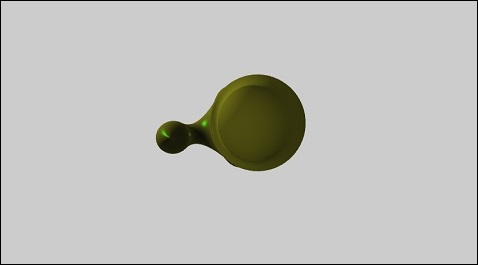
 babylonjs_parametric_shapes.html

