
BabylonJS - Tube
在本节中,我们将学习如何创建 Tube。
语法
以下是创建 Tube 的语法。
var tube = BABYLON.Mesh.CreateTube("tube", [V1, V2, ..., Vn], radius, tesselation, radiusFunction, cap, scene, false, BABYLON.Mesh.DEFAULTSIDE);
参数
考虑以下参数来创建 Tube −
名称 − 管的名称。
路径 −管道的路径。
Radius − 管道的半径。
Tessellation − 径向段的数量。
RadiusFunction − 它是一个提供半径值的函数。例如,function(i, distance) {
Cap − 管道帽。值为 NO_CAP、CAP_START、CAP_END、CAP_ALL。
Scene − 管道需要附加到的场景。
Updatable − 默认情况下为 true。它被设置为 false,稍后可以更新。
SideOrientation − 默认值为 DEFAULTSIDE。
演示 - Tube
<!doctype html>
<html>
   <head>
      <meta charset = "utf-8">
      <title>MDN Games: Babylon.js demo - shapes</title>
      <script src = "babylon.js"></script>
      <style>
         html,body,canvas { margin: 0; padding: 0; width: 100%; height: 100%; font-size: 0; }
      </style>
   </head>

   <body>
      <canvas id = "renderCanvas"></canvas>
      <script type = "text/javascript">
         var canvas = document.getElementById("renderCanvas");
         var engine = new BABYLON.Engine(canvas, true);
         var createScene  = function() {
            var scene = new BABYLON.Scene(engine);
            scene.clearColor = new BABYLON.Color3(0, 1, 0);

            var camera = new BABYLON.ArcRotateCamera("Camera", 1, 0.8, 10, new BABYLON.Vector3(0, 0, 0), scene);

            var light = new BABYLON.HemisphericLight("hemi", new BABYLON.Vector3(0, 1, 0), scene);

            var curvePoints =function(l, t) {
               var path = [];
               var step = l / t;
               var a = 5;
               for (var i = -l/4; i < l/4; i += step ) {
                  var t = i  / Math.PI * 4;
                  var x =   Math.sin(t) + i;
                  path.push(new BABYLON.Vector3(x, 0, 0 ));
               }
               return path;
            };

            var curve = curvePoints(10, 50);

            var radiusFunction = function(i, distance) {
               var t = i / Math.PI * 4 / 6;
               var radius =  Math.sin(t) + i / 15;
               return radius;
            };
            var tube = BABYLON.Mesh.CreateTube("tube", curve, 2, 30, radiusFunction, 0, scene, false, BABYLON.Mesh.FRONTSIDE);
            scene.activeCamera.attachControl(canvas);
            return scene;
         };
         var scene = createScene();
         engine.runRenderLoop(function() {
            scene.render();
         });
      </script>
   </body>
</html>
输出
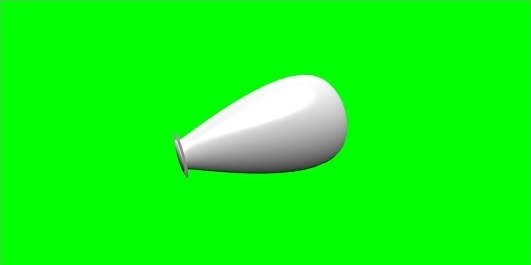
 babylonjs_basic_elements.html
