
Meteor - Blaze
Blaze 是一个用于构建实时响应式模板的 Meteor 包。
Render 方法
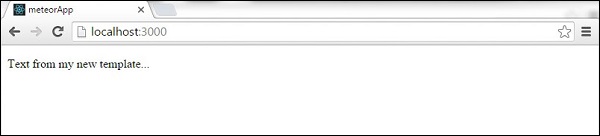
此方法用于将模板渲染到 DOM 中。首先,我们将创建要渲染的 myNewTemplate。我们还将添加 myContainer,它将用作父元素,因此 render 方法知道在哪里渲染我们的模板。
meteorApp.html
<head>
   <title>meteorApp</title>
</head>

<body>
   <div id = "myContainer">
   </div>
</body>

<template name = "myNewTemplate">
   <p>Text from my new template...</p>
</template>
接下来,我们将创建一个带有两个参数的渲染函数。第一个是将要渲染的模板,第二个是我们上面提到的父元素。
meteorApp.js
Meteor.startup(function () {

   if(Meteor.isClient) {
      var myNewTemplate = Template.myNewTemplate;
      var myContainer = document.getElementById('myContainer');
      Blaze.render(myNewTemplate, myContainer);
   }
});
使用数据渲染
如果您需要被动传递一些数据,可以使用 renderWithData 方法。HTML 将与上一个示例完全相同。
meteorApp.html
<head>
   <title>meteorApp</title>
</head>

<body>
   <div id = "myContainer">
   </div>
</body>

<template name = "myNewTemplate">
   <p>Text from my new template...</p>
</template>
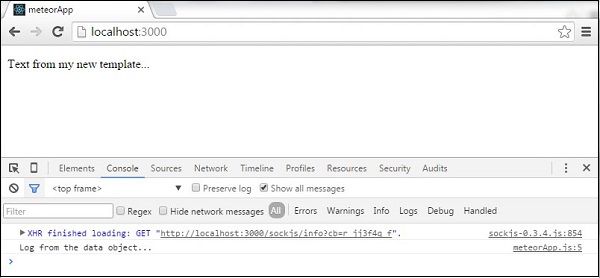
我们可以将数据作为第二个参数添加到 Meteor.renderWithData 方法中。其他两个参数与上一个示例相同。在此示例中,我们的数据是一个将记录一些文本的函数。
meteorApp.js
Meteor.startup(function () {

   if(Meteor.isClient) {
      var myNewTemplate = Template.myNewTemplate;

      var myData = function() {
         console.log('Log from the data object...')
      }

      var myContainer = document.getElementById('myContainer');
      Blaze.renderWithData(myNewTemplate, myData, myContainer);
   }
});
Remove 方法
我们可以添加 remove 方法。
meteorApp.html
<head>
   <title>meteorApp</title>
</head>

<body>
   <div id = "myContainer">
   </div>
</body>

<template name = "myNewTemplate">
   <p>Text from my new template...</p>
</template>
在此示例中,我们正在渲染将在三秒后删除的模板。请注意我们用于删除模板的 Blaze.Remove 方法。
meteorApp.js
Meteor.startup(function () {

   if(Meteor.isClient) {
      var myNewTemplate = Template.myNewTemplate;
      var myContainer = document.getElementById('myContainer');
      var myRenderedTemplate = Blaze.render(myNewTemplate, myContainer);

      Meteor.setTimeout(function() {
         Blaze.remove(myRenderedTemplate);
      }, 3000);
   }
});
下表显示了可以使用的其他方法。
| Sr.No. | 方法 &详细信息 |
|---|---|
| 1 | Blaze.getData([elementOrView]) 用于从渲染元素中检索数据。 |
| 2 | Blaze.toHTML(templateOrView) 用于将模板或视图渲染为字符串。 |
| 3 | Blaze.toHTMLWithData(templateOrView, data) 用于将模板或视图渲染为带有附加数据的字符串。 |
| 4 | new Blaze.View([name], renderFunction) 用于创建 DOM 的新 Blaze 反应部分。 |
| 5 | Blaze.currentView 用于获取当前视图。 |
| 6 | Blaze.getView([element]) 用于获取当前视图。 |
| 7 | Blaze.With(data, contentFunc) 用于构建一个视图,该视图使用上下文呈现一些内容。 |
| 8 | Blaze.If(conditionFunc, contentFunc, [elseFunc]) 用于构建一个视图,该视图呈现一些条件内容。 |
| 9 | Blaze.Unless(conditionFunc, contentFunc, [elseFunc]) 用于构建一个视图,该视图呈现一些条件内容(反转的 Blaze.if)。 |
| 10 | Blaze.Each(argFunc, contentFunc, [elseFunc]) 用于构建一个视图,为每个项目呈现 contentFunct。 |
| 11 | new Blaze.Template([viewName], renderFunction) 用于构建一个带有名称和内容的新 Blaze 视图。 |
| 12 | Blaze.isTemplate(value) 如果值是模板对象,则用于返回 true。 |

