使用 Selenium 在 Webdriver 中处理下拉菜单和多选
seleniumautomation testingtesting tools更新于 2026/1/23 21:07:17
我们可以使用 Selenium Webdriver 中的 Select 类来处理多选下拉菜单。多选下拉菜单允许选择多个选项。
用于处理多选下拉菜单的 Select 方法如下所示 −
getOptions - 返回下拉菜单中所有选项的列表。
Select s = new Select(e);
List<WebElement> l = s.getOptions();
getFirstSelectedOption - 返回下拉菜单中选定的选项。如果选择了多个选项,则仅返回第一个选项。
Select s = new Select(e);
l = s. getFirstSelectedOption();
isMultiple - 返回布尔值,如果下拉菜单允许选择多个项目,则返回 true。
Select s = new Select(e);
boolean l = s.isMultiple();
selectByIndex - 下拉菜单中要选择的选项的索引作为参数传递。索引从 0 开始。
WebElement e = driver.findElement(By.id("slc"));
Select s = new Select(e);
s.selectByIndex(0);
selectByValue - 下拉菜单中要选择的选项的 value 属性将作为参数传递。下拉菜单中的选项必须具有 value 属性才能使用此方法。
WebElement e = driver.findElement(By.id("slc"));
Select s = new Select(e);
s.selectByValue("option 1");
deselectByVisibleText - 下拉菜单中要取消选择的选项的可见文本将作为参数传递。此方法仅适用于多选下拉菜单。
WebElement e = driver.findElement(By.id("slc"));
Select s = new Select(e);
s.deselectByVisibleText("Selenium");
deselectByIndex - 下拉列表中待取消选中选项的索引作为参数传递。索引从 0 开始。该函数仅适用于多选下拉菜单。
WebElement e = driver.findElement(By.id("slc"));
Select s = new Select(e);
s.deselectByIndex(0);
deselectByValue - 下拉列表中待取消选中选项的 value 属性作为参数传递。该函数仅适用于多选下拉菜单。
WebElement e = driver.findElement(By.id("slc"));
Select s = new Select(e);
s.deselectByValue("option 1");
selectByVisibleText — 下拉菜单中要选择的选项的可见文本作为参数传递。
WebElement e = driver.findElement(By.id("slc"));
Select s = new Select(e);
s.selectByVisibleText("Selenium");
deselectAll — 取消选择下拉菜单中所有已选选项。
WebElement e = driver.findElement(By.id("slc"));
Select s = new Select(e);
s.deselectAll();
多选下拉菜单包含 select 标签,其选项由 option 标签表示。

示例
import org.openqa.selenium.By;
import org.openqa.selenium.WebDriver;
import org.openqa.selenium.WebElement;
import org.openqa.selenium.firefox.FirefoxDriver;
import java.util.concurrent.TimeUnit;
import org.openqa.selenium.support.ui.Select
public class MultiDrpDwn{
   public static void main(String[] args) {
      System.setProperty("webdriver.gecko.driver",
         "C:\Users\ghs6kor\Desktop\Java\geckodriver.exe");
      WebDriver driver = new FirefoxDriver();
      //隐式等待
      driver.manage().timeouts().implicitlyWait(5, TimeUnit.SECONDS);
      //最大化浏览器
      driver.manage().window().maximize();
      //启动 URL
      driver.get("https://www.tutorialspoint.com/selenium/selenium_automation_practice.htm");
      //识别下拉菜单
      WebElement d= driverfindElement(By.xpath("//select[@name='selenium_commands']"));

      //Select 类的对象
      Select s=new Select(d);
      //获取列表中下拉列表的选项
      List t =s.getOptions();
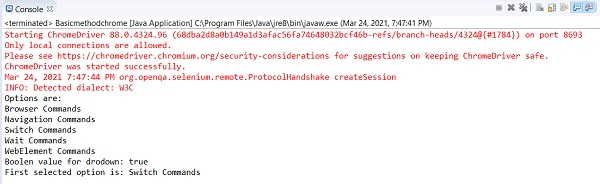
      System.out.println("Options are: ");
      for (WebElement i: t){
         System.out.println(i.getText());
      }
      //如果是多选下拉列表,则返回 true
      Boolean b=s.isMultiple();

      System.out.println(&"Boolen value for drodown: &"+ b);
      //通过索引选择项目
      s.selectByIndex(2);
      Thread.sleep(1000);
      //通过可见文本选择项目
      s.selectByVisibleText("等待命令");
      Thread.sleep(1000);
      //获取下拉菜单中第一个选定的选项
      WebElement f = s.getFirstSelectedOption();
      System.out.println("第一个选定的选项是:"+ f.getText());
      //通过索引取消选择选项
      s.deselectByIndex(2);
      Thread.sleep(1000);
      //取消选择所有选定的项目
      s.deselectAll();
      driver.close();
   }
}
输出