
如何使用 Selenium 中的"CSS 选择器"查找元素?
我们可以使用 Selenium webdriver 中的 css 定位器查找元素。要使用 css 来标识元素,表达式应为 tagname[attribute='value']。
我们也可以专门使用 id 属性来创建 css 表达式。
使用 id 属性时,css 表达式的格式应为 tagname#<id>。例如,input#txt [此处 input 是标签名,txt 是 id 属性的值]。
使用 class 属性时,css 表达式的格式应为 tagname.<class>。例如,input.cls-txt [其中 input 是标签名,cls-txt 是 class 属性的值]。
如果父元素有 n 个子元素,并且我们想要识别第 n 个子元素,则 css 表达式应为 nth-of –type(n)。
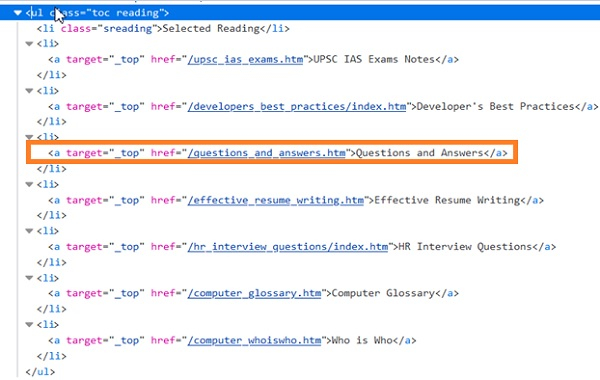
在上面的代码中,如果我们想要识别 ul[Questions and Answers] 的第四个 li 子元素,则 css 表达式应为 ul.reading li:nth-of-type(4)。同样,要标识最后一个子元素,CSS 表达式应为 ul.reading li:last-child。
对于值动态变化的属性,我们可以使用 ^= 来定位值以特定文本开头的元素。例如,input[name^='qa'] [此处 input 是标签名,name 属性的值以 qa 开头]。
对于值动态变化的属性,我们可以使用 $= 来定位值以特定文本结尾的元素。例如,input[class$='txt'] [此处 input 是标签名,class 属性的值以 txt 结尾]。
对于值动态变化的属性,我们可以使用 *= 来定位值包含特定子文本的元素。例如,input[name*='nam'] [此处 input 是标签名,name 属性的值包含子文本 nam]。
示例
import org.openqa.selenium.By;
import org.openqa.selenium.WebDriver;
import org.openqa.selenium.WebElement;
import org.openqa.selenium.firefox.FirefoxDriver;
import java.util.concurrent.TimeUnit;
public class LocatorCss{
   public static void main(String[] args) {
      System.setProperty("webdriver.gecko.driver",
         "C:\Users\ghs6kor\Desktop\Java\geckodriver.exe");
      WebDriver driver = new FirefoxDriver();

      WebElement n = driver.
      findElement(By.cssSelector("input[id='session_key']"));
      n.sendKeys("Java");
      String str = n.getAttribute("value");
      System.out.println("Attribute value: " + str);
      driver.quit();
   }
}
输出


