
如何在 Excel 中输入时自动完成文本框?
ms excelmicrosoft technologiescomputers更新于 2024/9/21 6:36:17
我们可以使用 Excel 中的自动完成功能,将文本框中的元素与列表中已有的元素关联起来。由于此过程默认无法完成,因此我们需要对工作簿进行一些更改才能启用自动完成功能。阅读本教程,了解如何在 Excel 中输入时自动完成文本框。
输入时自动完成文本框
在这里,我们将为文本框分配一个宏。让我们通过一个简单的过程来了解如何在 Excel 中输入时自动完成文本框。我们需要使用注释框并列出 ActiveX 命令。
步骤 1
假设有一个新的 Excel 工作表,要插入文本框和列表框,请点击"开发人员",然后点击"插入",并绘制框边界,如下图所示。
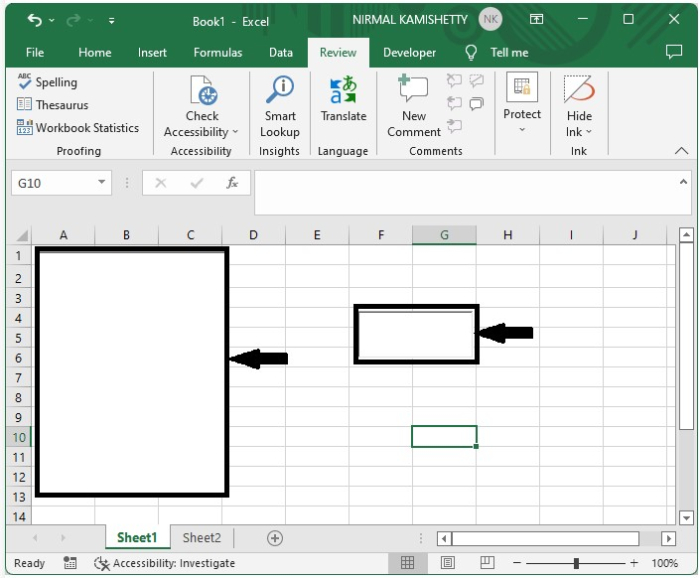
现在,右键单击工作表名称并选择"查看代码"以打开 VBA 应用程序,然后在文本框中输入"program",如下图所示。
Program
Dim xRg As Range
'Updated By Nirmal
Dim xDic As New Dictionary
Private Sub ListBox1_DblClick(ByVal Cancel As MSForms.ReturnBoolean)
   Me.TextBox1.Value = Me.ListBox1.Value
End Sub
Private Sub Worksheet_Change(ByVal Target As Range)
   Dim xVal As String
   On Error Resume Next
   If IsNumeric(Target.Value) Then
      xVal = Str(Target.Value)
   Else
      xVal = Target.Value
   End If
   If xVal <> "" Then
      If Not xDic.Exists(xVal) Then
         xDic.Add xVal, xVal
      End If
   End If
End Sub
Private Sub Worksheet_SelectionChange(ByVal Target As Range)
   Me.ListBox1.Visible = False
End Sub
Private Sub Worksheet_Activate()
   Dim I As Long
   Dim xStr As String
   On Error Resume Next
   If xRg Is Nothing Then
      Set xRg = ActiveSheet.UsedRange
   End If
   Me.ListBox1.Visible = False
   xDic.RemoveAll
   With Me.ListBox1
      For I = 1 To xRg.Count
         xStr = xRg(I).Value
         If xStr <> "" Then
            .AddItem xStr
            If Not xDic.Exists(xStr) Then
               xDic.Add xStr, xStr
            End If
         End If
      Next
   End With
End Sub
Private Sub TextBox1_KeyUp(ByVal KeyCode As MSForms.ReturnInteger, ByVal Shift As Integer)
   With Me.ListBox1
      .Top = Me.TextBox1.Top
      .Left = Me.TextBox1.Left + Me.TextBox1.Width
      .Width = Me.TextBox1.Width
   End With
   TextBoxVal Me.TextBox1.Object
End Sub
Sub TextBoxVal(xTextBox As Variant)
   Dim I As Long
   Dim xStr As String
   On Error Resume Next
   Application.ScreenUpdating = False
   If xRg Is Nothing Then Exit Sub
   Me.ListBox1.Clear
   xStr = xTextBox.Value
   If xStr = "" Then
      Me.ListBox1.Visible = False
      Application.EnableEvents = True
      Exit Sub
   End If
   For I = 0 To UBound(xDic.Items)
      If Left(xDic.Items(I), Len(xStr)) = xStr Then
         Me.ListBox1.AddItem xDic.Items(I)
      End If
   Next
   Me.ListBox1.Visible = True
   If Me.ListBox1.ListCount > 0 Then
      With xTextBox
         .Value = Me.ListBox1.List(0)
         .SelStart = Len(xStr)
         .SelLength = Len(Me.ListBox1.List(0))
      End With
   End If
   Me.ListBox1.Activate
   Me.ListBox1.Selected(0) = True
   Application.ScreenUpdating = True
End Sub
Private Sub ListBox1_KeyDown(ByVal KeyCode As MSForms.ReturnInteger, ByVal Shift As Integer)
   If KeyCode = 13 Then
      Me.TextBox1.Value = Me.ListBox1.Value
   End If
End Sub
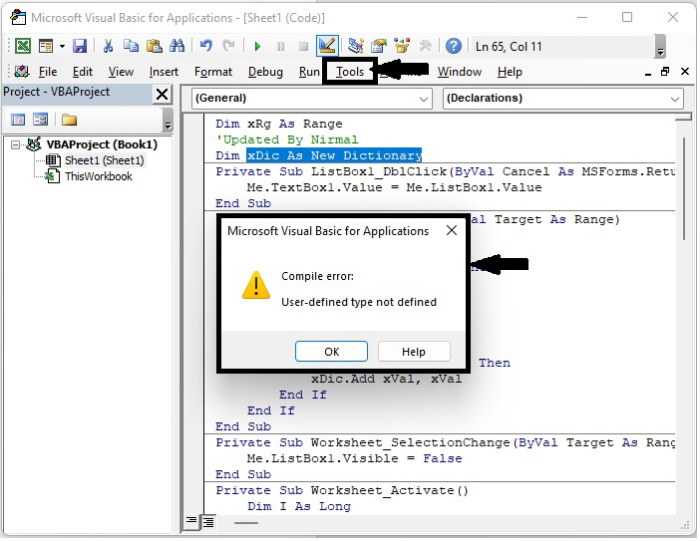
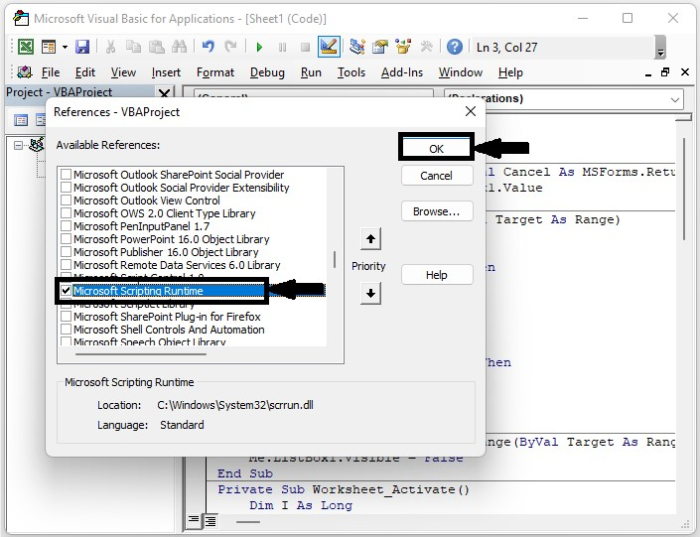
我们收到一个错误,如上图所示。要清除错误,请点击"工具",选择"引用"打开一个弹出窗口,然后选中"Microsoft Scripting Runtime"复选框,如下图所示。
步骤 2
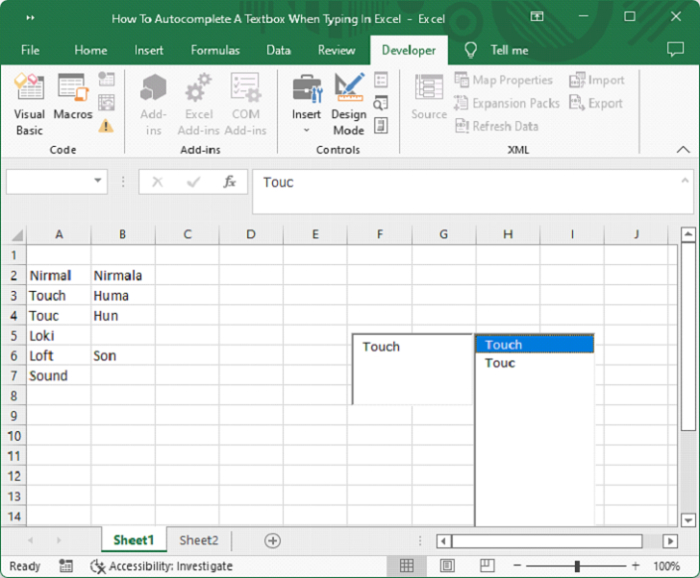
将工作表另存为启用宏的模板,并在 Excel 工作表的列表中输入数据,如下图所示。
总结
在本教程中,我们使用了一个简单的示例来演示如何在 Excel 中输入时自动完成文本框。
相关文章
有用资源
excel 参考教程 - 该教程包含有关 excel 的更多信息:https://www.cainiaomax.com/excel/

