
如何在 Excel 中多次复制和插入行,或将行重复 X 次?
ms excelmicrosoft technologiescomputers更新于 2025/3/6 10:20:17
如果我们想在 Excel 中手动复制表格中的现有行,那么这个过程可能会非常耗时,因为我们需要插入和复制值。我们可以使用 VBA 应用程序自动执行此过程。
阅读本教程,了解如何在 Excel 中多次复制和插入行,或将行重复 X 次。在这里,我们将首先插入 VBA 模块,然后运行代码来完成任务。让我们看一个简单的过程,在 Excel 中多次复制和插入一行,或者将一行重复"X"次。
步骤 1
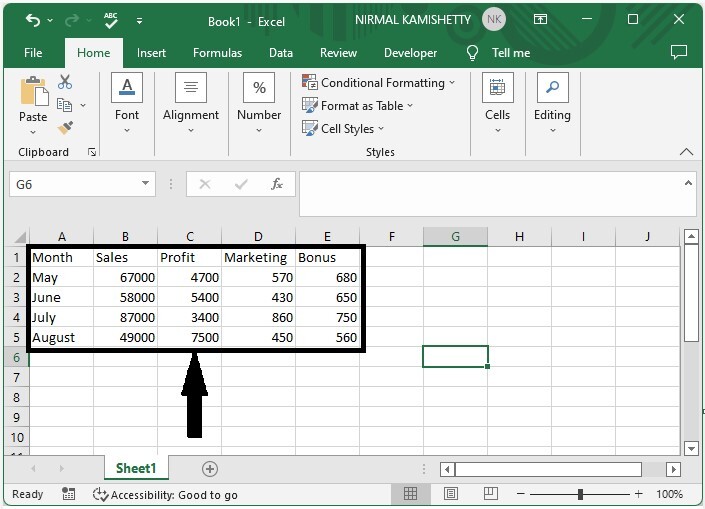
假设有一个 Excel 工作表,其中包含一个类似于下图的表格。
要打开 VBA 应用程序,请点击"插入",选择"查看代码",点击"插入",选择"模块",然后在文本框中输入下面提到的"program1",如下图所示。
程序 1
Sub test()
'Update By Nirmal
    Dim xCount As Integer
LableNumber:
    xCount = Application.InputBox("Number of Rows", "Duplicate the rows", , , , , , 1)
    If xCount < 1 Then
        MsgBox "the entered number of rows is error, please enter again", vbInformation, "Select the values"
        GoTo LableNumber
    End If
    ActiveCell.EntireRow.Copy
    Range(ActiveCell.Offset(1, 0), ActiveCell.Offset(xCount, 0)).EntireRow.Insert Shift:=xlDown
    Application.CutCopyMode = False
End Sub
步骤 2
现在将工作表保存为启用宏的工作表,点击要复制的值,然后按 F5 键,选择要复制的次数,最后点击"确定"。
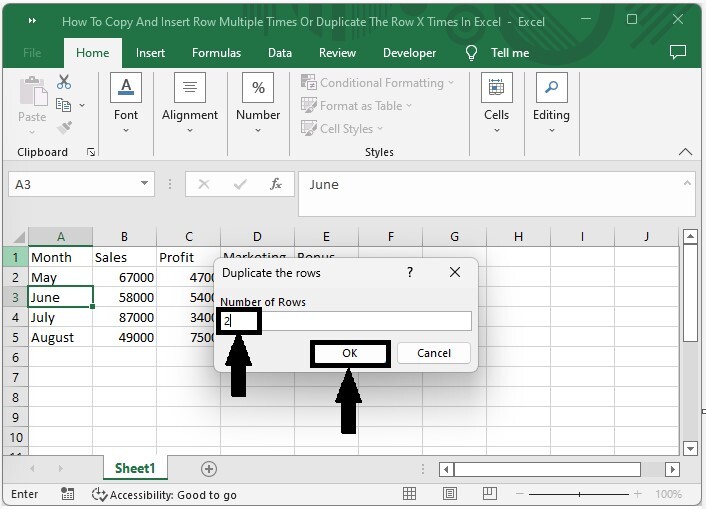
如果我们想复制整行,可以使用程序 2 而不是程序 1
程序 2
Sub insertrows()
'Update By Nirmal
Dim I As Long
Dim xCount As Integer
LableNumber:
xCount = Application.InputBox("Number of Rows", "Duplicate whole values", , , , , , 1)
If xCount < 1 Then
MsgBox "the entered number of rows is error ,please enter again", vbInformation, "Enter no of times"
GoTo LableNumber
End If
For I = Range("A" & Rows.CountLarge).End(xlUp).Row To 2 Step -1
Rows(I).Copy
Rows(I).Resize(xCount).Insert
Next
Application.CutCopyMode = False
End Sub
结论
在本教程中,我们使用了一个简单的示例来演示如何在 Excel 中多次复制和粘贴同一行或同一列。
相关文章
有用资源
excel 参考教程 - 该教程包含有关 excel 的更多信息:https://www.cainiaomax.com/excel/

