
JavaScript - 循环控制
JavaScript 循环控制
JavaScript 提供了对循环和 switch 语句的全面控制。有时您可能需要在未到达循环底部的情况下退出循环。有时您可能希望跳过部分代码块并开始循环的下一次迭代。
为了处理所有这些情况,JavaScript 提供了 break 和 continue 语句。这些语句分别用于立即退出任何循环或开始任何循环的下一次迭代。此外,JavaScript 允许开发者使用标签来命名循环。
下表解释了可用于控制循环的关键字。
| 关键字 | 说明 |
|---|---|
| break | 'break' 关键字用于退出循环。 |
| continue | 'continue' 关键字用于跳过循环的当前迭代。 |
| label | 'label' 不是关键字,但您可以使用任何标识符后跟冒号 (:) 来为循环添加标签。之后,您可以使用标签通过 break 和 continue 关键字定位到特定的循环。 |
在接下来的章节中,我们将详细学习 break、continue 和 label 语句。
break 语句
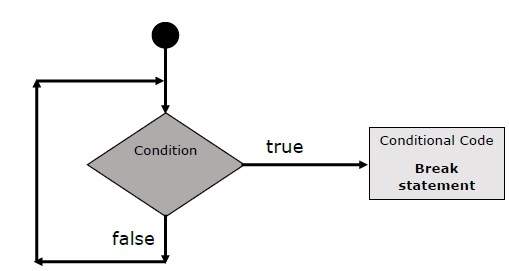
JavaScript break 语句(之前在 switch 语句中简要介绍过)用于提前退出循环,跳出括号。
流程图
break 语句的流程图如下所示:-
示例
以下示例说明了如何在 while 循环中使用 break 语句。注意,一旦 x 达到 5 并达到 −
,循环就会提前结束
<html>
<body>
   <div id = "output"> </div>
   <script>
      const coutput = document.getElementById("output");
      let x = 1;
      coutput.innerHTML = "Entering the loop<br> ";
      while (x < 20) {
         if (x == 5) {
            break;   // 完全跳出循环
         }
         x = x + 1;
         coutput.innerHTML +=  x + "<br>";
      }
      coutput.innerHTML += "Exiting the loop!<br> ";
   </script>
   <p>Set the variable to different value and then try...</p>
</body>
</html>
输出
Entering the loop
2
3
4
5
Exiting the loop!
Set the variable to different value and then try...
continue 语句
JavaScript continue 语句指示解释器立即开始循环的下一次迭代并跳过剩余的代码块。当遇到 continue 语句时,程序流程会立即转到循环检查表达式,如果条件仍然成立,则开始下一次迭代,否则退出循环。
示例
此示例演示了如何在 while 循环中使用 continue 语句。请注意,当变量 x 中的索引达到 5 时,如何使用 continue 语句跳过打印。-
<html>
<body>
   <div id = "output"> </div>
   <script>
      const coutput = document.getElementById("output");
      let x = 1;
      coutput.innerHTML = "Entering the loop<br> ";
      while (x < 10) {
         x = x + 1;
         if (x == 5) {
            continue; // 跳过循环体的其余部分
         }
         coutput.innerHTML +=  x + "<br>";
      }
      coutput.innerHTML += "Exiting the loop!<br> ";
   </script>
   <p>Set the variable to different value and then try...</p>
</body>
</html>
输出
Entering the loop
2
3
4
6
7
8
9
10
Exiting the loop!
Set the variable to different value and then try...
使用标签控制流程
从 JavaScript 1.2 开始,标签可以与 break 和 continue 一起使用,以更精确地控制流程。标签 只是一个标识符,后跟一个冒号 (:),应用于语句或代码块。我们将通过两个不同的示例来了解如何将标签与 break 和 continue 一起使用。
'continue' 或 'break' 语句与其标签名称之间不允许换行。此外,标签名称和关联循环之间不应有任何其他语句。
尝试以下两个示例,以更好地理解标签。
示例 1
以下示例展示了如何使用 break 语句实现标签。
在下面的示例中,我们为循环指定了"outerloop"和"innerloop"标签。
我们在嵌套循环中使用了带有标签的"break"语句。在输出中,您可以看到它将外循环与内循环断开。
<html>
<body>
   <div id = "output"> </div>
   <script>
      const coutput = document.getElementById("output");
      output.innerHTML = "Entering the loop!<br /> ";
      outerloop:        // 这是标签名称
      for (let i = 0; i < 5; i++) {
         output.innerHTML += "Outerloop: " + i + "<br />";
         innerloop:
         for (let j = 0; j < 5; j++) {
            if (j > 3 ) break ; // 退出最内层循环
            if (i == 2) break innerloop; // 执行相同操作
            if (i == 4) break outerloop; // 退出外层循环
            output.innerHTML += "Innerloop: " + j + " <br />";
         }
      }
      output.innerHTML += "Exiting the loop!<br /> ";
   </script>
</body>
</html>
输出
Entering the loop!
Outerloop: 0
Innerloop: 0
Innerloop: 1
Innerloop: 2
Innerloop: 3
Outerloop: 1
Innerloop: 0
Innerloop: 1
Innerloop: 2
Innerloop: 3
Outerloop: 2
Outerloop: 3
Innerloop: 0
Innerloop: 1
Innerloop: 2
Innerloop: 3
Outerloop: 4
Exiting the loop!
示例 2
在下面的代码中,我们在嵌套循环中使用带有标签的 continue 语句来跳过外层循环的当前迭代。每当 q 的值变为 3 时,它就会跳过当前迭代剩余代码的执行并开始新的迭代。
<html>
<head>
   <title> JavaScript - Label statement </title>
</head>
<body>
   <p id = "output"> </p>
   <script>
      let output = document.getElementById("output");
      output.innerHTML += "Entering the loop!<br /> ";
      outerloop:     // 这是标签名称
      for (let p = 0; p < 3; p++) {
         output.innerHTML += "Outerloop: " + p + "<br />";
         for (let q = 0; q < 5; q++) {
            if (q == 3) {
               continue outerloop;
            }
            output.innerHTML += "Innerloop: " + q + "<br />";
         }
      }
      output.innerHTML += "Exiting the loop!<br /> ";
   </script>
</body>
</html>
输出
Entering the loop!
Outerloop: 0
Innerloop: 0
Innerloop: 1
Innerloop: 2
Outerloop: 1
Innerloop: 0
Innerloop: 1
Innerloop: 2
Outerloop: 2
Innerloop: 0
Innerloop: 1
Innerloop: 2
Exiting the loop!

