
Spring Boot - 批处理服务
您可以创建一个可执行的 JAR 文件,并使用 Maven 或 Gradle 命令运行 Spring Boot 应用程序,如下所示 −
对于 Maven,您可以使用下面给出的命令 −
mvn clean install
在“BUILD SUCCESS”之后,您可以在目标目录下找到 JAR 文件。
对于 Gradle,可以使用如图所示的命令 −
gradle clean build
在“BUILD SUCCESSFUL”之后,您可以在 build/libs 目录下找到 JAR 文件。
使用此处给出的命令运行 JAR 文件 −
java –jar <JARFILE>
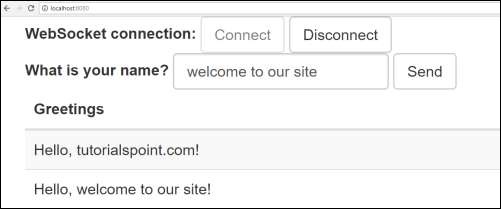
现在,应用程序已在 Tomcat 端口 8080 上启动,如图所示。

现在,在您的 Web 浏览器中点击 URL http://localhost:8080/ 并连接 Web 套接字并发送问候语并接收消息。
Batch 批处理服务是在单个任务中执行多个命令的过程。 在本章中,您将学习如何在 Spring Boot 应用程序中创建批处理服务。
让我们考虑一个将 CSV 文件内容保存到 HSQLDB 的示例。
要创建 Batch Service 程序,我们需要在构建配置文件中添加 Spring Boot Starter Batch 依赖和 HSQLDB 依赖。
Maven 用户可以在 pom.xml 文件中添加以下依赖项。
<dependency>
   <groupId>org.springframework.boot</groupId>
   <artifactId>spring-boot-starter-batch</artifactId>
</dependency>
<dependency>
   <groupId>org.hsqldb</groupId>
   <artifactId>hsqldb</artifactId>
</dependency>
Gradle 用户可以在 build.gradle 文件中添加以下依赖项。
compile("org.springframework.boot:spring-boot-starter-batch")
compile("org.hsqldb:hsqldb")
现在,在类路径资源下添加简单的 CSV 数据文件 - src/main/resources 并将文件命名为 file.csv,如图所示 −
William,John
Mike, Sebastian
Lawarance, Lime
接下来为HSQLDB写一个SQL脚本 – classpath 资源目录下 – request_fail_hystrix_timeout
DROP TABLE USERS IF EXISTS;
CREATE TABLE USERS  (
   user_id BIGINT IDENTITY NOT NULL PRIMARY KEY,
   first_name VARCHAR(20),
   last_name VARCHAR(20)
);
为 USERS 模型创建一个 POJO 类,如图所示 −
package com.tutorialspoint.batchservicedemo;
public class User {
   private String lastName;
   private String firstName;

   public User() {
   }
   public User(String firstName, String lastName) {
      this.firstName = firstName;
      this.lastName = lastName;
   }
   public void setFirstName(String firstName) {
      this.firstName = firstName;
   }
   public String getFirstName() {
      return firstName;
   }
   public String getLastName() {
      return lastName;
   }
   public void setLastName(String lastName) {
      this.lastName = lastName;
   }

   @Override
   public String toString() {
      return "firstName: " + firstName + ", lastName: " + lastName;
   }
}
现在,创建一个中间处理器来执行从 CSV 文件中读取数据之后和将数据写入 SQL 之前的操作。
package com.tutorialspoint.batchservicedemo;

import org.slf4j.Logger;
import org.slf4j.LoggerFactory;
import org.springframework.batch.item.ItemProcessor;

public class UserItemProcessor implements ItemProcessor<User, User> {
   private static final Logger log = LoggerFactory.getLogger(UserItemProcessor.class);

   @Override
   public User process(final User user) throws Exception {
      final String firstName = user.getFirstName().toUpperCase();
      final String lastName = user.getLastName().toUpperCase();
      final User transformedPerson = new User(firstName, lastName);

      log.info("Converting (" + user + ") into (" + transformedPerson + ")");
      return transformedPerson;
   }
}
让我们创建一个批处理配置文件,从 CSV 读取数据并写入 SQL 文件,如下所示。 我们需要在配置类文件中添加@EnableBatchProcessing 注解。 @EnableBatchProcessing 注解用于启用 Spring Boot 应用程序的批处理操作。
package com.tutorialspoint.batchservicedemo;

import javax.sql.DataSource;
import org.springframework.batch.core.Job;
import org.springframework.batch.core.Step;

import org.springframework.batch.core.configuration.annotation.EnableBatchProcessing;
import org.springframework.batch.core.configuration.annotation.JobBuilderFactory;
import org.springframework.batch.core.configuration.annotation.StepBuilderFactory;
import org.springframework.batch.core.launch.support.RunIdIncrementer;
import org.springframework.batch.item.database.BeanPropertyItemSqlParameterSourceProvider;
import org.springframework.batch.item.database.JdbcBatchItemWriter;
import org.springframework.batch.item.file.FlatFileItemReader;
import org.springframework.batch.item.file.mapping.BeanWrapperFieldSetMapper;
import org.springframework.batch.item.file.mapping.DefaultLineMapper;
import org.springframework.batch.item.file.transform.DelimitedLineTokenizer;
import org.springframework.beans.factory.annotation.Autowired;
import org.springframework.context.annotation.Bean;
import org.springframework.context.annotation.Configuration;
import org.springframework.core.io.ClassPathResource;

@Configuration
@EnableBatchProcessing
public class BatchConfiguration {
   @Autowired
   public JobBuilderFactory jobBuilderFactory;

   @Autowired
   public StepBuilderFactory stepBuilderFactory;

   @Autowired
   public DataSource dataSource;

   @Bean
   public FlatFileItemReader<User> reader() {
      FlatFileItemReader<User> reader = new FlatFileItemReader<User>();
      reader.setResource(new ClassPathResource("file.csv"));
      reader.setLineMapper(new DefaultLineMapper<User>() {
         {
            setLineTokenizer(new DelimitedLineTokenizer() {
               {
                  setNames(new String[] { "firstName", "lastName" });
               }
            });
            setFieldSetMapper(new BeanWrapperFieldSetMapper<User>() {
               {
                  setTargetType(User.class);
               }
            });
         }
      });
      return reader;
   }
   @Bean
   public UserItemProcessor processor() {
      return new UserItemProcessor();
   }
   @Bean
   public JdbcBatchItemWriter<User> writer() {
      JdbcBatchItemWriter<User> writer = new JdbcBatchItemWriter<User>();
      writer.setItemSqlParameterSourceProvider(new BeanPropertyItemSqlParameterSourceProvider<User>());
      writer.setSql("INSERT INTO USERS (first_name, last_name) VALUES (:firstName, :lastName)");
      writer.setDataSource(dataSource);
      return writer;
   }
   @Bean
   public Job importUserJob(JobCompletionNotificationListener listener) {
      return jobBuilderFactory.get("importUserJob").incrementer(
         new RunIdIncrementer()).listener(listener).flow(step1()).end().build();
   }
   @Bean
   public Step step1() {
      return stepBuilderFactory.get("step1").<User, User>chunk(10).reader(reader()).processor(processor()).writer(writer()).build();
   }
}
reader() 方法用于从 CSV 文件中读取数据,而 writer() 方法用于将数据写入 SQL。
接下来,我们将不得不编写一个 Job Completion Notification Listener 类 - 用于在 Job 完成后进行通知。
package com.tutorialspoint.batchservicedemo;

import java.sql.ResultSet;
import java.sql.SQLException;
import java.util.List;

import org.slf4j.Logger;
import org.slf4j.LoggerFactory;

import org.springframework.batch.core.BatchStatus;
import org.springframework.batch.core.JobExecution;
import org.springframework.batch.core.listener.JobExecutionListenerSupport;
import org.springframework.beans.factory.annotation.Autowired;
import org.springframework.jdbc.core.JdbcTemplate;
import org.springframework.jdbc.core.RowMapper;
import org.springframework.stereotype.Component;

@Component
public class JobCompletionNotificationListener extends JobExecutionListenerSupport {
   private static final Logger log = LoggerFactory.getLogger(JobCompletionNotificationListener.class);
   private final JdbcTemplate jdbcTemplate;

   @Autowired
   public JobCompletionNotificationListener(JdbcTemplate jdbcTemplate) {
      this.jdbcTemplate = jdbcTemplate;
   }
   @Override
   public void afterJob(JobExecution jobExecution) {
      if (jobExecution.getStatus() == BatchStatus.COMPLETED) {
         log.info("!!! JOB FINISHED !! It's time to verify the results!!");

         List<User> results = jdbcTemplate.query(
            "SELECT first_name, last_name FROM USERS", new RowMapper<User>() {

            @Override
            public User mapRow(ResultSet rs, int row) throws SQLException {
               return new User(rs.getString(1), rs.getString(2));
            }
         });

         for (User person : results) {
            log.info("Found <" + person + "> in the database.");
         }
      }
   }
}
现在,创建一个可执行 JAR 文件,并使用以下 Maven 或 Gradle 命令运行 Spring Boot 应用程序。
对于 Maven,使用如图所示的命令 −
mvn clean install
在“BUILD SUCCESS”之后,您可以在目标目录下找到 JAR 文件。
对于 Gradle,可以使用如图所示的命令 −
gradle clean build
在“BUILD SUCCESSFUL”之后,您可以在 build/libs 目录下找到 JAR 文件。
使用此处给出的命令运行 JAR 文件 −
java –jar <JARFILE>
您可以在控制台窗口中看到输出,如图所示 −


